Lesson 17 of 24
Change the module's settings: reinstatement period and document reminders
What you will be able to do
This lesson is for the HR lead who looks after the module's rules. The Settings tab of Workforce holds three rules for each entity. The Emiratisation target was covered earlier. Here you will change the other two: how long a termination can be undone, and how many days before a document expires the reminders go out.
Before you start
- You are signed in with an HR role that can edit employees. In the demo company that is the HR director. People who can only view Workforce see the same card with the fields greyed out and no Save button.
- You have agreed the new numbers with your team: they apply to this entity only.
Steps
- 1
Select the Settings tab
In Workforce select Settings. The first card is the Emiratisation target. Scroll to the second card, Leavers and document reminders. Its two fields are empty, which means the defaults apply; each default is shown in grey inside the field.
- Select Settings
- 2
Set the reinstatement period
Reinstatement period is the number of days after a termination is recorded during which it can still be undone with Reinstate. Type 45 to allow a month and a half. The field accepts a whole number from 0 to 365.
- Type Reinstatement period (days):
45
- Type Reinstatement period (days):
- 3
See what a wrong entry looks like
Document reminders takes days before expiry. Type the word soon to see what happens with a wrong entry: the line under the field turns red and explains what is expected, up to six whole numbers from 1 to 365 separated by commas, and Save is greyed out.
- Type Document reminders (days before expiry):
soon
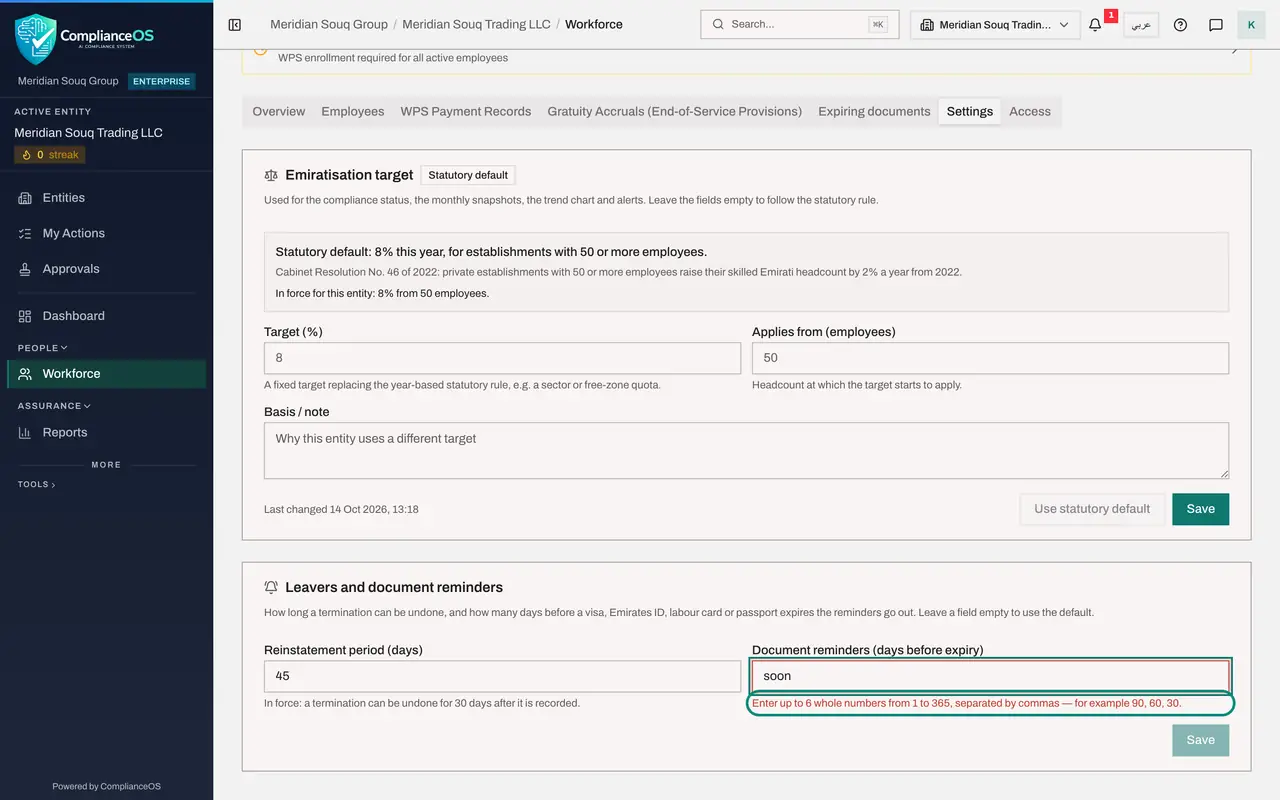
- Type Document reminders (days before expiry):
- 4
Enter the reminder days
Replace it with 120, 60, 30. Reminders will go out one hundred and twenty, sixty and thirty days before a visa, Emirates ID, labour card or passport expires, and once more on the day itself.
- Type Document reminders (days before expiry):
120, 60, 30
- Type Document reminders (days before expiry):
- 5
Select Save on this card
Select Save at the bottom of this card. The message Workforce settings saved appears. The lines under the fields now state what is in force: a termination can be undone for 45 days, and reminders go out 120, 60 and 30 days before expiry.
- Select Save
- 6
See the effect on Expiring documents
Select the Expiring documents tab. The Period now opens on Next 120 days, the longest reminder period you set, and the list reaches further ahead than before. A document also turns amber on an employee's record from that many days before it expires.
- Select Expiring documents
How to check it worked
Under each field the line starting In force shows your new numbers, and the Expiring documents tab opens on the longest reminder period you set.
Common mistakes
- Selecting the wrong Save. Each card has its own Save button; the one at the bottom of Leavers and document reminders saves only that card.
- Typing reminder days with words or full stops. The field takes up to six whole numbers separated by commas.
- Setting the reinstatement period to zero without meaning to. Zero means a termination can never be undone.
Check your understanding
1. You want reminders four months, two months and one month before a document expires. What do you type?
- A.4, 2, 1
- B.120, 60, 30
- C.four months
- D.120
Show answer
Answer: B. 120, 60, 30
The field takes days before expiry, as whole numbers separated by commas. A reminder also goes out once on the day of expiry.
2. How do you return a setting to its default?
- A.Type the word default
- B.Empty the field and select Save
- C.Delete the entity
- D.It cannot be changed back
Show answer
Answer: B. Empty the field and select Save
The card says it: leave a field empty to use the default. The default is shown in grey inside the empty field.