Lesson 14 of 24
Record a leaver
What you will be able to do
This lesson is for the HR team. When an employee leaves, you end their record with Terminate. You will enter the last day and the reason, read exactly what will be posted to the ledger before anything is saved, confirm, and then find the leaver and their final gratuity.
Before you start
- You are signed in with an HR role that can edit employees. In the demo company that is the HR director.
- You know the person's last day of employment and why they are leaving.
- The basic salary and start date on the record are correct: the final gratuity is worked out from them when you confirm.
Steps
- 1
Find the employee and select Terminate
In Workforce select Employees and find the person who is leaving: here, the warehouse associate. Select the red Terminate button on his row. The window names the employee; check it is the right person.
- Select Employees
- Select Terminate
- 2
Enter the termination date
Termination Date is the last day of employment. It cannot be in the future. Length of service for the gratuity is counted up to this date.
- Type Termination Date *:
2026-10-12
- Type Termination Date *:
- 3
Choose the termination type
Open Termination Type and choose the reason: Resignation, Dismissal, Mutual agreement or Contract end. He resigned. The type is stored on the record and shown in the calculation.
- Select Select reason
- Choose Resignation
- 4
Read the final gratuity
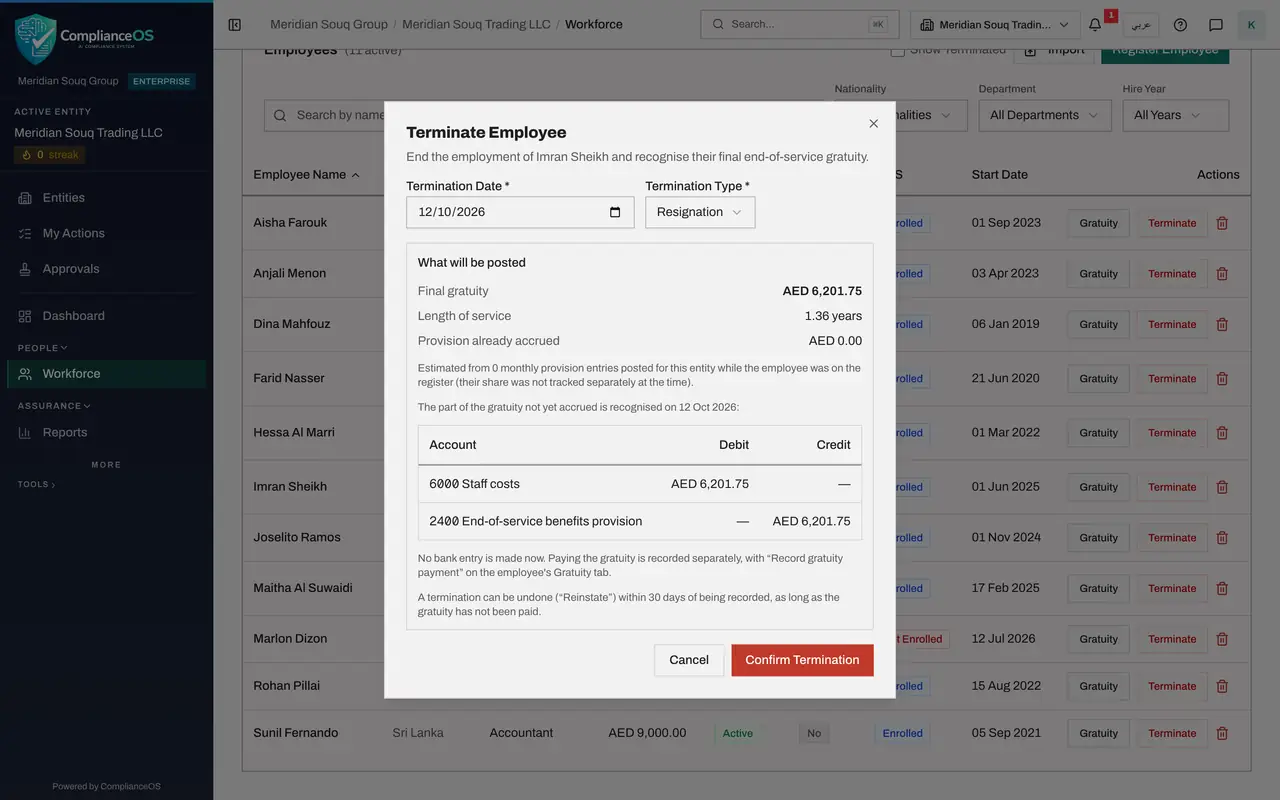
As soon as both are filled in, the box What will be posted shows the result before anything is saved: the final gratuity, the length of service and the provision already accrued for this employee in the ledger. Nothing has been accrued for him yet, so the whole amount is recognised now.
- 5
Read the journal entry
Below is the journal entry that will be posted, line by line: a debit to account 6000, Staff costs, and a credit to account 2400, End-of-service benefits provision. The two notes underneath matter: no bank entry is made now, and the termination can be undone with Reinstate within thirty days, as long as the gratuity has not been paid.
- 6
Select Confirm Termination
Select Confirm Termination. The message confirms the final gratuity and gives the number of the journal entry that was posted. The termination and its journal entry are saved together.
- Select Confirm Termination
- 7
Tick Show Terminated
He has left the list of active employees, and the strip at the top now counts one Terminated. Tick Show Terminated above the list to see leavers as well: his row is greyed, the status reads Terminated, and the Gratuity and Terminate buttons have gone.
- Select Show Terminated
- 8
Open the record to see the termination details
Select his name. The heading carries the status Terminated, and the Profile tab ends with Termination Details: the date and the type you recorded.
- Select Imran Sheikh
- 9
Select the Gratuity tab
Select Gratuity. In place of the estimate there is now the Final gratuity, with the green badge Final calculation and the breakdown of how it was reached.
- Select Gratuity
- 10
Read In the ledger
The box In the ledger ties the gratuity to the accounts: the provision already accrued, the journal entry posted at termination with its number and amount, and Payment, which reads Not paid yet. Underneath are two buttons, Record gratuity payment and Reinstate, with the last date on which the termination can be undone. Both have their own lesson.
How to check it worked
With Show Terminated ticked, the employee is listed in grey with the status Terminated. Their record shows Termination Details on the Profile tab and, on the Gratuity tab, the final gratuity with the number of the journal entry that was posted.
Common mistakes
- Using the bin icon for a leaver. Delete removes the record altogether; Terminate keeps it, with the leaving date, the reason and the final gratuity.
- Entering the day you record the termination instead of the last day of employment. Service, and with it the gratuity, is counted up to the termination date.
- Confirming without reading What will be posted. The entry goes to the ledger the moment you confirm.
Check your understanding
1. What does the ledger entry posted at termination do?
- A.It pays the gratuity from the bank
- B.It brings the end-of-service provision up to the final gratuity; no bank entry is made
- C.It reverses the employee's salary
- D.Nothing is posted
Show answer
Answer: B. It brings the end-of-service provision up to the final gratuity; no bank entry is made
The entry debits staff costs and credits the end-of-service provision for the part not yet accrued. Paying the gratuity is recorded later, as a separate step.
2. After a leaver is recorded, why are they missing from the Employees list?
- A.The record was deleted
- B.The list shows active employees unless Show Terminated is ticked
- C.They moved to the Gratuity Accruals tab
- D.Only administrators can see leavers
Show answer
Answer: B. The list shows active employees unless Show Terminated is ticked
Leavers are kept. Tick Show Terminated to list them with the current employees.