Lesson 23 of 24
How this connects: the ledger, ESG figures and privacy training
What you will be able to do
This lesson is for compliance officers and finance colleagues. You will follow three more connections out of Workforce: the journal entries that a termination and a gratuity payment post in Accounting, the headcount and Emiratisation figures that feed the social metrics of ESG, which stands for environmental, social and governance reporting, and the line manager who is told first when someone's privacy training is overdue.
Before you start
- You are signed in as the compliance officer. In the demo company that is Mariam Aziz, who can open Workforce, Accounting, ESG and Data Protection.
- HR has recorded a leaver and the payment of the final gratuity, and has reinstated an employee who was terminated by mistake.
Steps
- 1
Open a leaver's Gratuity tab
Start in Workforce. Select Employees, tick Show Terminated, open the warehouse associate who resigned and select his Gratuity tab. In the box In the ledger, the journal entry numbers are blue links for anyone who may also open Accounting.
- Select Employees
- Select Show Terminated
- Select Imran Sheikh
- Select Gratuity
- 2
Select the journal entry number
Select the number beside Journal entry at termination. Accounting opens on its Journals section with that entry in a window: the debit to staff costs and the credit to the end-of-service benefits provision that were posted when HR confirmed the termination.
- Select JE-2026-0001
- 3
Close the entry and read the list of journals
Select Close. The list behind it holds the four entries Workforce has posted. The leaver's final gratuity is posted, and so is the payment that cleared it against the bank. The entry for the employee who was terminated by mistake is marked reversed, and its reversal entry sits beside it.
- Select Close
- 4
Open the Social section of ESG
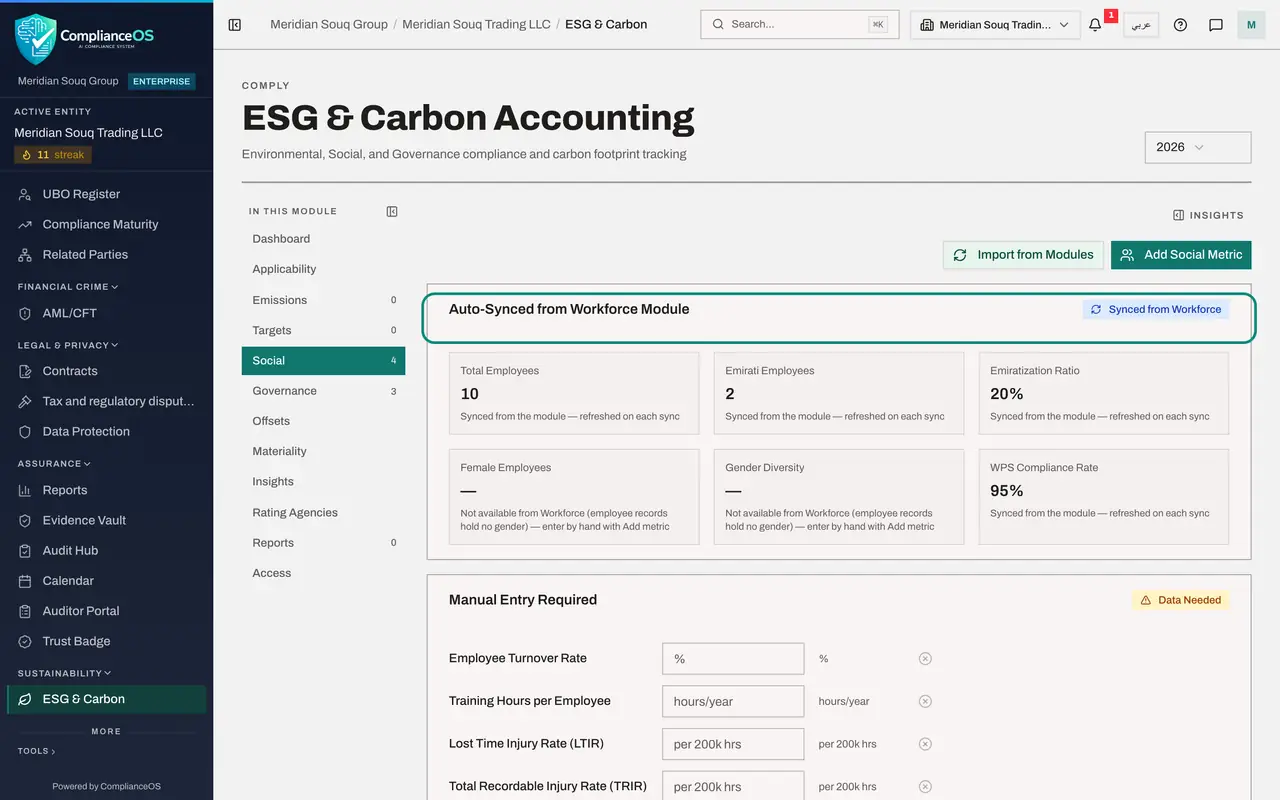
Select ESG and Carbon in the side menu, then Social in the module's own menu. The first block is headed Auto-Synced from Workforce Module: total employees, Emirati employees, the Emiratisation ratio and the WPS compliance rate, the same figures Workforce shows. Gender figures stay empty because employee records hold no gender.
- Select ESG & Carbon
- Select Social0 (0)
- 5
Select Import from Modules
Select Import from Modules at the top right to refresh the figures from Workforce and the other modules. A message says how many metrics were synced, and that figures entered by hand were left as they are. They are saved as social metrics for the reporting year.
- Select Import from Modules
- 6
Read the saved metrics
Scroll to All Social Metrics. Each imported figure is a row with its key, value, unit and period, and a note saying it was synced from the module, not typed by hand. Select Import from Modules again whenever the register has changed.
- 7
Open a privacy campaign form
Last, the link to privacy. Select Data Protection in the side menu, then Privacy policies and training, then Attestation campaigns, and select New campaign. A campaign asks people to read a policy and confirm it.
- Select Data Protection
- Select Privacy policies & training
- Select Attestation campaigns
- Select New campaign
- 8
Find the line manager option
Under Audience, the small print explains that an employee record places a person in their entity's org unit, so campaigns aimed at a unit reach them. Under Escalation, the first tick box reads Escalate to the person's line manager first, with the words From Workforce: it uses the Line manager that HR sets on each employee record.
- 9
Select Cancel
Select Cancel: no campaign is created in this lesson. Campaigns are taught in the course on privacy governance. What matters here is that the manager and the login HR records in Workforce decide who is asked and who is told when someone is late.
- Select Cancel
How to check it worked
You have opened a journal entry in Accounting from a leaver's Gratuity tab, seen the Workforce figures under Social in ESG, refreshed with Import from Modules, and found the line manager option in a privacy campaign.
Common mistakes
- Posting a gratuity journal by hand in Accounting as well. The termination and the payment already post their own entries; a manual one would count the cost twice.
- Typing headcount into ESG by hand. Use Import from Modules so that the figures match the register on the day.
- Expecting a manager without a login to receive escalations. The manager must be an employee whose record is linked to a login.
Check your understanding
1. A termination was undone with Reinstate. What do you find in Accounting?
- A.Nothing; the entry was deleted
- B.The original entry marked reversed, and a reversal entry beside it
- C.A payment from the bank
- D.An error
Show answer
Answer: B. The original entry marked reversed, and a reversal entry beside it
Posted entries are kept. The reversal entry cancels the original, and both remain visible.
2. Where do the Total Employees and Emirati Employees figures in ESG come from?
- A.They are typed by the ESG team
- B.From the Workforce register, when Import from Modules is selected
- C.From the salary file
- D.From the audit log
Show answer
Answer: B. From the Workforce register, when Import from Modules is selected
The Social section has a block synced from Workforce: active headcount, Emirati employees, the ratio and the WPS compliance rate.