Lesson 16 of 24
Record the payment of a final gratuity
What you will be able to do
This lesson is for the HR team, working with finance. Terminating an employee recognises what they are owed; paying it is a separate step. You will record that a leaver's final gratuity was paid, choose the account it was paid from, read the journal entry before it is posted and see what changes afterwards.
Before you start
- You are signed in with an HR role that can edit employees. In the demo company that is the HR director.
- The employee has been terminated and their final gratuity is on record, as in the lesson on recording a leaver.
- Finance has confirmed that the money left the company's account, and on which day.
Steps
- 1
Open the leaver's record
In Workforce select Employees and tick Show Terminated, so that leavers are listed. Select the name of the warehouse associate who resigned.
- Select Employees
- Select Show Terminated
- Select Imran Sheikh
- 2
Select the Gratuity tab
Select Gratuity. Under In the ledger, Payment reads Not paid yet. The amount is sitting in the end-of-service provision, waiting to be paid.
- Select Gratuity
- 3
Select Record gratuity payment
Select Record gratuity payment. The window names the employee and the amount, and warns that this posts a journal entry.
- Select Record gratuity payment
- 4
Enter the payment date
Payment date is the day the money left the company's account. It is set to today and cannot be in the future. Change it if finance paid on an earlier day.
- Type Payment date *:
2026-10-14
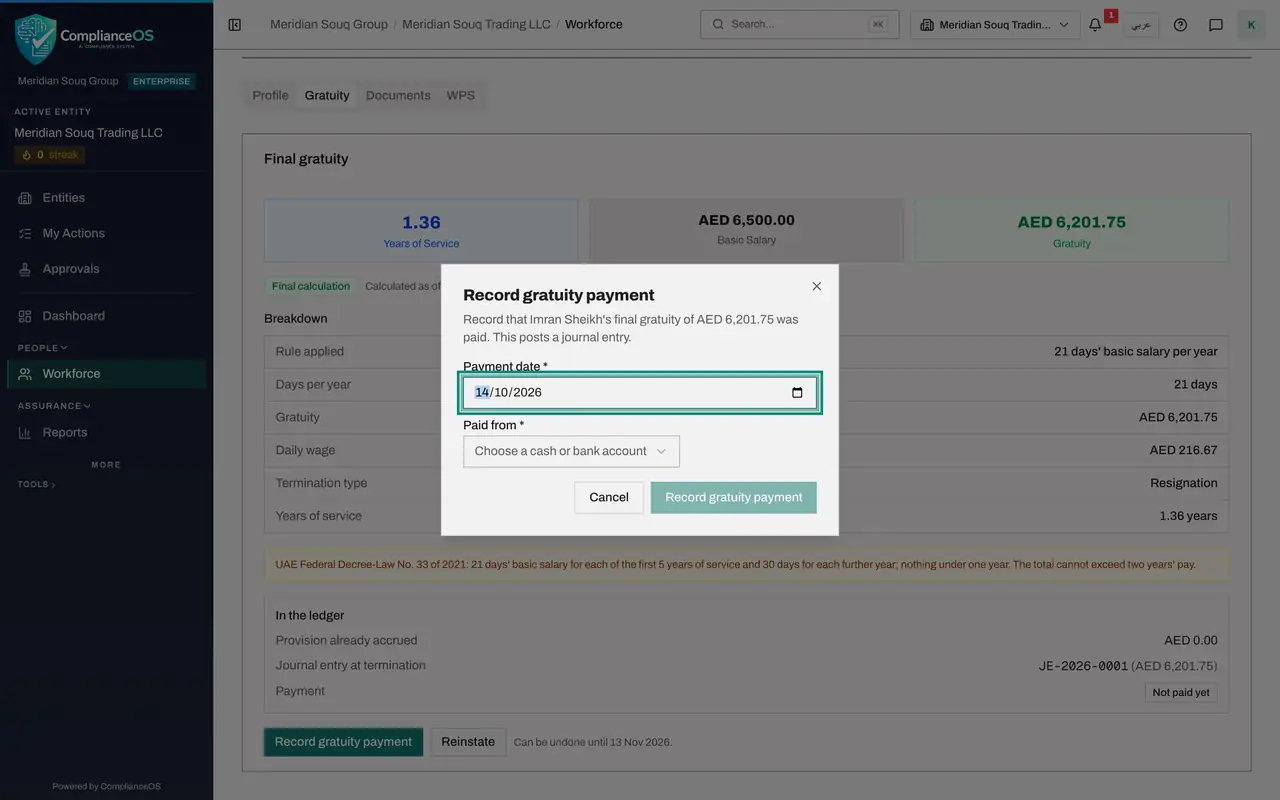
- Type Payment date *:
- 5
Choose the account it was paid from
Open Paid from. The list holds the cash and bank accounts of this entity's chart of accounts, each with its code. Choose the current bank account, code 1100.
- Select Choose a cash or bank account
- Choose 1100 · Bank Accounts — Current
- 6
Read What will be posted
Once an account is chosen, the window shows the entry: a debit to account 2400, End-of-service benefits provision, and a credit to the bank account, both for the amount of the gratuity. The provision is cleared and the bank balance goes down.
- 7
Select Record gratuity payment to post it
Select Record gratuity payment at the bottom of the window. The message confirms the payment and gives the number of the journal entry.
- Select Record gratuity payment
- 8
Check the ledger box
Payment now shows the entry number and the date paid, and the Record gratuity payment button has gone. Reinstate is greyed out, and the line beside it explains why: the gratuity has been paid, so this termination can no longer be undone.
How to check it worked
On the leaver's Gratuity tab, Payment shows a journal entry number with the date paid, the Record gratuity payment button has gone, and the line beside Reinstate says the termination can no longer be undone.
Common mistakes
- Recording the payment when it is only planned. The entry is posted to the ledger at once, and afterwards the termination cannot be undone.
- Choosing the wrong account under Paid from. The credit goes to the cash or bank account you pick; check which account finance actually paid from.
- Expecting ComplianceOS to make the transfer. It records the payment; the money is moved by your bank.
Check your understanding
1. Which accounts does the payment entry use?
- A.Debit staff costs, credit the provision
- B.Debit the end-of-service provision, credit the cash or bank account you choose
- C.Debit the bank, credit staff costs
- D.No entry is posted
Show answer
Answer: B. Debit the end-of-service provision, credit the cash or bank account you choose
The termination already moved the cost into the provision. Paying it clears the provision against the bank.
2. After the payment is recorded, can the termination still be undone?
- A.Yes, for thirty days
- B.No: a paid gratuity closes the termination
- C.Only by an administrator
- D.Yes, by deleting the payment
Show answer
Answer: B. No: a paid gratuity closes the termination
The line beside Reinstate says so: the gratuity has been paid, so this termination can no longer be undone.