Lesson 7 of 24
Follow up documents that are about to expire
What you will be able to do
This lesson is for the HR team. You will use the Expiring documents tab to see which visas, Emirates IDs, labour cards and passports have expired or will expire soon, narrow the list by document and by period, open the employee from the list and record a renewal.
Before you start
- You are signed in with an HR role. In the demo company that is the HR director.
- Documents with expiry dates are recorded for the employees, by hand or through the import, as in the earlier lessons.
Steps
- 1
Select the Expiring documents tab
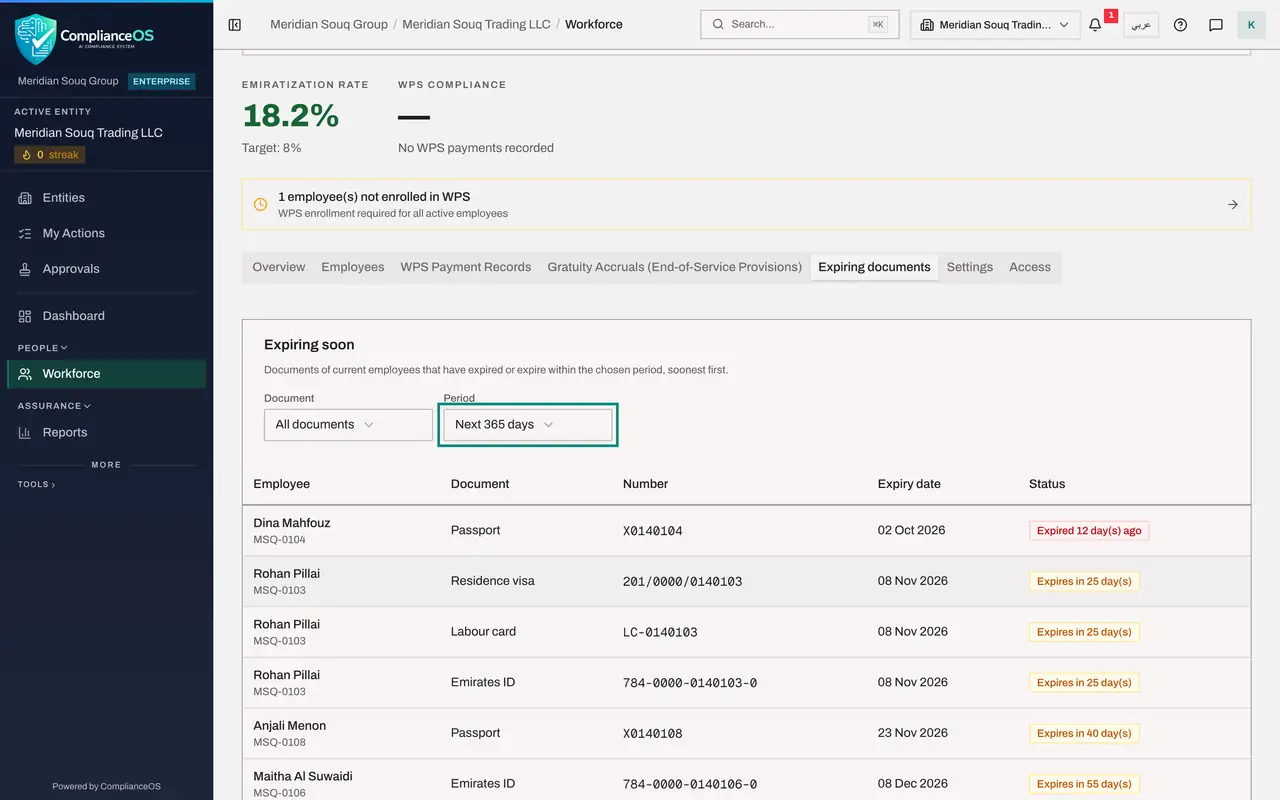
In Workforce select Expiring documents. The list shows the documents of current employees that have already expired or will expire within the period shown, soonest first. Each row names the employee and their number, the document, its number, the expiry date and a status.
- Select Expiring documents
- 2
Read the statuses
A red status means the document has expired and says how many days ago: one passport here is already out of date. An amber status counts the days that are left. The payroll officer has three documents that expire in less than a month.
- 3
Filter by document
Open the Document list and choose Passport. Only passports remain. Use this when you work through one kind of renewal at a time.
- Select Document
- Choose Passport
- 4
Change the period
Set Document back to All documents. Then open Period and choose Next 30 days to see only what is urgent. The list always includes documents that have already expired.
- Select Document
- Choose All documents
- Select Period
- Choose Next 30 days
- 5
Look further ahead
Choose Next 365 days to plan the year. The list grows to every document that falls due in the next twelve months.
- Select Period
- Choose Next 365 days
- 6
Open the employee from the list
Each name is a link. Select the payroll officer's name to open his record, then select the Documents tab. His visa, Emirates ID and labour card all show the amber status.
- Select Rohan Pillai
- Select Documents
- 7
Record the renewed visa
His new visa has arrived. Select the pencil on the Residence visa row, enter the new expiry date and select Save. The status turns to Valid.
- Select Edit document
- Type Expiry date *:
2028-11-07 - Select Save
- 8
Go back and check the list
Select Back to Workforce, then Expiring documents. The visa has left the list. The Emirates ID and the labour card are still there, waiting for their own renewals.
- Select Back to Workforce
- Select Expiring documents
- 9
See when reminders go out
Select the Settings tab and find Document reminders in the second card. The line under the field shows what is in force for this entity: reminders ninety, sixty and thirty days before expiry, and once on the day of expiry. A later lesson changes these numbers.
- Select Settings
How to check it worked
After the renewal is saved, the employee's visa no longer appears under Expiring documents, while the documents you have not renewed are still listed.
Common mistakes
- Looking for a leaver's documents here. The list covers current employees only.
- Assuming an empty list means all documents are fine. It only shows documents that have been recorded; an employee with no documents on file never appears.
- Choosing a short period and forgetting it. The period goes back to the entity's own reminder period when you reopen the page.
Check your understanding
1. What does the Expiring documents tab show when it first opens?
- A.Every document of every employee
- B.Documents of current employees that have expired or expire within the entity's longest reminder period
- C.Only expired documents
- D.Only residence visas
Show answer
Answer: B. Documents of current employees that have expired or expire within the entity's longest reminder period
It opens on the longest reminder period set for the entity, ninety days by default, and includes anything already expired.
2. How do you take a renewed visa off the list?
- A.Delete the visa record
- B.Open the employee, edit the visa on the Documents tab and enter the new expiry date
- C.Tick it on the list
- D.It cannot be removed
Show answer
Answer: B. Open the employee, edit the visa on the Documents tab and enter the new expiry date
The list is worked out from the expiry dates. Once the record carries the new date it is no longer due.