Lesson 24 of 24
How this connects: expiring documents in My Actions and Notifications
What you will be able to do
This lesson is for the HR team. Documents that are about to expire do not wait for you to open Workforce: each one becomes a task in your My Actions list, and a document recorded inside its reminder period raises a notification at once. You will work one task from My Actions to done and find the notification.
Before you start
- You are signed in with an HR role. In the demo company that is the HR director, who receives the document tasks for this entity.
- Employees have documents on record, some of them expiring within the reminder period, as in the earlier lessons.
Steps
- 1
Select My Actions in the side menu
Select My Actions. Among the open items assigned to you are tasks of the type Employee document, coming from Workforce. Each title says which document expires and in how many days, and the due date is the expiry date. The employees are not named here; open a task to see who it is.
- Select My Actions
- 2
Find the overdue task
The passport that has already expired is at the top: status Overdue, priority Critical. Documents that expire within a month are High, later ones Medium.
- 3
Select Open on the task
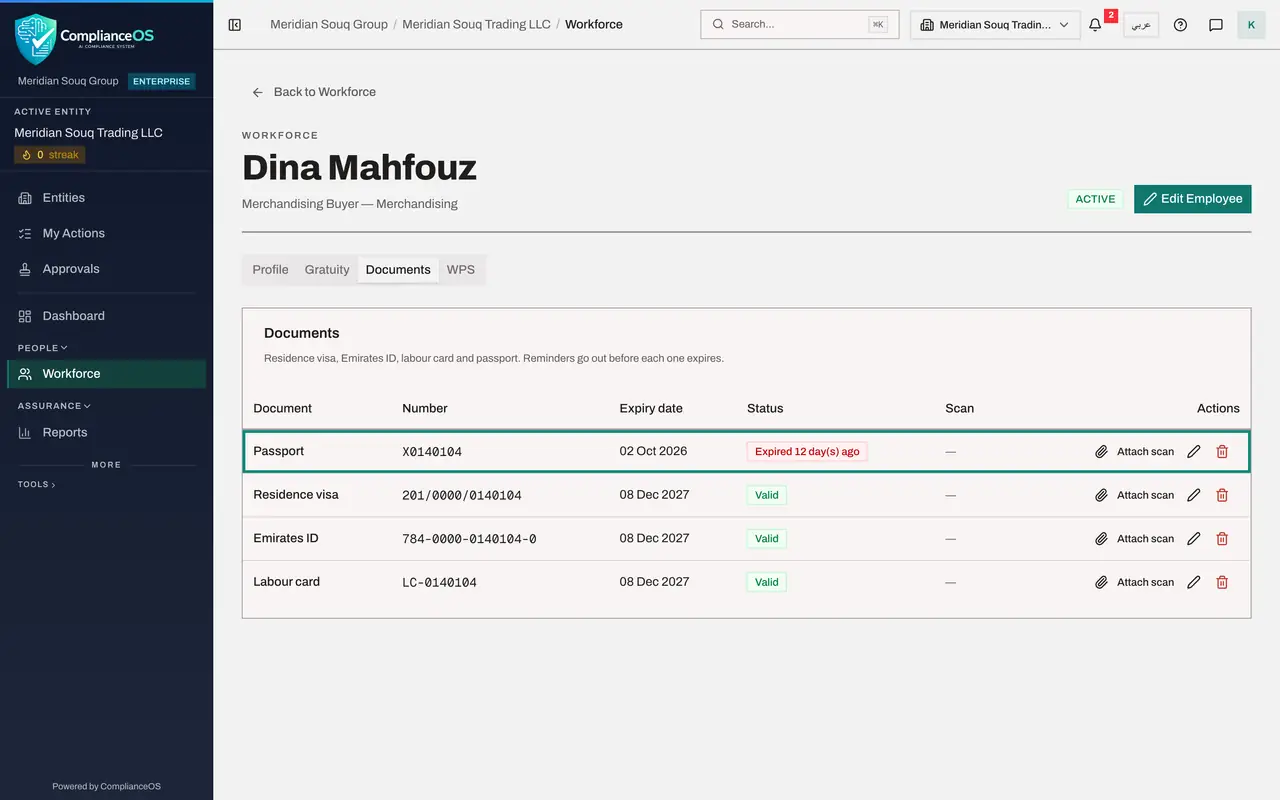
Select Open at the end of the row. The employee's record opens: the merchandising buyer. Select her Documents tab to see the expired passport.
- Select Open
- Select Documents
- 4
Record the new passport
She has her new passport. Select the pencil on the Passport row, enter the new expiry date and select Save. The status turns to Valid.
- Select Edit document
- Type Expiry date *:
2036-10-11 - Select Save
- 5
Go back to My Actions
Select My Actions again. The passport task has gone and the Overdue figure has dropped: the task closed itself when the document was renewed.
- Select My Actions
- 6
Open Notifications
Select Workforce in the side menu, then the bell at the top right, and View all notifications. When a document is recorded or changed inside its reminder period, a notification is raised at once. One of them is the residence visa recorded with forty days left. Each names the employee by number, gives the expiry date and is filed under Compliance; an expired document is marked Critical.
- Select Workforce
- Select 2 unread notifications
- Select View all notifications
How to check it worked
After the renewal is saved, the passport task has left My Actions, and Notifications lists the reminder raised when a document was recorded inside its reminder period.
Common mistakes
- Closing a document task without recording the renewal. The task is there because of the expiry date; it goes away when the document's record carries the new date.
- Looking for the employee's name in the notification. Outside Workforce employees are named by employee number.
- Ignoring the priority. An expired document is marked critical and overdue; one that expires within the month is high.
Check your understanding
1. How does an expiring visa reach your My Actions list?
- A.You add it by hand
- B.Workforce creates an employee document task for it, with the expiry date as the due date
- C.The employee sends it
- D.It does not
Show answer
Answer: B. Workforce creates an employee document task for it, with the expiry date as the due date
Each document inside its reminder period becomes a task of the type Employee document, assigned to the HR team.
2. What removes the task once the document is renewed?
- A.Deleting the notification
- B.Saving the new expiry date on the employee's document
- C.Marking the employee as terminated
- D.Nothing; it stays for ever
Show answer
Answer: B. Saving the new expiry date on the employee's document
The task follows the document. With the new date outside the reminder period, nothing is due any more.