Lesson 15 of 24
Undo a termination: reinstate an employee
What you will be able to do
This lesson is for the HR team. A termination recorded for the wrong person, or one that is withdrawn, can be undone with Reinstate. You will find the leaver, read what reinstating does to the ledger, confirm, and learn the two cases in which a termination can no longer be undone.
Before you start
- You are signed in with an HR role that can edit employees. In the demo company that is the HR director.
- An employee was terminated by mistake: yesterday the wrong row was selected, and the delivery driver was recorded as a leaver.
- The termination was recorded less than thirty days ago and the gratuity has not been paid.
Steps
- 1
Tick Show Terminated and find the employee
In Workforce select Employees and tick Show Terminated. Two leavers are listed in grey. The warehouse associate really left. The delivery driver did not: his termination was recorded by mistake.
- Select Employees
- Select Show Terminated
- 2
Open the record and select Gratuity
Select his name to open the record, then the Gratuity tab. It shows the final gratuity that was calculated and, under In the ledger, the journal entry that was posted by the mistaken termination.
- Select Joselito Ramos
- Select Gratuity
- 3
Check that the termination can still be undone
Beside the Reinstate button a line says until which date the termination can be undone. The period starts on the day the termination was recorded and lasts thirty days unless the entity's settings say otherwise.
- 4
Select Reinstate
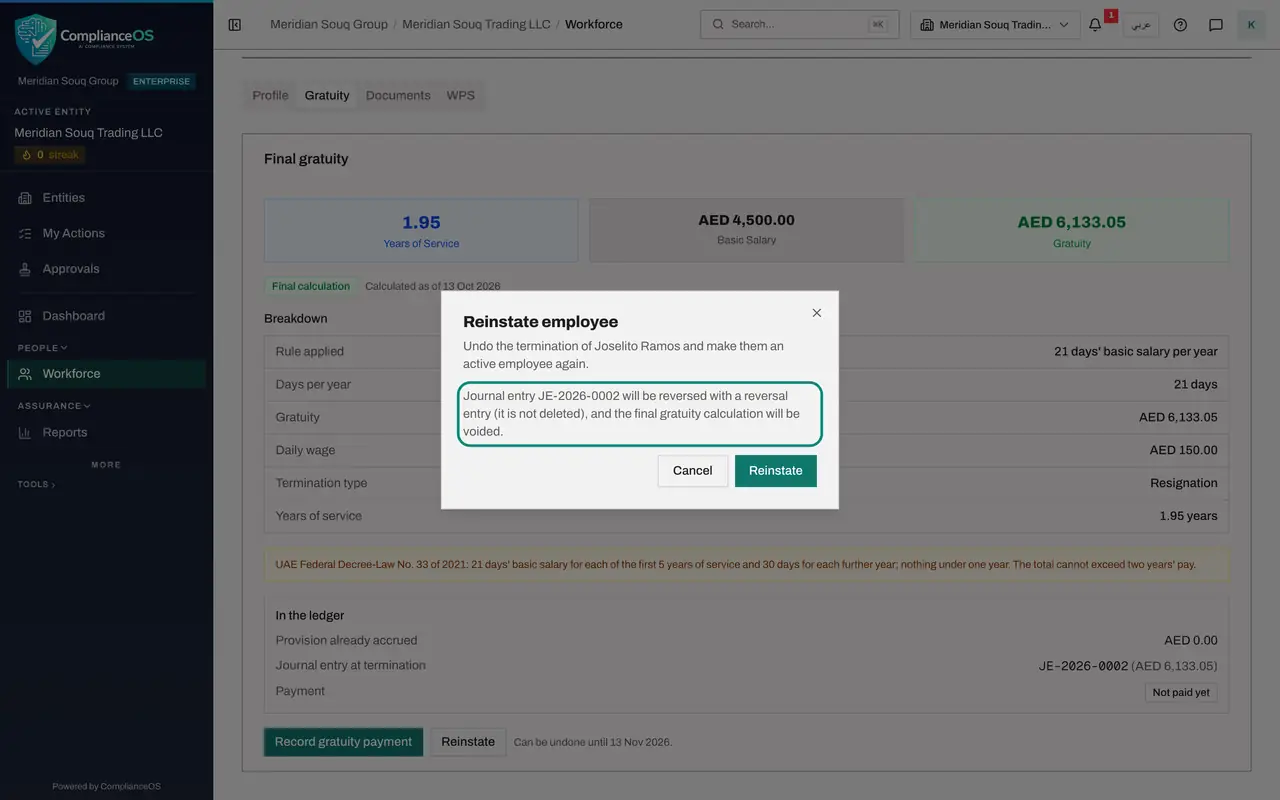
Select Reinstate. The window names the employee and says what will happen in the ledger: the journal entry of the termination will be reversed with a reversal entry, not deleted, and the final gratuity calculation will be voided.
- Select Reinstate
- 5
Confirm with Reinstate
Select Reinstate in the window. The message Employee reinstated appears. The status in the heading is Active again, and the Gratuity tab is back to the estimate with its Calculate Gratuity button.
- Select Reinstate
- 6
Check the Profile tab
Select Profile. Termination Details has gone and the status under Employment Details reads Active. Nothing else on the record changed: documents, payment details and WPS records were kept throughout.
- Select Profile
- 7
Go back to the list
Select Back to Workforce and then Employees. The delivery driver is among the active employees again, with his Gratuity and Terminate buttons, and the strip at the top counts one Terminated instead of two.
- Select Back to Workforce
- Select Employees
- 8
Know where the period is set
Select the Settings tab. Under Leavers and document reminders, Reinstatement period is the number of days a termination can be undone. The line below the field shows what is in force: thirty days. A later lesson changes it.
- Select Settings
How to check it worked
The employee's status is Active again, their Gratuity tab shows the estimate instead of a final gratuity, and their row in the Employees list has its Gratuity and Terminate buttons back.
Common mistakes
- Registering the person again instead of reinstating. That creates a second record and leaves the wrong termination, with its journal entry, in place.
- Waiting too long. After the reinstatement period, thirty days unless the entity changed it, the Reinstate button is greyed out.
- Recording the gratuity payment first. Once a payment is recorded, the termination can no longer be undone.
Check your understanding
1. What happens to the journal entry that was posted when the employee was terminated?
- A.It is deleted
- B.It is reversed by a new reversal entry, and the final gratuity calculation is voided
- C.It stays as it is
- D.It is moved to the bank account
Show answer
Answer: B. It is reversed by a new reversal entry, and the final gratuity calculation is voided
Posted entries are never deleted. Reinstating posts a reversal, so the ledger shows both the mistake and its correction.
2. In which case is Reinstate no longer available?
- A.The employee has documents on file
- B.The gratuity payment has been recorded, or the reinstatement period has ended
- C.The employee is a UAE national
- D.The employee was terminated by resignation
Show answer
Answer: B. The gratuity payment has been recorded, or the reinstatement period has ended
A paid gratuity or an expired reinstatement period closes the door. The text beside the button says which applies.