Lesson 15 of 21
Who can file a return: rights and the approval policy
What you will be able to do
This lesson is for the organisation administrator, and for the tax team who want to understand the rule they work under. You will open the Access tab inside Tax Intelligence, read who can view, create, edit and approve tax records for the entity, and read the approval policy that decides who may file a VAT return. You will not change anything: the standard policy is the one Meridian Souq uses.
Before you start
- You are signed in as an administrator, Layla Hassan. Only people who administer access can open this view; a tax manager or an accountant sees a message asking them to contact the security administrator.
- The accountant has computed the return for July to September 2026, and the tax manager has reviewed it.
Steps
- 1
Select Setup, then the Access tab
In Tax Intelligence select Setup and then the Access tab. The page shows who can view, create, edit and approve tax records for this entity, and the role grants behind it. Changes made here follow the same rules as the organisation's access control settings.
- Select Setup
- Select Access
- 2
Read the table of rights
Each line is a kind of record: classification rules, tax groups, returns and transactions. Each column is a right: View, Create, Edit and Approve. The number is how many people hold that right over this entity.
- 3
Select the Approve number for Returns
Select the number under Approve on the Returns line. The list below names the people who can approve and file returns, the role that gives each of them the right, and where the role applies. The tax manager is there; the accountant is not.
- Select 4 people can Approve: Returns
- 4
Read the role grants
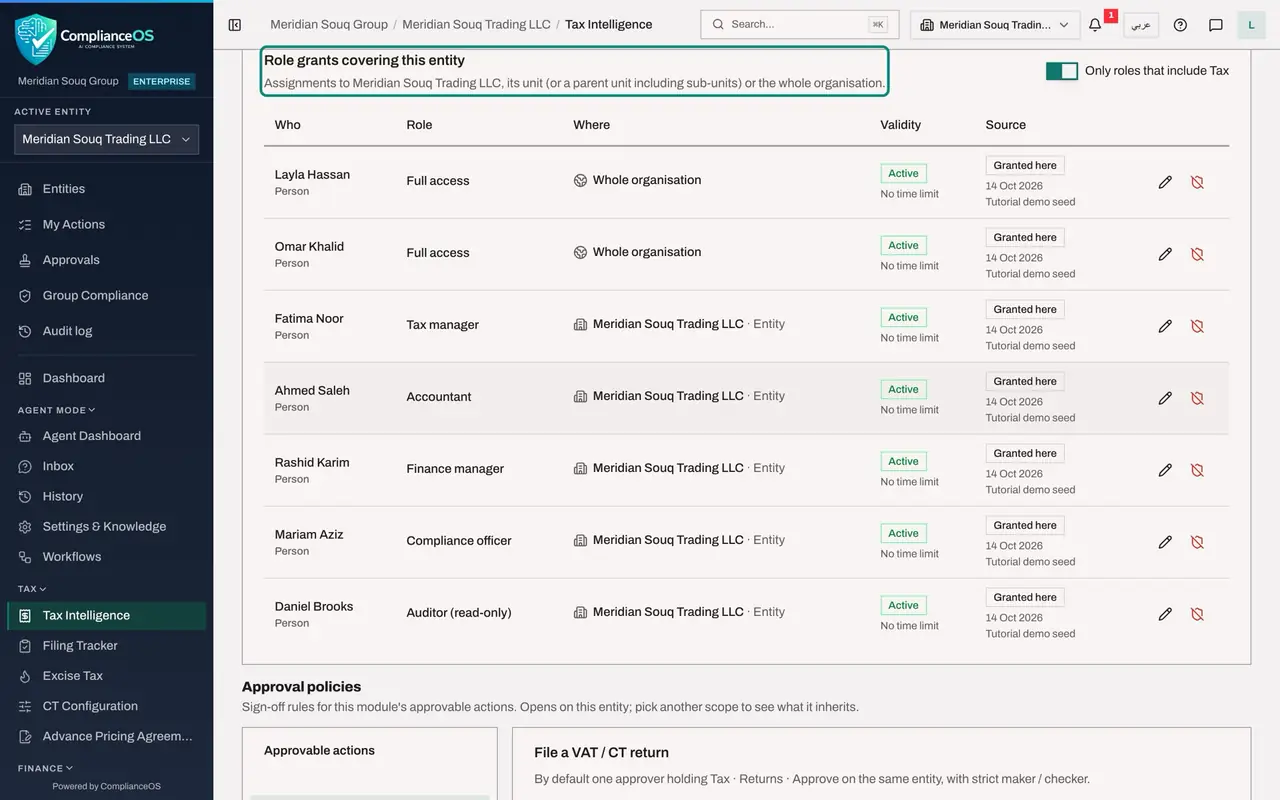
Role grants covering this entity lists every assignment that includes Tax: the tax manager, the accountant, the finance manager, the compliance officer, the auditor with read-only access, and the administrators. Edit and Revoke change a grant, and Grant access for this module, at the top, adds one.
- 5
Scroll to Approval policies and select File a VAT / CT return
Scroll down to Approval policies. These are the sign-off rules for the module's actions that need approval. Select File a VAT or CT return. The tag Default means no policy has been saved, so the standard one applies: one approver who holds the right Tax, Returns, Approve on the same entity, with strict maker and checker.
- 6
Read the two maker and checker choices
Under Maker and checker there are two choices. Strict, which is selected, means nobody approves a record they created or edited, administrators included. For a return, the person who computed it counts as its maker. Self-approval with justification is for very small teams: the author may approve, with a written justification that is flagged in the audit log.
- 7
Read the approval step
Approval steps lists who must sign, in order. Here there is one step: one approver who holds Tax, Returns, Approve over the same entity. Add step would add a second signature, and the switch A different person for each step stops one person signing twice.
- 8
Know who files at Meridian Souq
The accountant computed the return, so he is its maker. The tax manager holds the approve right and only reviewed the return, so she is the checker who files it in the next lesson. Opening a saved return, or computing it again without any change, does not make a person a maker. Leave the policy as it is and do not select Save policy.
How to check it worked
You can say who may file the return for this entity, and why the accountant who computed it cannot be the person who files it.
Common mistakes
- Loosening the policy to let one person both prepare and file. Self-approval is flagged in the audit log and on access reviews; use it only for a team that really has one person.
- Confusing the right to approve with the policy. The role gives the right; the policy says how many approvers are needed and whether a maker may be one of them.
- Saving a policy for the wrong scope. Check the box Policy for before you save anything.
Check your understanding
1. Under strict maker and checker, the accountant computed the return. Who may file it?
- A.The accountant
- B.Someone else who holds Tax, Returns, Approve over the entity, such as the tax manager
- C.Nobody
- D.Only the auditor
Show answer
Answer: B. Someone else who holds Tax, Returns, Approve over the entity, such as the tax manager
Nobody approves a record they created or edited. The tax manager holds the approve right and did not compute the return, so she is the checker.
2. Where do you see who holds the right to approve returns for this entity?
- A.VAT Config
- B.The Access tab, by selecting the Approve number on the Returns line
- C.The Filing Tracker
- D.The Evidence Vault
Show answer
Answer: B. The Access tab, by selecting the Approve number on the Returns line
Selecting a number in the rights table lists the people behind it, with the role and where it applies.