Lesson 18 of 21
Draft a voluntary disclosure to correct a filed return
What you will be able to do
This lesson is for the compliance officer, who in the demo company is the person allowed to create voluntary disclosures. After a return is filed and locked, an error can only be corrected by a voluntary disclosure, the tax authority's Form 211. You will link a disclosure to the filed return, enter the corrected figure, give the reason, and save it as a draft.
Before you start
- You are signed in as the compliance officer, Mariam Aziz. The tax manager and the accountant can read disclosures but cannot create them.
- The return for July to September 2026 is filed and locked, with net VAT of 6,680 dirhams.
- The tax team has found a sales invoice of 3,000 dirhams that was left out. The VAT on it is 150 dirhams, so the corrected net VAT is 6,830.
Steps
- 1
Open the filed return
In Tax Intelligence select Returns, choose 2026 and Q3 and select Compute VAT Return. The return is filed, so computing never changes the figures as filed. The green panel says that today's data gives the same figures as filed. The missing invoice is not in the system, so the app cannot see the error: you correct it with a disclosure.
- Select Returns
- Choose Year:
2026 - Select Q3
- Select Compute VAT Return
- 2
Select More, then Voluntary Disclosures
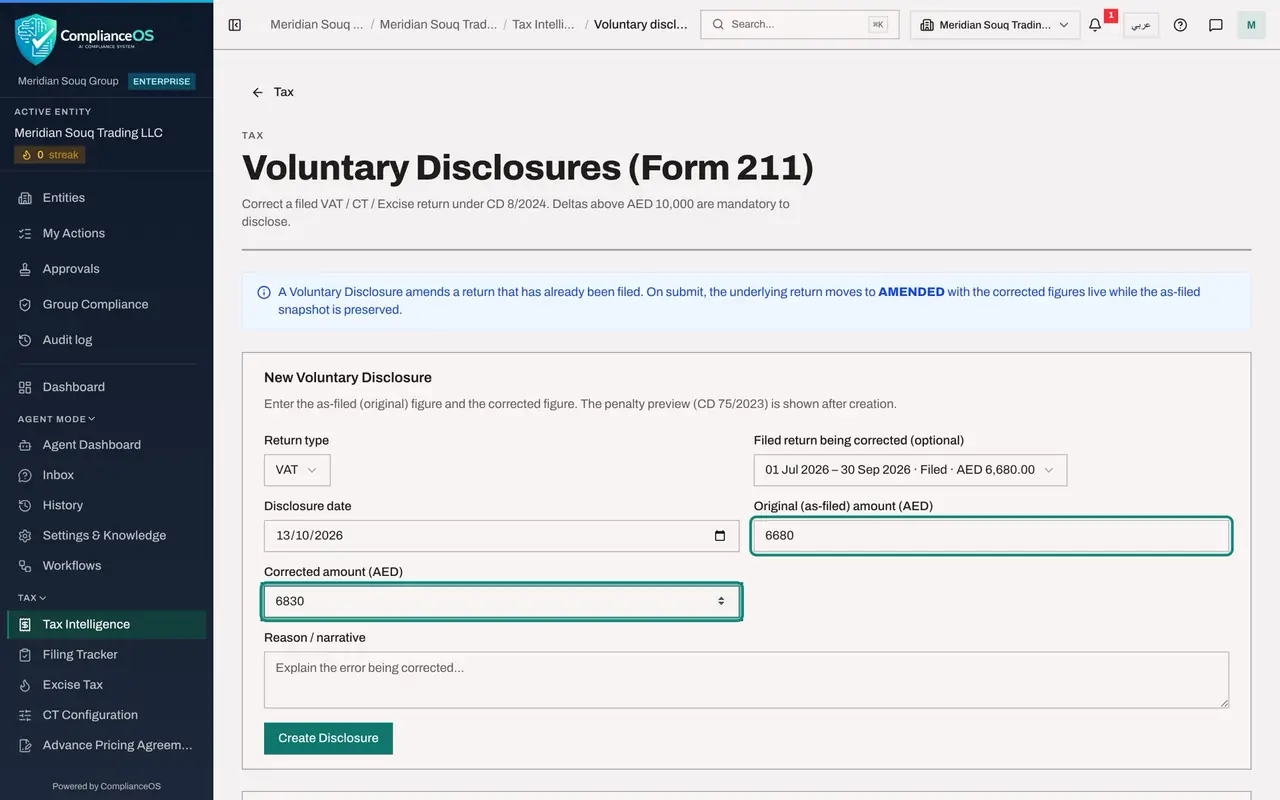
Select More and, under Filing, corrections and sign-off, select Voluntary Disclosures. The page opens with the form New Voluntary Disclosure. Return type is already VAT.
- 3
Choose the filed return being corrected
Open Filed return being corrected and choose the return for 1 July to 30 September 2026, shown with its status Filed and its net VAT of 6,680 dirhams. This links the disclosure to the return. The amount as filed is filled in from it.
- Select Not linked to a return
- 4
Enter the disclosure date
In Disclosure date enter the day you make the disclosure, here 13 October 2026. The date matters for the penalty, which grows with the time since the original due date.
- Type Disclosure date:
2026-10-13
- Type Disclosure date:
- 5
Check the amount as filed and type the corrected amount
Original, as-filed, amount reads 6680, the net VAT that was filed. In Corrected amount type what it should have been: 6830. Type the whole corrected figure, not the difference.
- Type Corrected amount (AED):
6830
- Type Corrected amount (AED):
- 6
Explain the error
In Reason, narrative, explain the error being corrected in plain words: which document, which period, and the effect on the tax.
- Type Reason / narrative:
Sales invoice MST-INV-7106 of 3,000 dirhams dated 28 September 2026 wa…
- Type Reason / narrative:
- 7
Select Create Disclosure
Select Create Disclosure. The disclosure is saved as a draft and the form is cleared. A panel under it shows the difference, 150 dirhams, and a penalty preview. It also says this disclosure is voluntary: the difference is below 10,000 dirhams, so the error may instead be corrected in the next return.
- Select Create Disclosure
- 8
Find the draft in the Disclosures list
The Disclosures list at the bottom shows the date, the return, the difference, the penalty, the status Draft and the Form 211 reference, which is still empty. View opens the detail.
- 9
Select View
Select View. The detail shows the linked return, the amount as filed, the corrected amount, the difference, the penalty preview and your reason. It says whether the disclosure is mandatory: a difference above 10,000 dirhams must be disclosed.
- Select View
- 10
Know what Submit does
Close the detail. Submit, on the line of the draft, is for later, after the disclosure has been made on the authority's portal. It asks for the Form 211 reference, goes through the same approval policy as filing a return, and then changes the filed return to Amended with the corrected figures. Do not select it now: the draft stays here until then.
- Select Close
How to check it worked
The Disclosures list shows one disclosure for the VAT return with the status Draft and a difference of 150 dirhams.
Common mistakes
- Trying to fix a filed period by editing its transactions. They are locked. The disclosure is the correction.
- Entering the size of the error as the corrected amount. Corrected amount is the whole figure as it should have been, here 6,830, not the 150 difference.
- Selecting Submit before the disclosure has been made on the authority's portal. Submitting asks for the Form 211 reference and changes the filed return to amended.
Check your understanding
1. The filed net VAT was 6,680 and should have been 6,830. What do you type in Corrected amount?
- A.150
- B.6,680
- C.6,830
- D.13,510
Show answer
Answer: C. 6,830
The form takes the figure as filed and the corrected figure, and works out the difference itself.
2. What happens to the filed return when a disclosure is submitted?
- A.It is deleted
- B.It moves to Amended with the corrected figures, and the figures as filed are kept
- C.Nothing
- D.It goes back to Draft and can be edited freely
Show answer
Answer: B. It moves to Amended with the corrected figures, and the figures as filed are kept
The page explains that on submit the return moves to Amended with the corrected figures live, while the as-filed snapshot is preserved.