Lesson 12 of 21
Compute the VAT return and read every box
What you will be able to do
This lesson is for the accountant who prepares the return, and for the tax manager who reviews it. You will compute the VAT return for July to September 2026 from the approved transactions and read it box by box, so you can explain where every figure comes from before anyone files it.
Before you start
- You are signed in as the accountant. Computing a return needs the right to create returns; filing it needs a different right, which the accountant does not have.
- Every transaction for the quarter is classified and approved. Nothing is waiting in the Review Queue.
- The return follows the layout of the tax authority's VAT return form, called Form 201. The app prepares the figures; it does not send anything to the authority.
Steps
- 1
Select Compute VAT return on the strip
In Tax Intelligence select Compute VAT return on the strip at the top. It opens the Returns group on the VAT Return tab. You can also select Returns yourself.
- Select Compute VAT return
- 2
Choose the period
Choose the Year, 2026, and select Q3 under Quick select. Period Start becomes 1 July 2026 and Period End 30 September 2026. Full year fills the whole calendar year, and you can also type any two dates.
- Choose Year:
2026 - Select Q3
- Choose Year:
- 3
Select Filing-Ready
There are two ways to count. Projected includes every classified transaction, even ones still waiting for a person, and is useful for a forecast during the quarter. Filing-Ready counts approved transactions only. Select Filing-Ready for the figures you will file.
- Select Filing-Ready
- 4
Compute the return and read the three totals
Select the green Compute button. After a few seconds three totals appear. VAT due is the VAT you owe on sales and on reverse charge purchases: 11,221 dirhams. Recoverable VAT is the VAT you can reclaim: 4,541. Net VAT payable is the difference, 6,680 dirhams, due to the Federal Tax Authority. If more were recoverable than due, the third tile would read net VAT refundable.
- Select Compute VAT Return
- 5
Read the status line
Under the totals is the status of the return: the period, the date it is due, 28 October 2026, and the status Draft. Submit and Lock, on the right, files the return and locks the period. It is greyed out for the accountant, because it needs the right to approve returns.
- 6
Read boxes 1a to 1g
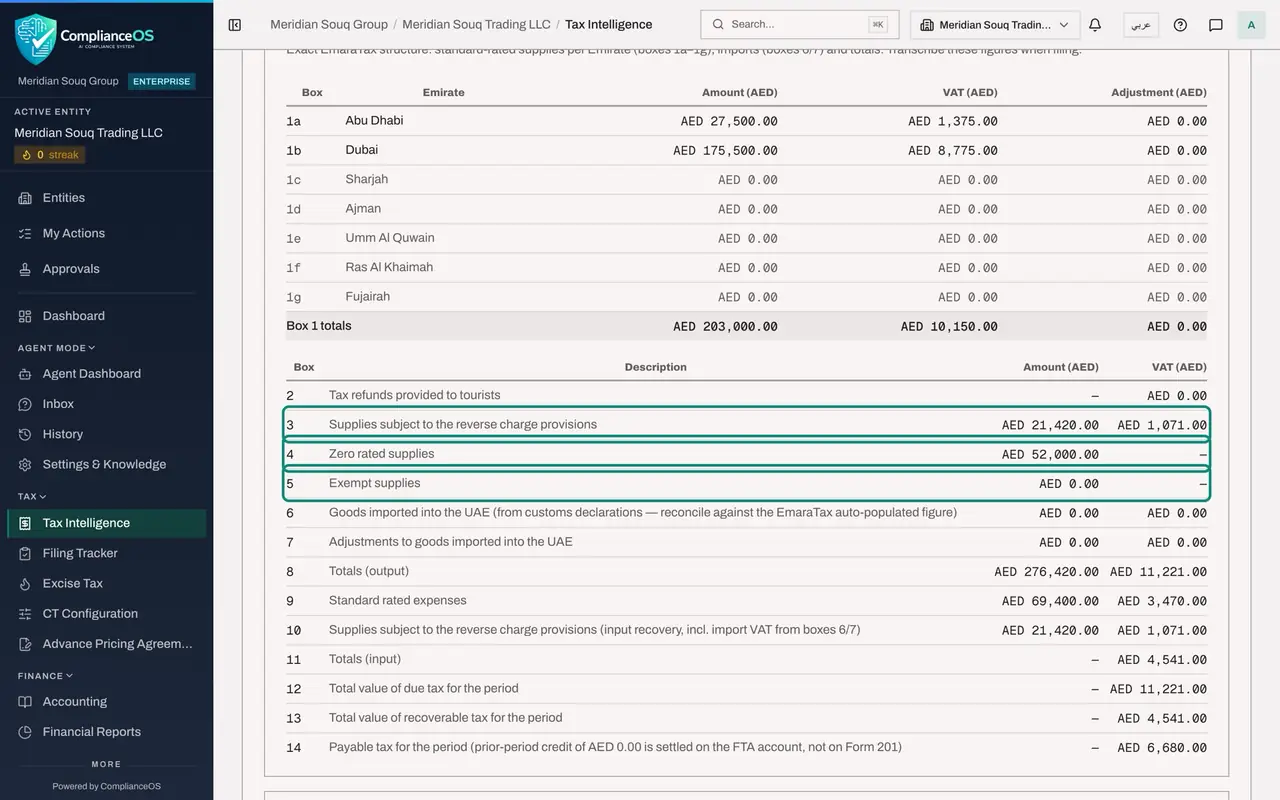
The table headed FTA Form 201 is laid out like the authority's form. Boxes 1a to 1g are standard rated sales for each Emirate, with their VAT. Box 1a, Abu Dhabi, holds the gift hampers sale of 27,500 that was given an Emirate override. Box 1b, Dubai, holds the other local sales, less the credit note: 175,500, with VAT of 8,775.
- 7
Read boxes 2 to 5
Box 2 is tax refunded to tourists, not used here. Box 3 is purchases under the reverse charge: the two services bought from abroad, 21,420, with VAT of 1,071 that you owe. Box 4 is zero rated sales: the export of 52,000. Box 5 is exempt sales: none. The exempt loan interest and residential rent are purchases, so they are not in box 5.
- 8
Read boxes 6 to 8
Boxes 6 and 7 are goods imported through customs and adjustments to them: none here. The form warns you to compare box 6 with the figure the authority's portal fills in itself. Box 8 totals the sales side: 276,420 of supplies and 11,221 of VAT.
- 9
Read boxes 9 to 11
Box 9 is standard rated purchases whose VAT you can reclaim: the stock, the shop rent and the van costs, 69,400, with VAT of 3,470. Box 10 is the VAT recovered on the reverse charge purchases, the same 1,071 as in box 3. Box 11 totals the recoverable VAT: 4,541.
- 10
Read boxes 12 to 14
Box 12 is the total VAT due and box 13 the total recoverable. Box 14 is the tax payable for the period: 6,680 dirhams. These are the figures to copy into the authority's portal when you file.
- 11
Look at the working tables underneath
Below the form are working tables. VAT Computation Lines lists the app's own working lines, numbered L1, L2 and so on. They are not box numbers: use the form table above when you file. Box 9 Reconciliation shows what was included in box 9 and what was left out: here 17,350 of exempt purchases: the loan interest, the residential rent and the travel cards; and the blocked base of 9,600 for the entertainment dinner.
- 12
Read the computation notes and alerts
Computation Notes and Alerts explains anything unusual, each note with a level and the law it relies on. Read every one. Here they report a transaction with no account mapped, counterparties whose country is not recorded, the zero rated export and the blocked VAT on entertainment. A note marked blocking would have to be fixed before filing.
- 13
Find the period in VAT Return History
At the bottom, VAT Return History lists every period that has been computed, with its output VAT, input VAT, net VAT and the date. Computing a period again updates its line; it does not add a second one.
How to check it worked
The VAT Return tab shows VAT due of 11,221 dirhams, recoverable VAT of 4,541 and net VAT payable of 6,680, the status Draft, and a line for the period in VAT Return History.
Common mistakes
- Preparing the figures to file in Projected mode. Projected includes transactions nobody has approved. Use Filing-Ready for the return you will file.
- Expecting the saved return to follow later changes. After a transaction is added, edited or reclassified, compute the return again.
- Trying to type an adjustment into a box. Boxes cannot be typed over: correct the transactions and compute again.
Check your understanding
1. A purchase of services from a supplier abroad, 21,420 dirhams, is under the reverse charge. Where does it appear?
- A.Only in box 9
- B.In box 3 as VAT due and in box 10 as VAT recoverable
- C.In box 4 as zero rated
- D.Nowhere, it is outside the return
Show answer
Answer: B. In box 3 as VAT due and in box 10 as VAT recoverable
Under the reverse charge the buyer reports the VAT as due, in box 3, and reclaims the same amount, in box 10, so the two cancel out for a fully taxable business.
2. Why is the client entertainment dinner not in box 9?
- A.It was not approved
- B.Its input VAT is blocked, so it cannot be reclaimed
- C.It is zero rated
- D.It belongs to the next quarter
Show answer
Answer: B. Its input VAT is blocked, so it cannot be reclaimed
Box 9 holds purchases whose VAT can be reclaimed. VAT on entertainment is blocked, and the notes under the return say so.