Lesson 16 of 21
File the return as the checker with Submit and Lock
What you will be able to do
This lesson is for the tax manager, who is the checker for the return the accountant prepared. After the return has been filed on the tax authority's portal, you will open it from its deadline, check it, and record the filing with Submit and Lock: attach the acknowledgement, give the reference and lock the period. The next lesson shows what the lock changed.
Before you start
- You are signed in as the tax manager. You hold the right to approve returns, and you did not compute this return: the accountant did.
- You have filed the return for July to September 2026 on the authority's portal and saved the acknowledgement. ComplianceOS does not file it for you.
- Locking cannot be undone. After it, the period's transactions can no longer be edited, and a correction needs a voluntary disclosure.
Steps
- 1
Open the Filing Tracker and find the VAT deadline
In the left menu, under Tax, choose Filing Tracker. The VAT Return Filing for 1 July to 30 September 2026 is due on 28 October 2026 and is still Upcoming. The note under it says the return is still a draft, and filing it completes this deadline.
- 2
Select File the return
Select File the return. Tax Intelligence opens on the VAT Return tab with the period of the deadline, 1 July to 30 September 2026. The return the accountant computed is shown as it was saved; a line says you are looking at the computation saved for this period. You do not need to compute it again.
- Select File the return
- 3
Check the figures and the status
Compare the three totals with what you filed on the portal: VAT due 11,221, recoverable VAT 4,541 and net VAT payable 6,680 dirhams. The status line shows the due date and the status Draft. For you, Submit and Lock is active.
- 4
Select Submit and Lock
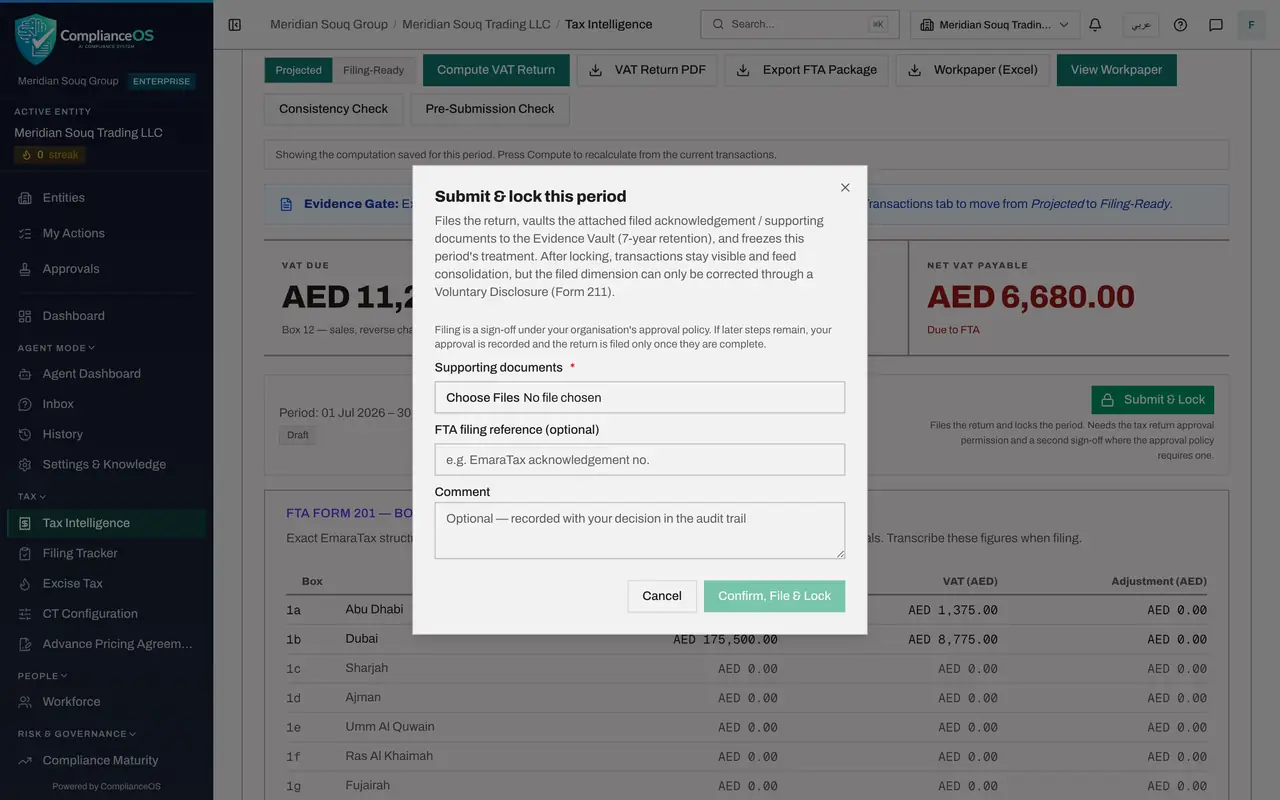
Select Submit and Lock. The window explains what will happen: the return is filed, the documents you attach are stored in the Evidence Vault for seven years, and the period's tax treatment is frozen. It also reminds you that filing is a sign-off under the organisation's approval policy. Two things make the app refuse the filing with a message: AI suggestions still waiting for review, and credit notes that do not reconcile to their invoices. The Pre-Submission Check lists both. Here there are none.
- Select Submit & Lock
- 5
Attach the acknowledgement
Under Supporting documents choose the acknowledgement you saved from the portal. At least one file is required. PDF, picture, Excel and CSV files are accepted. Here it is sample-vat-acknowledgement.pdf, a training sample. The window confirms 1 file attached.
- Upload Supporting documents *:
sample-vat-acknowledgement.pdf
- Upload Supporting documents *:
- 6
Type the filing reference and a comment
In FTA filing reference type the reference printed on the acknowledgement. In Comment write what a colleague or an auditor should know. The comment is recorded with your decision in the audit trail.
- Type FTA filing reference (optional):
VAT-201-2026-Q3-TRAINING-0001 - Type Comment:
Filed on the portal on 13 October 2026. Reviewed against the workpaper…
- Type FTA filing reference (optional):
- 7
Select Confirm, File and Lock
Select Confirm, File and Lock. A message confirms: Period filed and locked, treatment frozen, documents vaulted. The window closes.
- Select Confirm, File & Lock
- 8
Read the filed return
The VAT Return tab stays on the period you filed, 1 July to 30 September 2026. The status line now reads Filed, Submit and Lock has gone, and the three totals are the ones you filed: net VAT payable 6,680 dirhams.
How to check it worked
The message Period filed and locked, treatment frozen, documents vaulted appears, the window closes, and the VAT Return tab shows 1 July to 30 September 2026 with the status Filed.
Common mistakes
- Recomputing the return with changed transactions just before filing. That makes you a maker, and under the strict policy someone else then has to file.
- Locking before the return is really filed on the portal. The lock freezes the figures; make sure they are the figures you filed.
- Attaching the wrong file. The supporting document is kept in the Evidence Vault for seven years as the proof of filing.
Check your understanding
1. Why can the tax manager file this return under the strict policy?
- A.Administrators changed the policy
- B.She holds the approve right and did not compute the return, so she is not its maker
- C.The accountant asked her to
- D.Strict policies do not apply to VAT
Show answer
Answer: B. She holds the approve right and did not compute the return, so she is not its maker
The accountant who computed the return is its maker. Opening a saved return does not make the reviewer a maker, so she can approve it.
2. After the period is locked, how is a mistake in a filed transaction corrected?
- A.By editing the transaction
- B.By deleting and importing it again
- C.Through a voluntary disclosure
- D.By computing the return again
Show answer
Answer: C. Through a voluntary disclosure
The filed treatment is frozen. The pencil and the bin are greyed out, and corrections go through a voluntary disclosure.