Lesson 16 of 21
Early warnings: threshold alerts, evidence gaps and anomalies
What you will be able to do
This lesson is for the compliance officer and for internal audit. Three lists warn you before a problem becomes a breach of the rules. Threshold alerts fire when the entity's figures near a limit set by law. Evidence gaps point at payments with no document behind them. Anomalies flag transactions that look unusual. You will open each, learn what feeds it, and review an anomaly.
Before you start
- You are signed in with the Compliance officer role for the entity.
- The tax module holds transactions. Here the tax manager has entered a sale in August and a courier expense dated on a Saturday.
Steps
- 1
Open the Evidence Vault
In the left menu, under Assurance, choose Evidence Vault. The vault itself, where supporting documents are kept, is covered in the course on approvals, evidence and the audit trail. This lesson uses the section at the very bottom of the page.
- 2
Open Evidence Gap and Threshold Alerts
Scroll to the bottom and select the bar Evidence Gap and Threshold Alerts. The section opens with two lists: Evidence Gaps and Threshold Alerts.
- 3
Read Evidence Gaps
An evidence gap is raised when two or more outgoing bank payments to the same payee have not been matched to an invoice or a receipt. A background check reads the bank transactions in Accounting and adds one gap for each such payee. This company has no bank transactions yet, so the list reads No evidence gap alerts. When gaps exist, each one can be acknowledged to record that you have seen it.
- 4
Read a threshold alert
A threshold alert is raised when the entity's figures reach a limit set by law. This one is a VAT deregistration advisory. It reads Below threshold, 45 percent of it, and gives the figures: 84,000 dirhams against a threshold of 187,500, for the period 1 January to 31 December 2026, and the date it was detected. Taxable sales this year are below the voluntary VAT registration threshold, so the tax manager must consider whether the entity should stay registered.
- 5
Know the other thresholds
The same list warns about the other limits as figures approach them: the mandatory VAT registration threshold of 375,000 dirhams, the voluntary one of 187,500, the corporate tax threshold of 375,000 of taxable income, the Small Business Relief revenue limit of 3 million, and the 50 million of revenue above which audited financial statements are required. The alerts are raised as transactions are entered, and a daily check catches imports. They cannot be closed here: pass each one to the tax manager.
- 6
Open Anomaly Detection
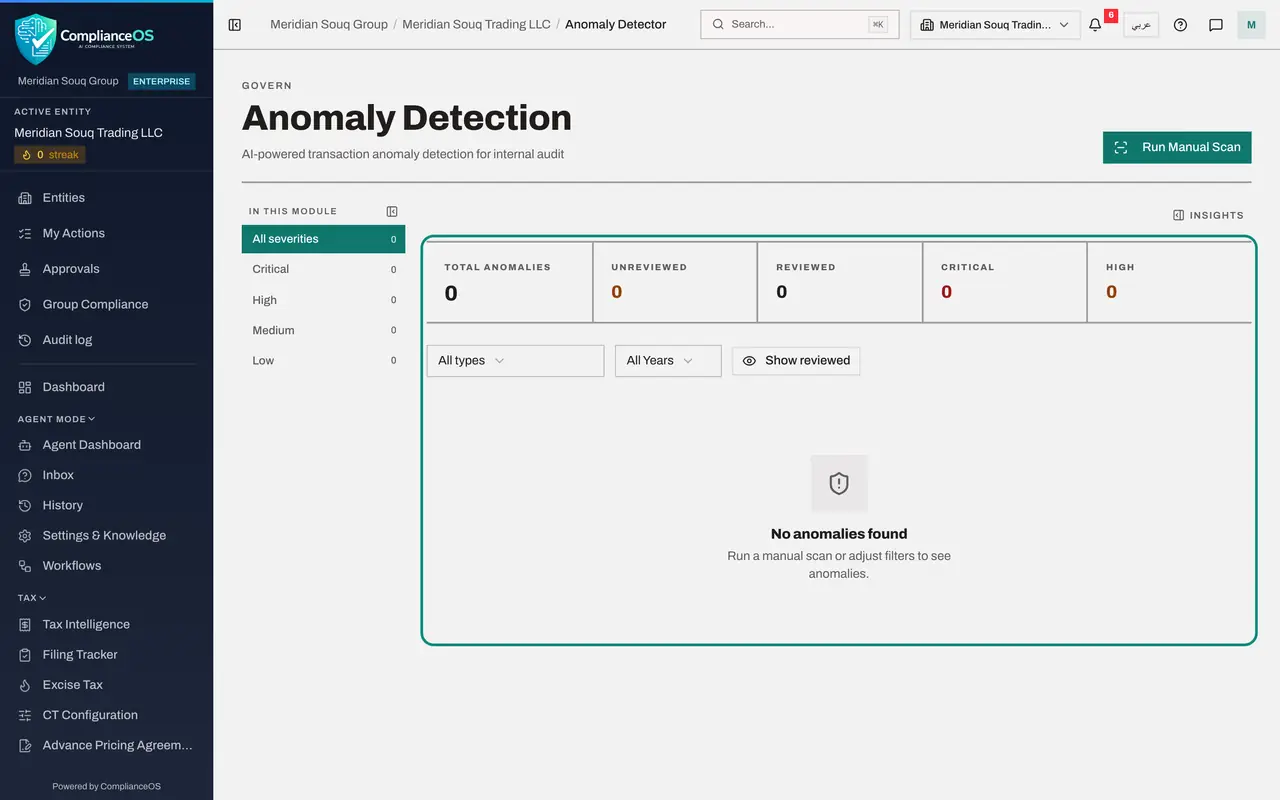
Now, in the left menu under Risk and Governance, choose Anomaly Detector. The page is headed Anomaly Detection. The tiles count the anomalies found, those not yet reviewed, those reviewed, and the critical and high ones. On the left, In this module filters by severity.
- 7
Select Run Manual Scan
Select Run Manual Scan. The scan reads the entity's tax transactions of the last 90 days and applies its tests: repeated round sums to one supplier, the same invoice number twice, amounts far from a supplier's usual, a sudden burst of payments, payments split to stay under a limit, dates on a weekend or public holiday, and supplier names that do not fit their tax registration number. A message gives the result: how many anomalies were found among the transactions scanned. A finding is never raised twice, so a repeat scan reports only what is new. The same scan runs by itself every night.
- Select Run Manual Scan
- 8
Read the anomaly
Each row gives the Type of anomaly, its Severity, a Score, the Signal that triggered it and the value seen, a Title, whether it has been Reviewed, and the date. This one is a Timing Anomaly of low severity: a payment of 1,850 dirhams to a courier, dated on a Saturday.
- 9
Open the detail
Select the row to open it. Description explains in a sentence why the transaction was flagged. Evidence Details lists the facts the test used: the supplier, the amount, the date and the day of the week. Above the table, AI Risk Analysis sums up all the findings and lists Investigation Priorities.
- 10
Select Mark as reviewed
Two actions end the row. Mark as reviewed records that you looked into it and it is explained. Mark as false positive records that the flag was wrong. Select Mark as reviewed. A window asks you to confirm that the anomaly has been reviewed by your team. In Notes, which is optional, say what you found: here the stall at Global Village trades at weekends, so a Saturday courier run is normal.
- Select Mark as reviewed
- Type Add context or justification...:
The Global Village stall trades at weekends. Courier run confirmed aga…
- 11
Select Confirm
Select Confirm. The anomaly is recorded as reviewed with your note, and at the top the Unreviewed tile drops to zero while Reviewed shows one.
- Select Confirm
- 12
Use the filters
Reviewed anomalies leave the list. Select Show reviewed, above the table, to bring them back. The list All types narrows the table to one kind of anomaly, All Years to one year, and the severities on the left to Critical, High, Medium or Low.
- Select Show reviewed
How to check it worked
Under Threshold Alerts you can read the VAT deregistration advisory with its percentage and amounts. In Anomaly Detection, the weekend transaction reads Reviewed.
Common mistakes
- Expecting these lists to be filled by hand. Nothing is typed here. Threshold alerts come from the tax transactions, evidence gaps from bank payments in Accounting, and anomalies from a scan of the last 90 days of transactions.
- Reading a threshold alert as a filing. It is a warning. Pass it to the tax manager, who decides whether to register, deregister or file.
- Marking an anomaly as a false positive to clear the list. Use Mark as reviewed when you have looked into it and it is explained; keep false positive for a flag that was simply wrong.
Check your understanding
1. A threshold alert reads Below threshold, 45% of it, AED 84,000 against a threshold of AED 187,500. What is it telling you?
- A.The entity owes AED 84,000 of VAT
- B.Taxable sales over the period are below the voluntary VAT registration threshold, so deregistration may have to be considered
- C.45 percent of invoices are missing
- D.The VAT return is 45 percent complete
Show answer
Answer: B. Taxable sales over the period are below the voluntary VAT registration threshold, so deregistration may have to be considered
The VAT deregistration advisory compares taxable sales with the AED 187,500 voluntary registration threshold. Sales of AED 84,000 are 45 percent of it.
2. What does Run Manual Scan in Anomaly Detection look at?
- A.Every contract ever signed
- B.The entity's tax transactions of the last 90 days
- C.Employee attendance
- D.The regulatory feed
Show answer
Answer: B. The entity's tax transactions of the last 90 days
The scan reads the last 90 days of transactions and applies its tests, such as repeated round sums to one supplier, duplicate invoices, unusual amounts, and dates on weekends or public holidays. The same scan also runs every night.