Lesson 6 of 21
Set up departments inside an entity
What you will be able to do
This lesson is for access administrators. You will create a department inside one legal entity, give it a head and the modules it handles, rename it, and then see how it appears as a unit in the organisation structure. You will also see why a department cannot hold roles that manage access.
Before you start
- You are signed in as an administrator who can manage access.
- You know who heads the department and which areas of work it handles.
Steps
- 1
Open the entity and choose Entity settings
On the Entities screen, select Meridian Souq Trading LLC to enter it. Then select the round button with your initial at the top right and choose Entity settings.
- Select Account menu
- Select Entity settings
- 2
Select the Departments tab
Select the Departments tab. It is empty for now. The note explains that people belong to a department by holding a role on it. While the list is empty, the button Seed Defaults offers a starter set of departments; we will add our own with New Department.
- Select Departments
- 3
Select New Department and name it
Select New Department. Type the name Finance and a short description of what the department does. The name is required; the description helps colleagues choose the right department.
- Select New Department
- Type e.g. Finance, Legal, Operations:
Finance - Type Optional description…:
Bookkeeping, tax returns and financial reporting for the trading compa…
- 4
Choose the department head
Under Department Head, choose the person who leads the department. The list offers the people who have access to this entity. Leave it on None if the post is vacant.
- Select None
- Choose Rashid Karim
- 5
Tick the modules the department handles
Under Modules Handled, tick the areas of work this department looks after. Here we tick Accounting, Tax Filing and Financial Reports. This tells colleagues, and the routing of work, which department owns which module.
- Select Accounting
- Select Tax Filing
- Select Financial Reports
- 6
Select Create Department
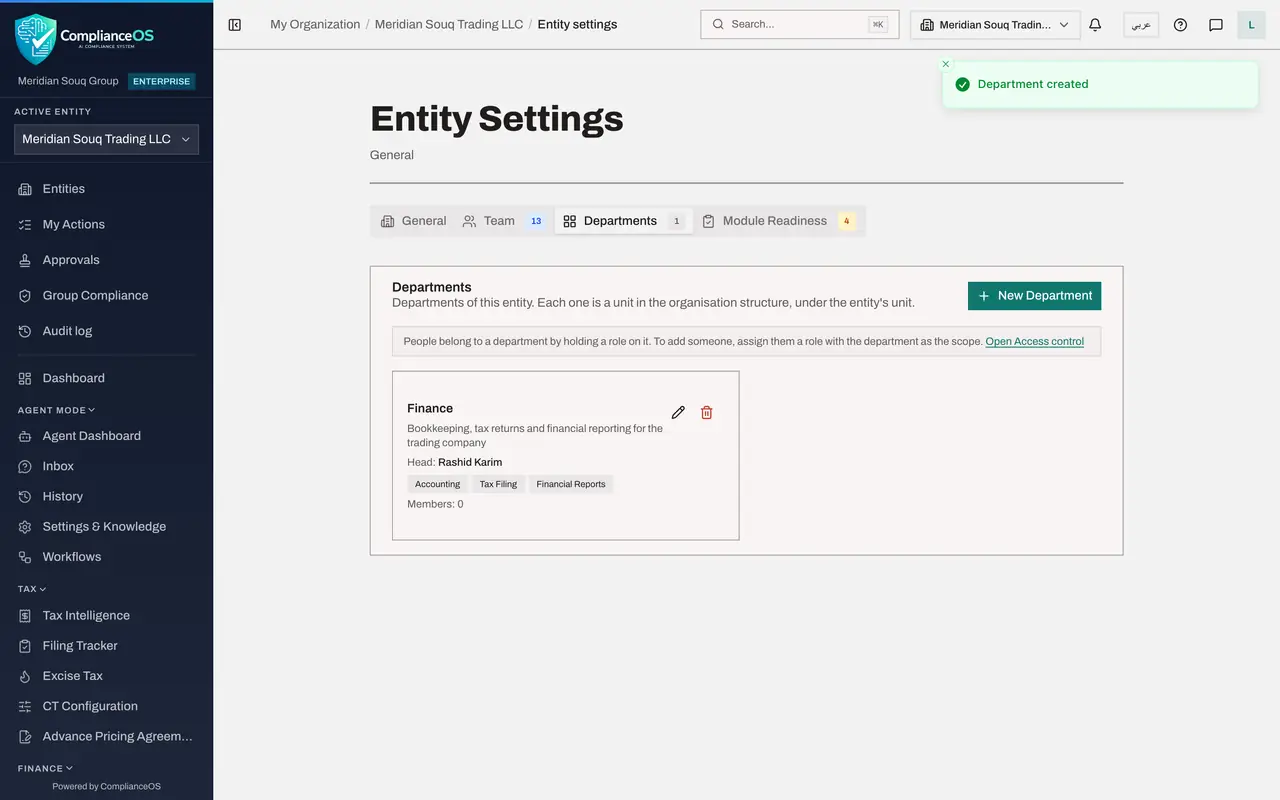
Escalation Email is optional: it is a shared mailbox for matters that need the department's attention, and we leave it empty. Select Create Department. A message confirms it, and the department appears as a card.
- Select Create Department
- 7
Read the department card
The card shows the name, the description, the head, the modules handled and the number of members, which is 0 until someone is granted a role on the department. The pencil button edits the department and the bin button deletes it after a confirmation.
- 8
Rename the department
Select the pencil button on the card. Change the name to Finance and Tax, then select Save Changes. The card, and the unit that stands for this department in the organisation structure, both take the new name.
- Select Edit department
- Type e.g. Finance, Legal, Operations:
Finance and Tax - Select Save Changes
- 9
Select Open Access control in the note
To add people, follow the link Open Access control in the note. It opens the People and assignments tab of Access control. Select Grant role at the top right.
- Select Open Access control
- Select Grant role
- 10
Choose the department under Where and read the note
Under Where, choose Finance and Tax. A note appears under Role: roles that show or manage access cannot be granted on a department, because a role on a department applies to the department's whole entity. Grant such roles on the entity instead.
- Select Whole organisation
- Type Search units and entities…:
Finance
- 11
Open the Role list to see what is offered
Open the Role list and type admin. Trade administrator and other business roles are offered, but Security administrator, Org unit administrator, Organisation administrator and Full access are not in the list. A later lesson grants a role on this department.
- Select Choose a role
- Type Search…:
admin
- 12
Open the Organisation structure tab
Close the window and select the Organisation structure tab. The department is listed as a unit of the type Department under Head office, which is the unit that holds its entity, with the line Department of Meridian Souq Trading LLC. Its plus and bin buttons are greyed out: a department has no sub-units and is deleted from the entity's Departments tab.
- Select Cancel
- Select Organisation structure
How to check it worked
The Departments tab of the entity shows a card named Finance and Tax with its head and its modules, and the Organisation structure tab shows a unit of the same name, of the type Department, marked as a department of Meridian Souq Trading LLC.
Common mistakes
- Looking for a button that adds people to a department. People belong to a department by holding a role on it, so you add someone by granting them a role with the department chosen under Where.
- Trying to grant Security administrator or Org unit administrator on a department. A role on a department applies to the department's whole entity, so roles that show or manage access are not offered there. Grant them on the entity instead.
- Trying to delete the department from the Organisation structure tab. The bin there is greyed out; a department is deleted from the entity's Departments tab.
Check your understanding
1. How does a person become a member of a department?
- A.An administrator ticks their name in the department window
- B.They are granted a role with the department as its scope
- C.They choose it in their own profile
- D.Membership follows the department head automatically
Show answer
Answer: B. They are granted a role with the department as its scope
The note on the Departments tab says people belong to a department by holding a role on it.
2. Where does a department appear in the organisation structure?
- A.It does not appear there
- B.As a unit under the unit that holds its entity
- C.As a new top-level unit beside Head office
- D.Inside the Roles tab
Show answer
Answer: B. As a unit under the unit that holds its entity
Each department is a unit in the organisation structure, placed under its entity's unit, and it moves when the entity moves.