Lesson 14 of 21
Arrange cover for an absence with a delegation
What you will be able to do
This lesson is for access administrators. A delegation lets a named deputy act on a colleague's behalf for a set period, without giving the deputy a new role. You will set up cover for a compliance officer who is going on leave, limited to one permission on one company, and find it in the list of everyone's delegations.
Before you start
- You are signed in as an administrator who can manage access. Anyone can delegate their own access from this tab; an administrator can also set one up for a colleague.
- You know who is away, who covers, for how long and for which work.
Steps
- 1
Open Access control on the Delegations tab
In Access control select the Delegations tab. A delegation is cover for an absence: the deputy acts on the other person's behalf, and the audit log records both names. The tab opens on Mine, which lists delegations you give or receive.
- 2
Select New delegation and choose who is delegating
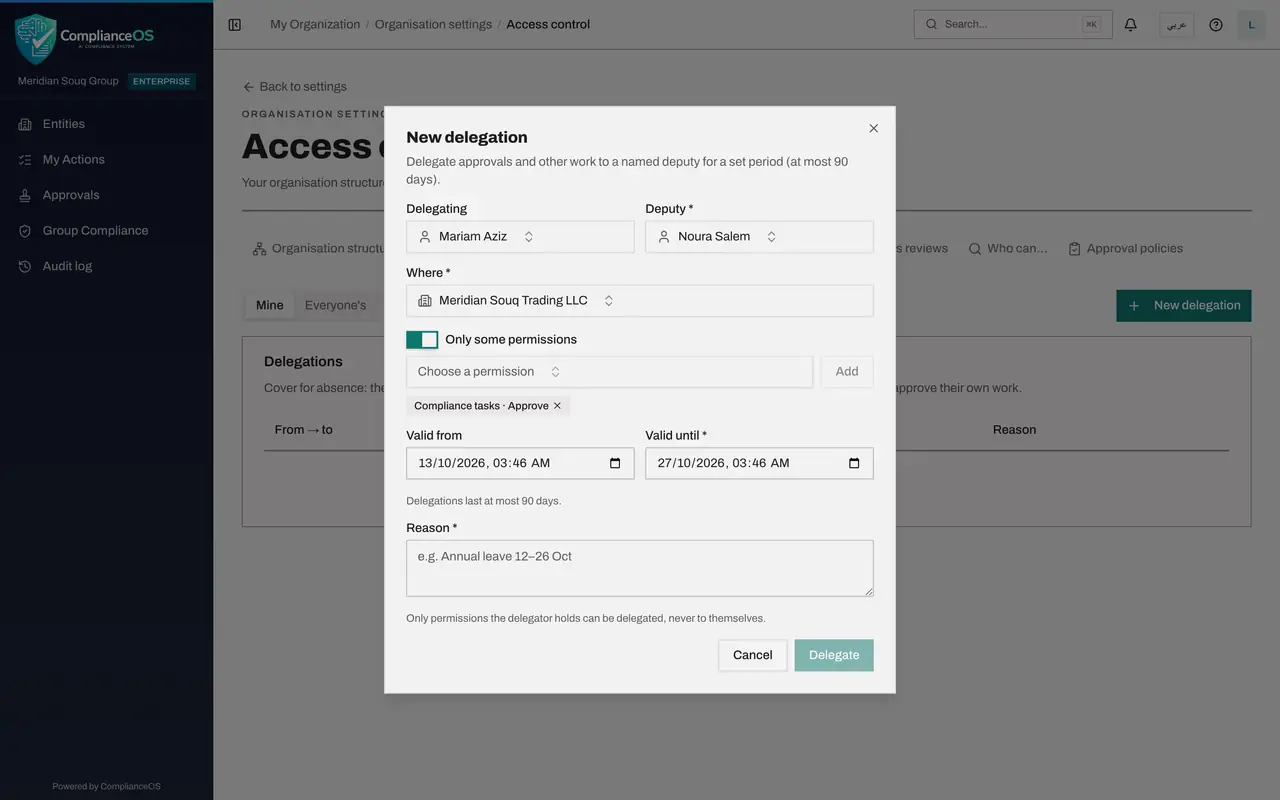
Select New delegation. Delegating starts as you. Because you administer access, you can choose a colleague instead: choose Mariam Aziz, the compliance officer who is going on leave.
- Select New delegation
- Select Layla Hassan
- Type Search people…:
Mariam
- 3
Choose the deputy
Under Deputy, choose Noura Salem, who will cover. The rule at the bottom of the window applies: only permissions the delegating person holds can be delegated, and never to themselves.
- Select Choose a person
- Type Search people…:
Noura
- 4
Choose where the cover applies
Under Where, choose the entity Meridian Souq Trading LLC. The cover then applies to that company only, even though Mariam also holds a role on the UAE Operations region.
- Select Whole organisation
- Type Search units and entities…:
Trading - Choose Meridian Souq Trading LLCHead office
- 5
Switch on Only some permissions and add one
With the switch off, the deputy gets everything the delegating person holds in this scope. Switch on Only some permissions, choose Compliance tasks, Approve in the list and select Add. The permission appears as a chip, and you can add more in the same way.
- Select Choose a permission
- Type Search permissions…:
compliance tasks approve - Select Add
- 6
Set the dates
Valid from is filled in with the present moment; change it to the first day of the leave if the cover should start later. Valid until is suggested two weeks ahead; set it to the moment the cover ends, here the evening of the last day. A delegation lasts at most 90 days and ends by itself.
- Type Valid until *:
2026-10-27T18:00
- Type Valid until *:
- 7
Give the reason and select Delegate
The reason is required. Type it, then select Delegate. A message confirms the delegation was created.
- Type Reason *:
Annual leave for two weeks - Select Delegate
- Type Reason *:
- 8
Select Everyone's to find it
You are neither the delegating person nor the deputy, so the Mine list stays empty. Select Everyone's. The row shows who delegates to whom, where, what, the validity and the reason. Revoke at the end of the row ends the cover early.
- Select Everyone's
- 9
Look at Show ended and revoked
The switch Show ended and revoked adds past delegations to the list, so that you can answer later who was covering for whom on a given day. The course on approval policies shows the deputy's side: how delegated work arrives and is approved.
How to check it worked
With Everyone's selected, the Delegations table shows a row from Mariam Aziz to Noura Salem for Meridian Souq Trading LLC, with the permission Compliance tasks, Approve, the status Active, the two dates and the reason.
Common mistakes
- Delegating everything when the deputy needs one thing. Switch on Only some permissions and add just the permissions the cover needs.
- Looking for the delegation under Mine when you created it for a colleague. Mine lists delegations you give or receive; choose Everyone's.
- Expecting a delegation to appear in Who can. That list shows role grants only, and its note says delegated cover is not included.
Check your understanding
1. What is the longest a delegation can last?
- A.7 days
- B.30 days
- C.90 days
- D.It has no limit
Show answer
Answer: C. 90 days
The New delegation window says delegations last at most 90 days. For longer cover, grant a role with an end date.
2. Can a deputy approve a record that they prepared themselves?
- A.Yes, because they act as the other person
- B.No, a delegate can never approve their own work
- C.Only with a comment
- D.Only on the last day
Show answer
Answer: B. No, a delegate can never approve their own work
The Delegations tab states that a delegate can never approve their own work, and the audit log records both people.