Lesson 5 of 21
Place entities in the units of the structure
What you will be able to do
This lesson is for access administrators. You will move two legal entities from Head office into the UAE Operations region, so that a role given on that region covers both companies. You will also see why a unit that holds entities cannot be deleted.
Before you start
- The units UAE Operations and Dubai Mall Store exist, from the previous lesson.
- You are signed in as an administrator who can manage access for the whole organisation.
Steps
- 1
Find the Entities list under the structure
On the Organisation structure tab, scroll to the Entities list below the tree. It shows each entity, meaning each legal company in your group, and the unit it sits in. All three companies start in Head office.
- 2
Select Move on the entity's row
Select Move at the end of the row for Meridian Souq E-Commerce. The Move an entity window opens with that entity already chosen, and its current unit is shown underneath.
- 3
Choose the unit to move it to
Under Move to unit, choose UAE Operations. You can type part of the name or code to find it.
- Select Choose a unit
- Type Search units…:
UAE - Choose UAE OperationsUAE-OPS · Region
- 4
Select Move
Select Move. The window closes and the message Entity moved confirms the change. The list now shows UAE Operations beside the entity.
- Select Move
- 5
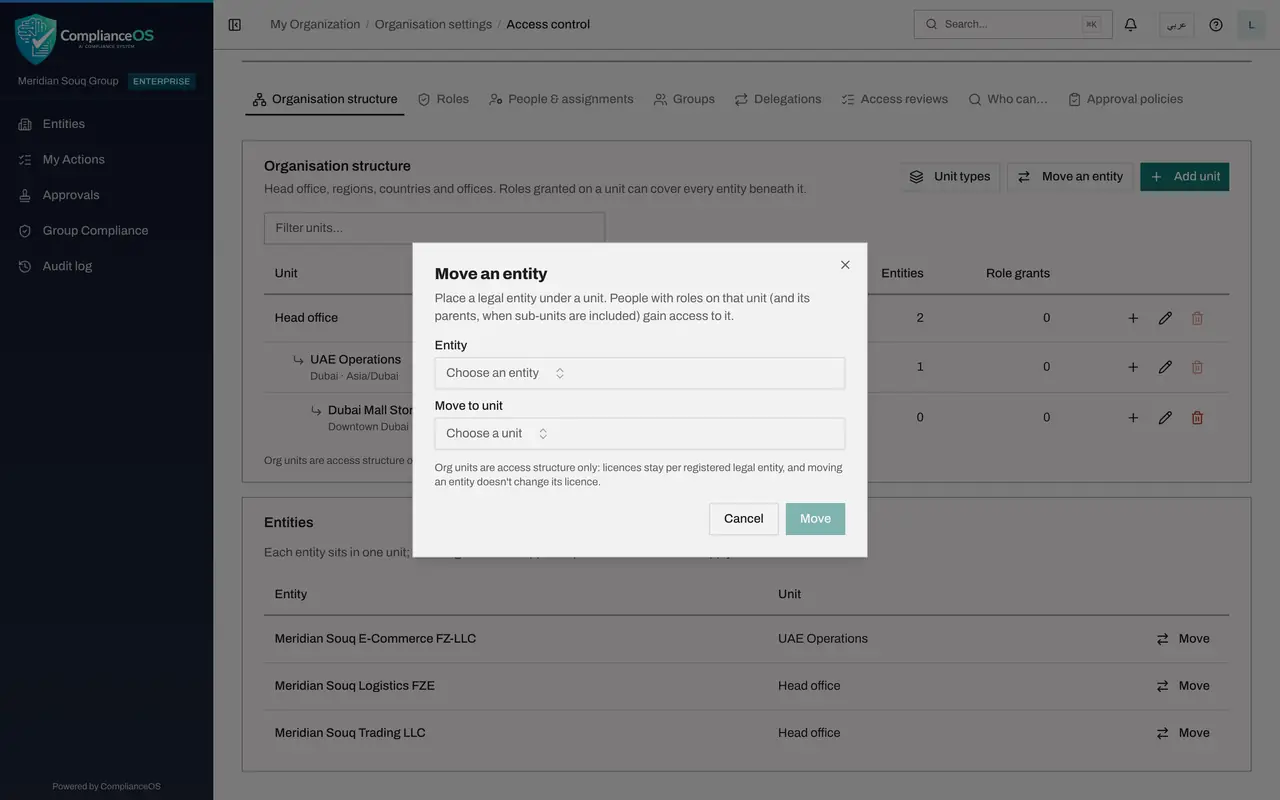
Select Move an entity at the top
The button Move an entity above the tree does the same job when you are not looking at the list. Select it. This time the window opens with nothing chosen.
- Select Move an entity
- 6
Choose the entity and the unit
Under Entity, choose Meridian Souq Logistics. A line shows that it is currently in Head office. Under Move to unit, choose UAE Operations.
- Select Choose an entity
- Type Search…:
Logistics - Choose Meridian Souq Logistics FZEHead office
- Select Choose a unit
- Type Search units…:
UAE - Choose UAE OperationsUAE-OPS · Region
- 7
Select Move
Select Move. Both companies now sit in UAE Operations, and Meridian Souq Trading stays in Head office.
- Select Move
- 8
Check the counts in the tree
In the structure table, the UAE Operations row now counts 2 entities and Head office counts 1 of its own. From now on, a role given on UAE Operations also covers these two companies.
- 9
Look at the bin buttons
The bin button deletes a unit. On UAE Operations it is greyed out, because a unit can only be deleted when it has no sub-units, no entities and no role grants. On Dubai Mall Store, which is empty, it is available. We keep both units.
How to check it worked
In the Entities list, Meridian Souq E-Commerce and Meridian Souq Logistics both show UAE Operations as their unit, and the UAE Operations row in the structure table counts 2 entities.
Common mistakes
- Expecting a move to change licensing or data. It changes access only: people with roles on the new unit gain access to the entity, and people whose role was on the old unit lose it.
- Moving an entity without checking who holds roles on the destination unit. Open the unit's role grants first if the entity is sensitive.
- Trying to delete a unit that still holds entities. Move its entities and sub-units out and remove its role grants first.
Check your understanding
1. After you move an entity into UAE Operations, who gains access to it?
- A.Nobody until roles are granted again
- B.People who hold roles on UAE Operations, and on its parents when sub-units are included
- C.Everyone in the organisation
- D.Only the person who moved it
Show answer
Answer: B. People who hold roles on UAE Operations, and on its parents when sub-units are included
The Move an entity window says that people with roles on that unit, and on its parents when sub-units are included, gain access to the entity.
2. The bin button on UAE Operations is greyed out. Why?
- A.You are not an administrator
- B.The unit still holds sub-units or entities, or has role grants
- C.Regions can never be deleted
- D.The unit is inactive
Show answer
Answer: B. The unit still holds sub-units or entities, or has role grants
A unit can only be deleted when it has no sub-units, entities or role grants.