Lesson 9 of 21
Grant roles for an entity, a unit, a department or the whole organisation
What you will be able to do
This lesson is for access administrators. A role says what a person may do; the scope says where. You will grant four roles, each with a different scope: one legal entity, an organisation unit with the units beneath it, a department, and the whole organisation. Then you will read the result for one person and for everyone.
Before you start
- The region UAE Operations, the department Finance and Tax and the custom role Access register viewer exist, from the earlier lessons.
- You are signed in as an administrator who can manage access, and you hold the permissions of the roles you are about to grant.
Steps
- 1
Open People and assignments and select a person
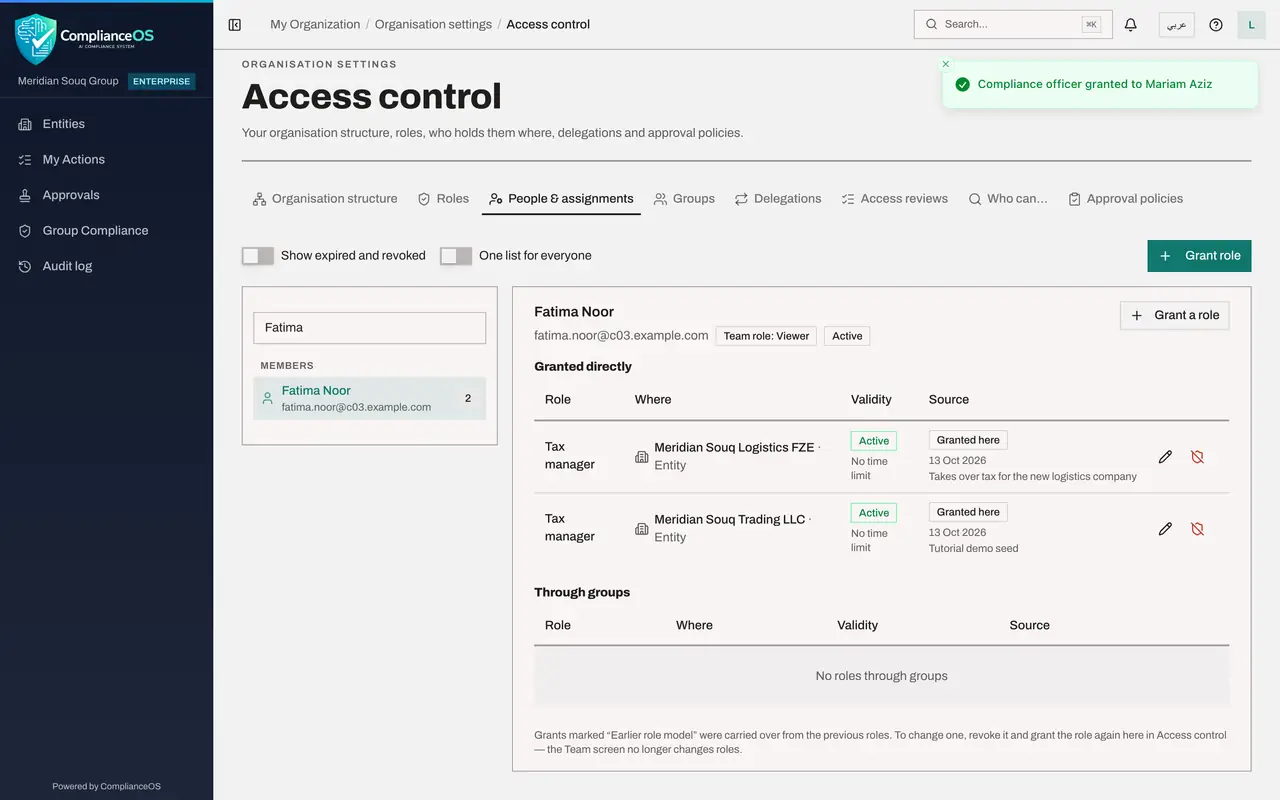
In Access control open the People and assignments tab. Everyone is listed on the left with the number of roles they hold. Type part of a name in the search box and select Fatima Noor. Her card shows the one role she holds, Tax manager for Meridian Souq Trading LLC.
- Type Search people…:
Fatima
- Type Search people…:
- 2
Select Grant a role and choose the role
Select Grant a role on her card. The Grant role window opens with her name already under Who. Under Role, choose Tax manager. Each role in the list shows whether it is a template or a custom role and how many permissions it holds.
- Select Grant a role
- Select Choose a role
- Type Search…:
tax manager
- 3
Choose one entity under Where
Where is the scope: the part of the organisation the role covers. Open it and choose the entity Meridian Souq Logistics. The list offers the whole organisation, then each unit, then each entity. An entity scope limits the role to that single company.
- Select Whole organisation
- Type Search units and entities…:
Logistics - Choose Meridian Souq Logistics FZEUAE Operations
- 4
Give a reason and select Grant
Type a short reason. It is shown beside the grant, to reviewers and in the audit log. Select Grant. A message confirms the role was granted, and her card now lists Tax manager twice, once for each company.
- Type Reason:
Takes over tax for the new logistics company - Select Grant
- Type Reason:
- 5
Select Grant role at the top and choose the person and role
The button Grant role at the top right starts a grant for anyone. Select it. Under Who, keep Person and choose Mariam Aziz. Under Role, choose Compliance officer.
- Select Grant role
- Select Choose a person
- Type Search people…:
Mariam - Select Choose a role
- Type Search…:
compliance
- 6
Choose a unit and keep Include sub-units on
Under Where, choose the unit UAE Operations. A switch named Include sub-units appears and is on, so the role also covers Dubai Mall Store and any unit added beneath later, with every entity placed in them. Add a reason and select Grant.
- Select Whole organisation
- Type Search units and entities…:
UAE - Choose UAE OperationsUAE-OPS · Region
- Type Reason:
Compliance lead for the UAE Operations region - Select Grant
- 7
Start a grant on a department
Select Grant role again and choose Ahmed Saleh. This time set Where first: choose the department Finance and Tax. The note under Role reminds you that roles which show or manage access are not offered on a department.
- Select Grant role
- Select Choose a person
- Type Search people…:
Ahmed - Select Whole organisation
- Type Search units and entities…:
Finance
- 8
Choose the role and select Grant
Under Role, choose Tax analyst and select Grant. Ahmed is now a member of the department, and the role applies across the department's entity, Meridian Souq Trading LLC.
- Select Choose a role
- Type Search…:
tax analyst - Type Reason:
Joins the Finance and Tax department - Select Grant
- 9
Grant a custom role for the whole organisation
Select Grant role once more. Choose Daniel Brooks, and under Role choose Access register viewer, the custom role from the last lesson; custom roles are grouped above the templates. Leave Where on Whole organisation, because organisation-level permissions only take effect there. Add a reason and select Grant.
- Select Grant role
- Select Choose a person
- Type Search people…:
Daniel - Select Choose a role
- Type Search…:
register - Type Reason:
Internal audit needs to read the access register - Select Grant
- 10
Select a person and read their grants
Search for Mariam and select her. Under Granted directly, each row is one grant: the role, where it applies, its validity, and how and when it was given, with the reason. She is compliance officer for one entity, and for the UAE Operations unit and its sub-units. The pencil edits a grant and the shield button revokes it.
- Type Search people…:
Mariam
- Type Search people…:
- 11
Switch on One list for everyone
Switch on One list for everyone, above the list. The screen changes to a single table named All assignments, with every grant in the organisation: who, which role, where, the validity and the source. Use it to scan for grants that look too wide.
- 12
Check the Role grants column in the structure
Select the Organisation structure tab. The Role grants column now counts 1 on UAE Operations and 1 on Finance and Tax. It tells you at a glance which units have roles given on them.
- Select Organisation structure
How to check it worked
On the People and assignments tab, each of the four people shows the new role with the right place under Where, the status Active and your reason. On the Organisation structure tab, UAE Operations and Finance and Tax each count 1 role grant.
Common mistakes
- Leaving Where on Whole organisation out of habit. Always choose the smallest scope that does the job: one entity, or one unit.
- Switching off Include sub-units on a unit and then wondering why the person cannot see a store or a company beneath it.
- Granting a role you do not hold yourself. The grant is refused, because nobody can give more than they have.
Check your understanding
1. Mariam must act as compliance officer for every company in UAE Operations, including companies added there later. Which scope do you choose?
- A.Each entity, one grant at a time
- B.The unit UAE Operations, with Include sub-units on
- C.Whole organisation
- D.The department Finance and Tax
Show answer
Answer: B. The unit UAE Operations, with Include sub-units on
A role on a unit covers every entity placed in it, now and later, and with Include sub-units on it also covers the units beneath.
2. What does granting a role on a department do?
- A.It limits the person to records owned by that department only
- B.It makes the person a member of the department, and the role applies to the department's whole entity
- C.It gives the role on every entity
- D.Nothing until the department head approves
Show answer
Answer: B. It makes the person a member of the department, and the role applies to the department's whole entity
People belong to a department by holding a role on it, and the note in the Grant role window says a role on a department applies to the department's whole entity.