Lesson 3 of 20
Track your requests, withdraw one and send it again
What you will be able to do
This lesson is for anyone who has sent a record for approval. You will read a request card, filter your requests by status and by type, withdraw a request you sent too early, correct the record and submit it again.
Before you start
- You have submitted at least two records for approval. Lessons 1 and 2 submitted a privacy policy and a data protection impact assessment.
- The request you want to withdraw is still pending. A decided request cannot be withdrawn.
Steps
- 1
Open Approvals and select My requests
Select Approvals in the left menu, then My requests. The number on the tab counts your requests that are still pending. Each request is a card, newest first.
- Select Approvals
- Select My requests
- 2
Read a request card
The small heading says what kind of approval it is, here Approve a DPIA. Below are the record's name, the entity and when you submitted it. The box lists the facts the approver sees, and the coloured line shows the status and each approval step.
- 3
Filter by status
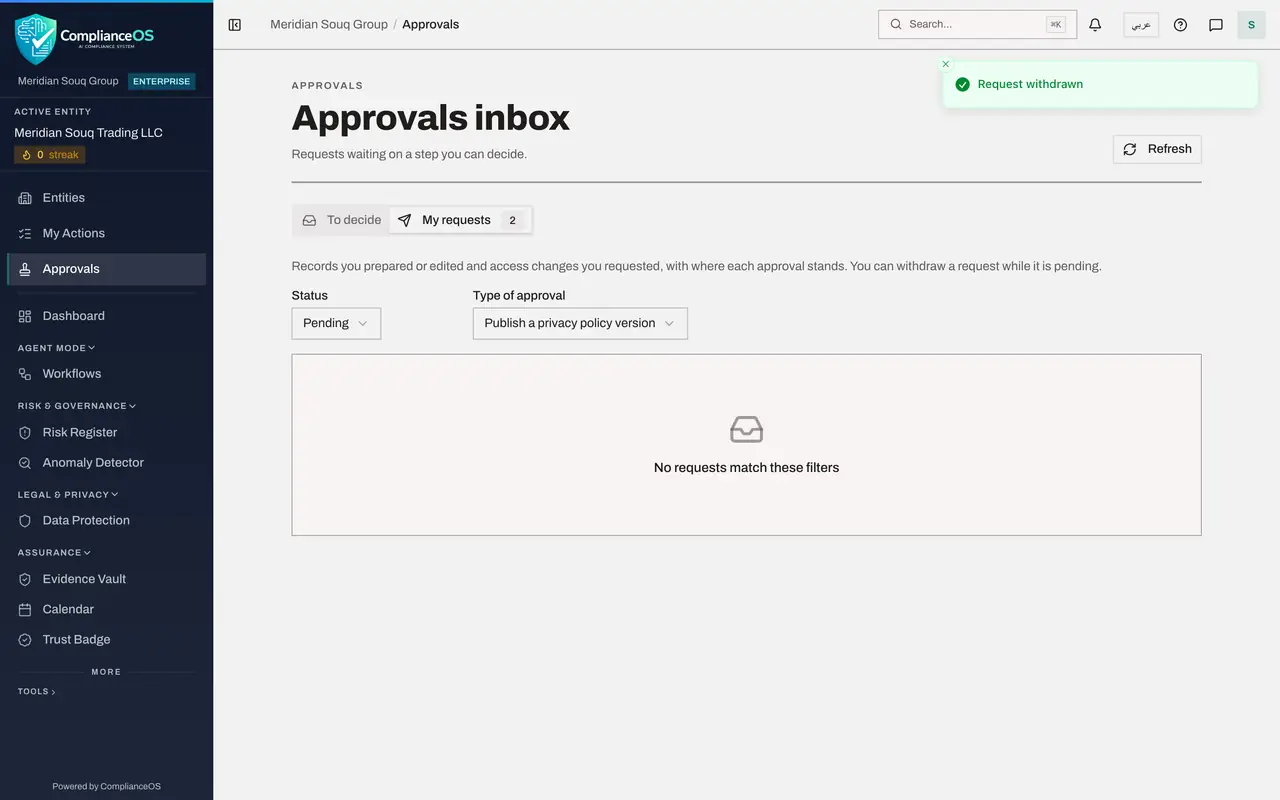
Open Status and choose Pending to see only what is still waiting. The other choices are Approved, Rejected and Cancelled.
- Select All statuses
- Choose Pending
- 4
Filter by type of approval
Open Type of approval and choose Publish a privacy policy version. Only the privacy policy is listed now. This filter appears when your requests are of more than one type.
- Select All
- Choose Publish a privacy policy version
- 5
Select Withdraw on the card
You notice the effective date is wrong, so the request should not be decided yet. Select Withdraw on the card. A box asks you to confirm and offers a place for a reason.
- Select Withdraw
- 6
Give a reason and confirm
Type why you are withdrawing. The reason is optional but helps anyone who reads the history. Then select Withdraw request. A message confirms Request withdrawn, and the list is empty because nothing of this type is pending any more.
- Type Reason (optional):
Effective date is wrong. I will correct it and submit again. - Select Withdraw request
- Type Reason (optional):
- 7
Show cancelled requests
Set Status to Cancelled. The withdrawn request is kept, marked Cancelled, with the time it was withdrawn and the words Withdrawn: nothing was changed.
- Select Pending
- Choose Cancelled
- 8
Open the record
Select Open record on the card. Withdrawing the request also returned the policy to Draft, so it is no longer locked and its fields can be edited again.
- Select Open record
- 9
Correct the effective date
Change Effective date to the fifteenth of next month, the day the new signs go up in the stores.
- Type Effective date:
2026-11-15
- Type Effective date:
- 10
Select Submit for approval again
Select Submit for approval. The draft is saved and locked, and a new request opens for the approvers.
- Select Submit for approval
- 11
Check My requests and select Refresh
Go back to Approvals and My requests, and select Refresh to load the latest status. The new request is Pending at the top, and the cancelled one stays below it as history.
- Select Approvals
- Select My requests2
- Select Refresh
How to check it worked
My requests shows the withdrawn request as Cancelled with the words Withdrawn: nothing was changed, and a new Pending request for the same policy above it.
Common mistakes
- Withdrawing a request you still want decided. Withdrawing cancels the request and returns the record to Draft, so it has to be submitted again before anyone can approve it.
- Editing after resubmitting. Once you select Submit for approval the draft is locked again, so make every correction first.
- Leaving a filter on and thinking a request has vanished. If the list is empty, set Status back to All statuses and Type of approval back to All.
Check your understanding
1. What does a withdrawn request look like under My requests?
- A.It disappears
- B.It shows Rejected
- C.It shows Cancelled, with the time it was withdrawn
- D.It shows Approved
Show answer
Answer: C. It shows Cancelled, with the time it was withdrawn
Withdrawn requests stay in the list with the status Cancelled and the line Withdrawn: nothing was changed, so the history is complete.
2. When can you withdraw a request?
- A.Only while it is pending
- B.At any time, even after approval
- C.Only after it is rejected
- D.Never; only the approver can
Show answer
Answer: A. Only while it is pending
The Withdraw button is shown only on pending requests. After a decision the request is closed.