Lesson 18 of 20
The audit log across the whole organisation
What you will be able to do
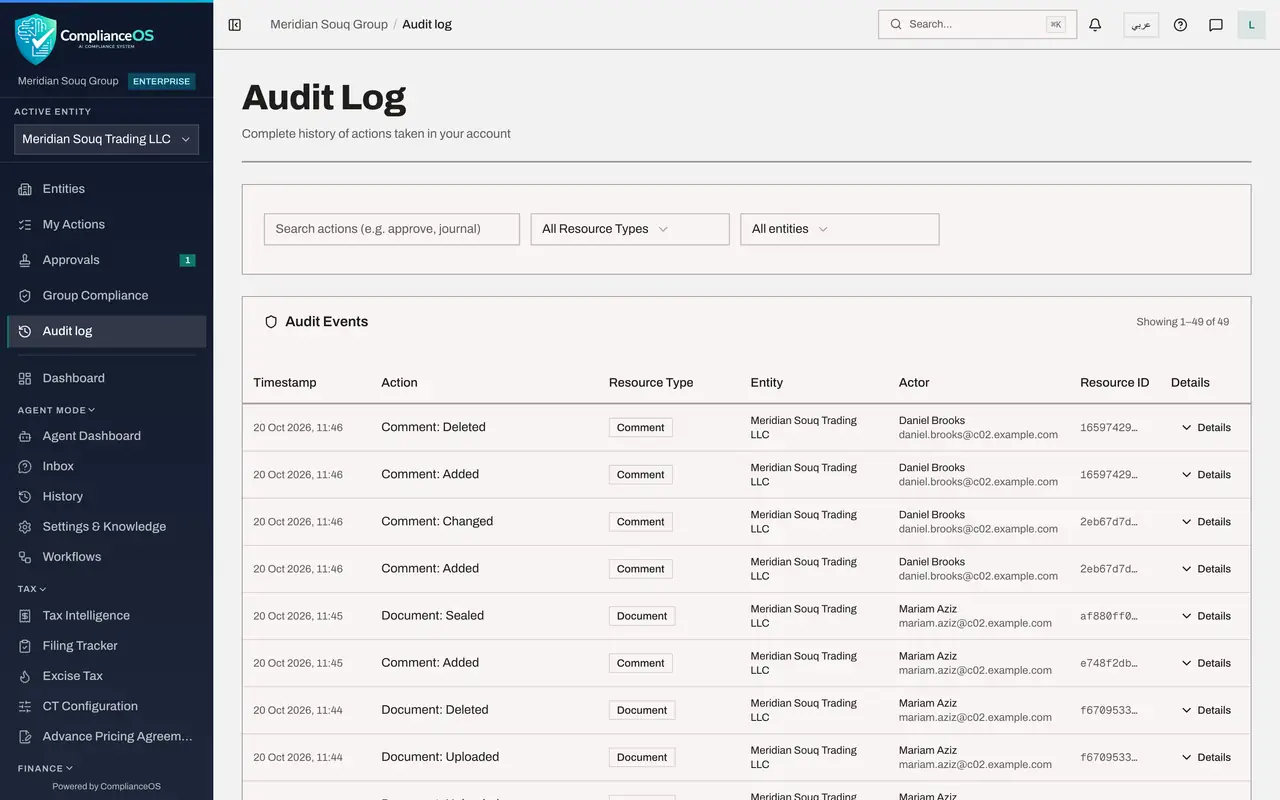
This lesson is for administrators with organisation-wide access. You will see how your audit log differs from that of a person whose role covers one entity: it has an entity filter, and it includes events that belong to the organisation rather than to an entity, such as a delegation.
Before you start
- You hold a role with organisation-wide access that includes the audit log, such as security administrator or full access.
Steps
- 1
Open the Audit log
Select Audit log in the left menu. For you there is no notice about limited entities. Beside Resource Type there is a second box, All entities.
- Select Audit log
- 2
Filter by entity
Open All entities and choose Meridian Souq E-Commerce FZ-LLC, the second company. No work was done there in this course, so the log reads No events match these filters.
- Select Entity
- Choose Meridian Souq E-Commerce FZ-LLC
- 3
Return to all entities
Open the box again and choose All entities. Every event in the organisation is listed again, with the company in the Entity column.
- Select Entity
- Choose All entities
- 4
Find an organisation-level event
Open Resource Type and choose Access delegation. One entry appears: the delegation Yusuf Rahman created in lesson 8. Events like this belong to the organisation, so only people with organisation-wide access see them.
- Select Resource Type
- Choose Access delegation
- 5
Open its details
Select Details on the line. It shows what was recorded when the delegation was created: the end date and the names of the two people involved, the person who delegated and the deputy. The Entity column reads Organisation.
- Select Details
- 6
Clear the filters
Select Clear filters when you have finished, so the next search starts from the full log.
- Select Clear filters
How to check it worked
With Resource Type set to Access delegation, the log shows the delegation created by Yusuf Rahman, an entry that the entity-scoped compliance officer did not have in her list.
Common mistakes
- Expecting colleagues to see what you see. People whose role covers one entity see only that entity's events; organisation-level events are visible to people with organisation-wide access.
- Leaving the entity filter on one company. Set it back to All entities before you search for something that may have happened elsewhere.
Check your understanding
1. Which filter does an organisation-wide administrator have that an entity-scoped person does not?
- A.Search by action
- B.Resource Type
- C.Entity
- D.Date
Show answer
Answer: C. Entity
The administrator's log has a box that reads All entities and lists each company. The entity-scoped person's log shows a notice instead.
2. Where is the creation of a delegation recorded?
- A.Nowhere
- B.In the audit log, as an Access delegation entry with the name of the person who created it
- C.Only in the deputy's inbox
- D.In the Evidence Vault
Show answer
Answer: B. In the audit log, as an Access delegation entry with the name of the person who created it
Filtering Resource Type by Access delegation shows the entry, with Yusuf Rahman as the actor.