Lesson 20 of 20
How this connects: one record from inbox to audit log
What you will be able to do
This closing lesson is for everyone. You will follow one record through every part of this course. The CCTV assessment was submitted in lesson 2 and has waited in the inbox since. As the compliance officer you will decide it, then watch what the decision creates: tracked actions on the record, a sealed record in the Evidence Vault beside the files attached earlier, and entries in the audit log.
Before you start
- The assessment In-store CCTV cameras is pending. Lesson 2 submitted it.
- You hold a role that can approve it and can open the Evidence Vault and the audit log: the compliance officer role does all three.
Steps
- 1
Start in the Approvals inbox
Select Approvals. The request for In-store CCTV cameras, which Sara Ahmed submitted in lesson 2, is waiting under To decide. Data Protection opened this request; the inbox is where it is decided.
- Select Approvals1
- 2
Select Open record
Select Open record. The inbox takes you to the assessment in Data Protection, with the scores, the report and the measures Sara listed.
- Select Open record
- 3
Approve the assessment
Scroll down to the heading DPO Approval Required and select the green button, Approve DPIA. You did not prepare this record, so the decision is offered to you.
- Select Approve DPIA
- 4
Add notes and confirm
Type your review notes and select Confirm Approval. A message confirms DPIA approved.
- Type Approval Notes:
Signs and 30 day deletion confirmed with store operations. Approved. - Select Confirm Approval
- Type Approval Notes:
- 5
Read the approval history on the record
The status is now Approved. Scroll down to Approval progress: the step reads Approved by Mariam Aziz, with the time and your notes. The decision made in the inbox is written on the record itself.
- 6
See what the approval created on the record
Scroll up and select Risk Actions. The two measures Sara listed have become tracked actions. Approving did more than change a status.
- Select Risk Actions0/2
- 7
Open the Evidence Vault
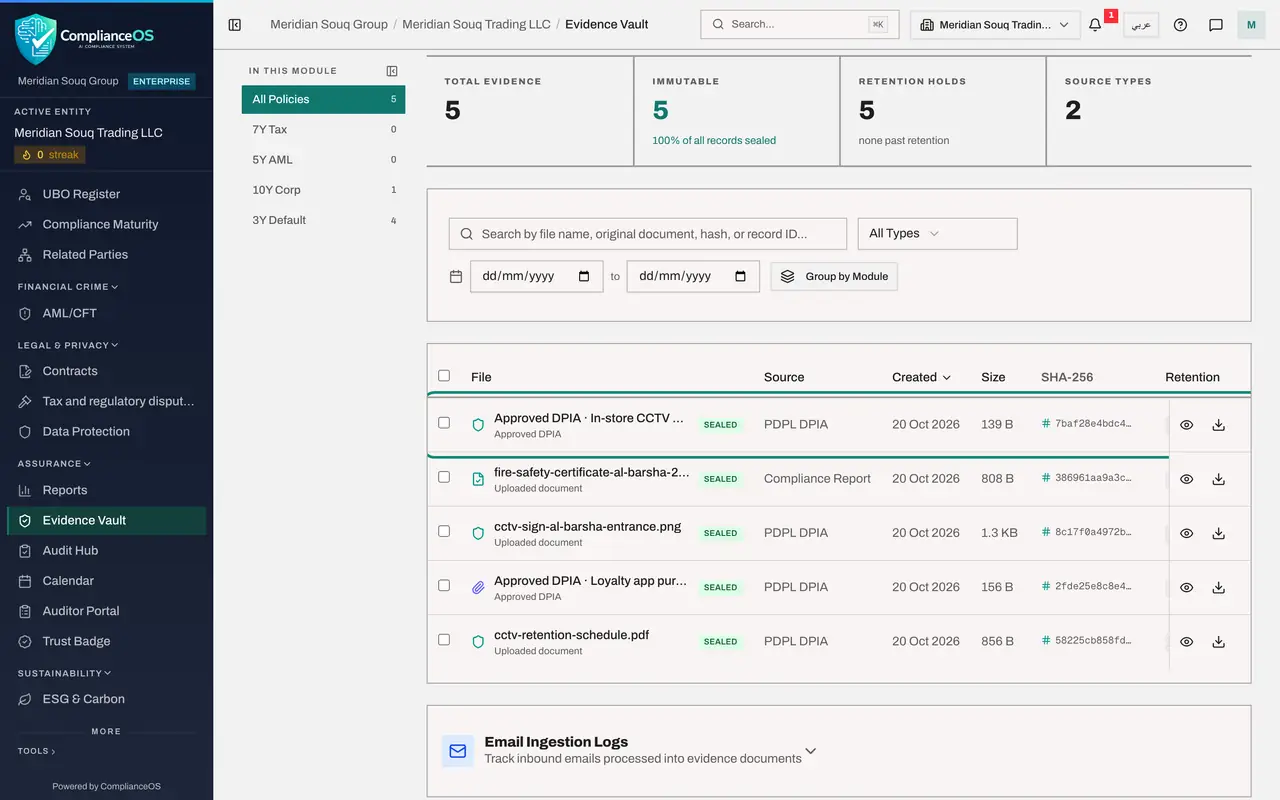
Select Evidence Vault in the left menu. The total has risen by one. At the top of the list is a new record, Approved DPIA, In-store CCTV cameras, sealed, with the source PDPL DPIA. Nobody uploaded it: the approval created it.
- Select Evidence Vault
- 8
Show all evidence for this kind of record
Set the type filter to PDPL DPIA. Three things from this course sit side by side: the retention schedule Sara attached to a question in lesson 2, the photograph you uploaded and linked in lesson 11, and the records of the two approvals.
- Select Source Type
- Choose PDPL DPIA
- 9
Open the new record
Select Approved DPIA, In-store CCTV cameras. Overview shows a short content preview with the status Approved, the words Compliance snapshot, the linked assessment, and Performed by with your name.
- 10
Close the record and open the Audit log
Select Close, then Audit log in the left menu. The newest lines are the ones you have just caused.
- Select Close
- Select Audit log
- 11
Filter the log to assessments
Open Resource Type and choose DPIA report. Reading upwards: Sara Ahmed created the assessment and saved and submitted her answers, Noura Salem approved the other assessment as a deputy, and at the top are your approval and the entry that marks this assessment approved.
- Select Resource Type
- Choose DPIA report
- 12
Open the details of your approval
Select Details on the line Approval request: Approved, with your name. It records the step, the action, the status Approved and whether it was a self-approval: No. Maker and checker were different people, and the log proves it.
- Select Details
- 13
See the whole chain
That is the chain every module follows. A record is prepared and submitted in its module. The request is decided in the Approvals inbox by a second person. The decision is written on the record and stored in the Evidence Vault. Every action along the way is in the audit log, under the name of the person who did it.
How to check it worked
The assessment shows Approved by Mariam Aziz in its approval history, the Evidence Vault holds a new record, Approved DPIA, In-store CCTV cameras, with your name, and the audit log lists the approval above the entries Sara Ahmed made when she created and submitted the assessment.
Common mistakes
- Thinking the approval is the end of the trail. The decision is the start of the evidence: the vault record and the audit entries are what you show an auditor.
- Uploading proof of the approval by hand. The system stores its own sealed record of the approval; add only the supporting documents.
- Looking for evidence in the module where the work was done. Files attached in Data Protection are kept in the Evidence Vault, under the source type PDPL DPIA.
Check your understanding
1. What appears in the Evidence Vault when a data protection impact assessment is approved?
- A.Nothing, unless someone uploads a file
- B.A sealed record named Approved DPIA with the assessment's name, created by the system, with the approver's name
- C.A copy of the approver's email
- D.The whole questionnaire as a PDF
Show answer
Answer: B. A sealed record named Approved DPIA with the assessment's name, created by the system, with the approver's name
The vault count rose by one after the approval, and the new record is a compliance snapshot performed by the approver.
2. Where can you read, in one place, who created, submitted and approved a record?
- A.The Document Library
- B.The audit log, filtered by the kind of record
- C.The retention report
- D.The Approvals inbox of the preparer
Show answer
Answer: B. The audit log, filtered by the kind of record
Filtering the audit log by DPIA report shows the entries by Sara Ahmed and the approval by Mariam Aziz, each with its time.