Lesson 13 of 20
Share evidence, export an audit pack and check retention
What you will be able to do
This lesson is for compliance officers. You will give an outside party one file through a link that expires, see what they see, read the download in the handling history, check every fingerprint in the vault at once, read the retention report, and download an audit pack of everything that matches your filters.
Before you start
- The vault holds the fire safety certificate uploaded in lesson 11.
- You know who needs the file and for how long.
Steps
- 1
Open the record and select Share
Open the Evidence Vault, select the fire safety certificate, and select the Share tab. A share link lets someone outside the organisation download this one file until the link expires or you revoke it.
- Select Evidence Vault
- Select Share
- 2
Set the limits
Expires in is the life of the link in hours; type 48 for two days. Max downloads is optional; type 3. In Label, write who the link is for, so you can recognise it later.
- Type Unlimited:
3 - Type e.g. For external auditor review:
Landlord fire safety review, Al Barsha
- Type Unlimited:
- 3
Select Create link
Select Create link. The link appears in a green box with the words copy it now, it is shown only once. Select the copy button beside it and paste the link into your message to the recipient.
- Select Create link
- 4
See what the recipient sees
Open the link as the recipient would. The page needs no sign-in. It shows the real file name, its size and type, the full SHA-256 fingerprint, when the link expires, and Downloads 0 of 3 used. Opening the page is not counted as a download.
- 5
Select Download file
Select Download file. The file is saved, and the counter changes to 1 of 3 used. The recipient can compare the fingerprint on this page with the fingerprint of the file they received.
- Select Download file
- 6
Check the link from inside the vault
Go back to the Evidence Vault, open the certificate and select Share. Under Active and past links, your link shows its label, Active, the expiry and 1 of 3 downloads.
- Select Share1
- 7
Read the download in the Custody tab
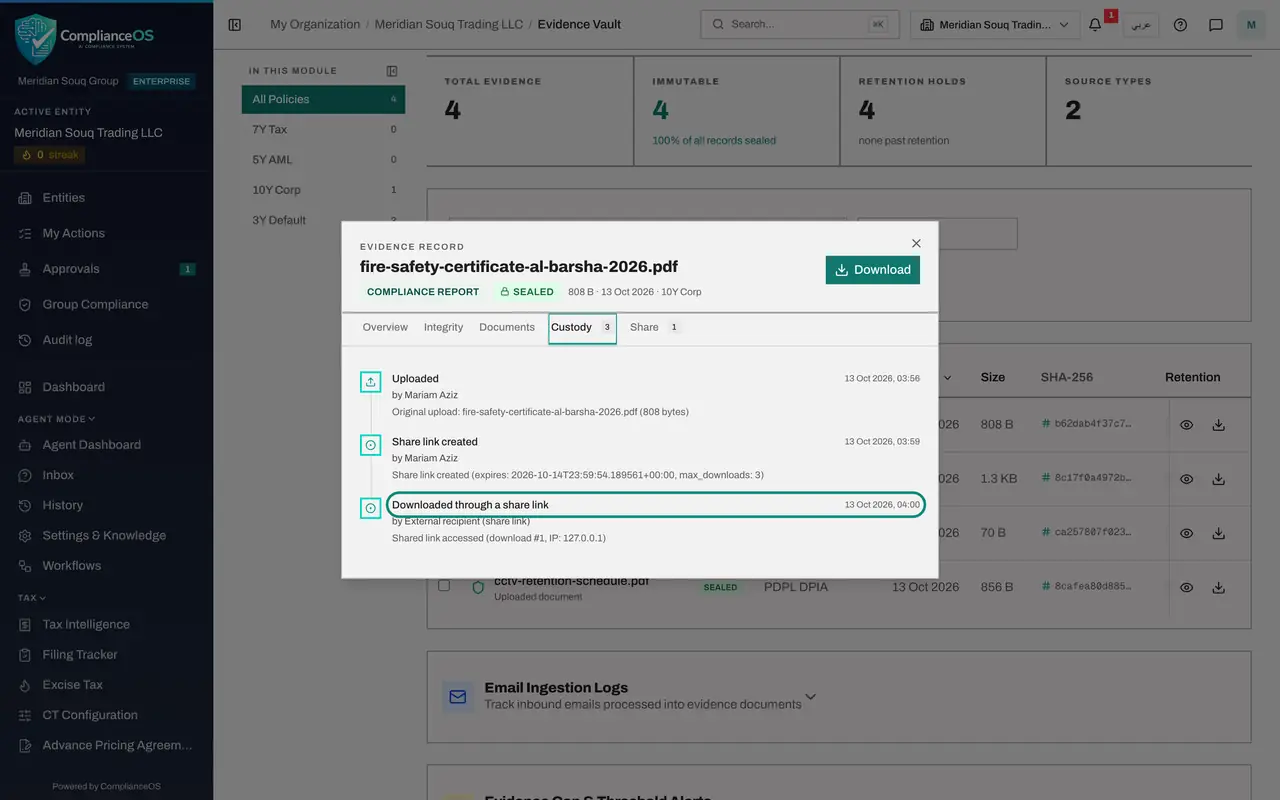
Select Custody. The list now holds the upload, Share link created with your name, and Downloaded through a share link by External recipient, with the time and the address it came from.
- Select Custody3
- 8
Revoke the link
Return to Share and select Revoke on the link. It stops working at once, even though two downloads and some time were left. Revoke a link as soon as it is no longer needed.
- Select Share1
- Select Revoke
- 9
Verify every fingerprint at once
Close the record. At the top of the vault select Verify all hashes. Every stored file is checked against its recorded fingerprint, and a message reports how many were verified and how many failed.
- Select Close
- Select Verify all hashes
- 10
Open the retention report
Select Retention. The Retention Report groups the records by retention period and shows each file's expiry date and whether it is still Active. Expired counts the files past their date. Select Close.
- Select Retention
- 11
Filter, then select Download Audit Pack
Close the report. Set the type filter to PDPL DPIA, then select Download Audit Pack. The box states how many records will be exported: every record that matches, across all pages, not only the rows on screen.
- Select Close
- Select All Types
- Choose PDPL DPIA
- Select Download Audit Pack
- 12
Download the pack
Select the Download button in the box. A ZIP file is saved with each evidence file, its source document, an audit certificate for each record and a list of fingerprints. A message confirms the number of records.
- Select Download 3 record(s)
- 13
Export only the rows you tick
To export a few chosen records instead, tick the box at the start of their rows. Two more buttons appear at the top: Export and ZIP Pack, each with the number ticked.
- Select on
- 14
Look at the two panels below the list
Below the list, select Email Ingestion Logs and Evidence Gap and Threshold Alerts to open them. The first lists files received by email; none have been set up here. The second warns about transactions with no supporting evidence; there are none.
How to check it worked
The share link shows 1 of 3 downloads and is then marked revoked, the Custody tab lists Downloaded through a share link, a message confirms All hashes verified, and the audit pack message states how many records were exported.
Common mistakes
- Closing the box before copying the link. The link is shown only once; if you lose it, revoke it and create a new one.
- Leaving Max downloads empty for a sensitive file. Empty means unlimited until the link expires.
- Thinking Download Audit Pack exports only the rows on screen. It exports every record that matches the filters, across all pages, and tells you the number first.
Check your understanding
1. A recipient opens the share link but does not download the file. Does that count as a download?
- A.Yes
- B.No, only a real download is counted
- C.Only on the first visit
- D.It depends on the browser
Show answer
Answer: B. No, only a real download is counted
The shared page says viewing this page is not recorded as a download. The counter moved from 0 of 3 to 1 of 3 only after Download file was selected.
2. How do you know how many records an audit pack will contain before you download it?
- A.You cannot know
- B.Count the rows on screen
- C.The confirmation box states the number of records that will be exported
- D.It is always 25
Show answer
Answer: C. The confirmation box states the number of records that will be exported
Download Audit Pack opens a confirmation that reads, for example, 1 record will be exported, covering the whole filtered set.