Lesson 7 of 20
See the outcome and the approval history
What you will be able to do
This lesson is for preparers. You will confirm that your request was approved, read who approved it and what they wrote, look back over the whole history of the record, and open the published version.
Before you start
- Your request has been decided. Lesson 6 approved the CCTV privacy notice.
Steps
- 1
Open My requests and show approved requests
Select Approvals, then My requests, and set Status to Approved. The card shows Approved by Yusuf Rahman with the time and his comment, and the line Fully approved. You were also told on the bell as soon as the request was decided.
- Select Approvals
- Select My requests
- Select All statuses
- Choose Approved
- 2
Look back over the whole history
Set Status back to All statuses and Type of approval to Publish a privacy policy version. Three cards tell the story of this one policy, newest first: approved, rejected, and cancelled when you withdrew it.
- Select Approved
- Choose All statuses
- Select All
- Choose Publish a privacy policy version
- 3
Select Open record
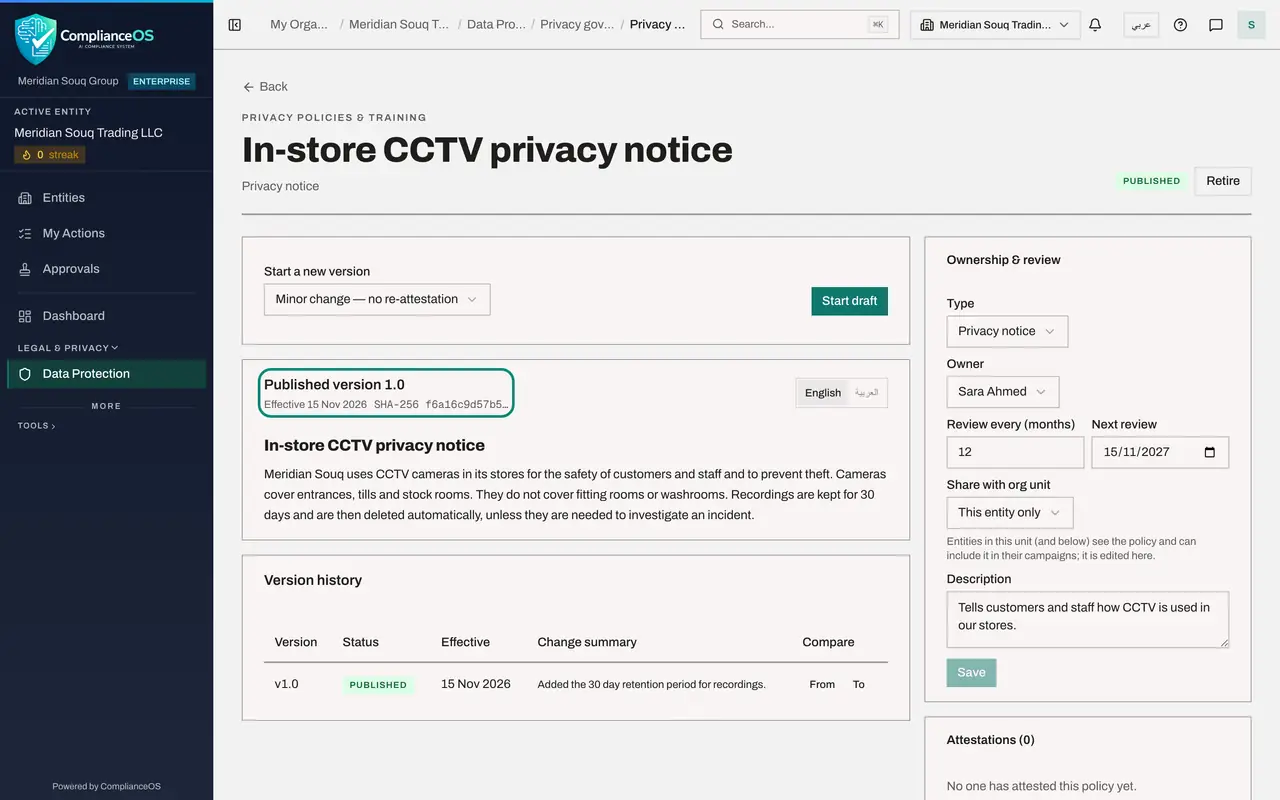
Select Open record on the approved card. The policy opens as Published version 1.0, with the effective date and the fingerprint of the wording.
- Select Open record
- 4
Read the version history
Scroll to Version history. Version 1.0 is Published, with the effective date and the change summary you wrote.
- 5
Know how to change a published policy
Scroll back to the top. Start a new version is the only way to change a published policy. It opens a new draft, and that draft must be submitted and approved by someone else, exactly as before.
- 6
Check the Policy library
Select Back. The Policy library lists the policy as Published, with its version, owner and next review date.
- Select Back
How to check it worked
My requests shows the request as Approved with the words Fully approved, the approver's name and comment, and the policy page shows Published version 1.0.
Common mistakes
- Editing the published text to fix a small error. A published version cannot be edited; use Start a new version, which goes through approval again.
- Reading only the newest card. The earlier Rejected and Cancelled cards are part of the record's history and are what an auditor will ask about.
Check your understanding
1. Which three outcomes did the CCTV privacy notice go through, in order?
- A.Approved, rejected, withdrawn
- B.Withdrawn, rejected, approved
- C.Rejected, approved, withdrawn
- D.Approved only
Show answer
Answer: B. Withdrawn, rejected, approved
It was withdrawn by its author, submitted again and rejected, then corrected, submitted a third time and approved. Each request is kept as its own card.
2. A published policy needs a correction. What do you do?
- A.Edit the published text
- B.Ask the approver to edit it
- C.Use Start a new version, then submit the new draft for approval
- D.Delete the policy and start again
Show answer
Answer: C. Use Start a new version, then submit the new draft for approval
The published version is fixed. A new version is a new draft, and the same maker and checker rule applies to it.