Lesson 9 of 20
Decide a request as a deputy
What you will be able to do
This lesson is for anyone who covers for a colleague. As a deputy you will find the requests that the delegation has brought into your inbox, review a data protection impact assessment, approve it, and read the approval history on the record.
Before you start
- A colleague has delegated their approvals to you. Lesson 8 created the delegation from Yusuf Rahman.
- You did not prepare the record you are about to decide.
Steps
- 1
Open Approvals
A number now shows beside Approvals in your left menu. Select Approvals. To decide lists two data protection impact assessments, or DPIAs. They are here because Yusuf Rahman delegated his approvals to you.
- Select Approvals2
- 2
Select Open record
Find the assessment called Loyalty app purchase history and select Open record. Always read the record before you decide.
- Select Open record
- 3
Read the risk and the report
The Overview tab shows the likelihood and severity scores, the overall risk level, and the Assessment Report: the conclusion, the description, the measures and why the processing is necessary.
- 4
Check the answers on the Questionnaire tab
Select Questionnaire to see every answer the preparer gave. The counter reads 3 of 3 required questions answered. The answers are locked while the assessment is awaiting approval.
- Select Questionnaire
- 5
Find the decision buttons
Go back to Overview and scroll down to DPO Approval Required. It shows the approval policy and the step that is waiting. Because of the delegation, you are offered Approve DPIA and Reject DPIA.
- Select Overview
- 6
Approve the assessment
Select the green button, Approve DPIA. A box asks you to confirm and offers a place for notes. Nothing is decided until you confirm.
- Select Approve DPIA
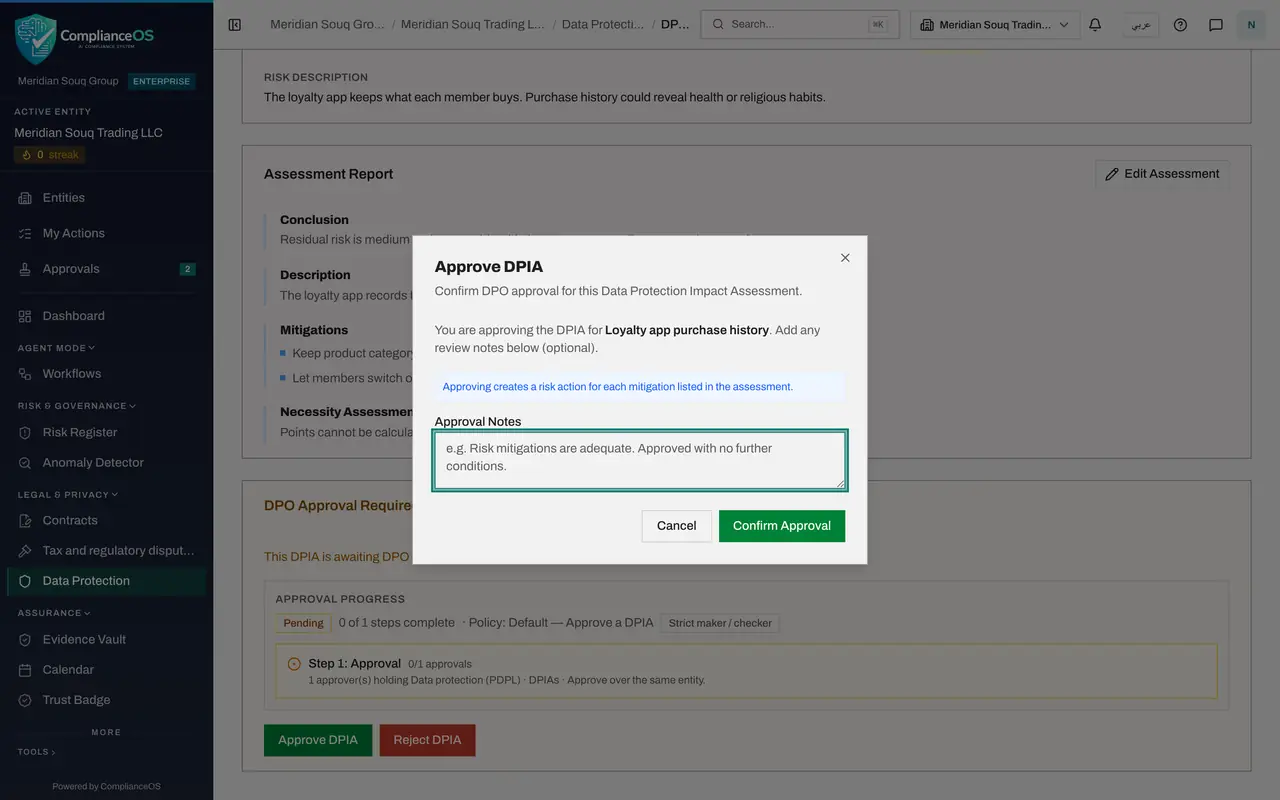
- 7
Add your notes
Type your review notes. Say that you are covering for a colleague, so the history explains why you decided.
- Type Approval Notes:
Reviewed while covering for Yusuf Rahman during his leave. The two mea…
- Type Approval Notes:
- 8
Select Confirm Approval
Select Confirm Approval. A message confirms DPIA approved, and the status at the top changes to Approved.
- Select Confirm Approval
- 9
Read the approval history on the record
Scroll down to Approval progress. The step is complete and reads Approved by Noura Salem, with the time and your notes. A label beside your name reads under delegation from Yusuf Rahman, so the approval records whom you acted for. Anyone who can open the record can read this history.
- 10
Open the Risk Actions tab
Scroll up and select Risk Actions. Each measure the preparer listed has become a tracked action, ready to be assigned and completed.
- Select Risk Actions0/2
- 11
Return to the inbox
Select Approvals. The assessment you decided has gone. In-store CCTV cameras is still waiting. Decide only what you have had time to read; the rest stays in the inbox for you and for the other approvers.
- Select Approvals1
- 12
See the delegation you received
From your account menu open Profile and preferences, then Access control and Delegations. The line shows Yusuf Rahman, an arrow and your name, with the dates. When the end date passes, his requests leave your inbox.
- Select Account menu
- Select Profile & preferences
- Select Access control
- Select Delegations
How to check it worked
A message confirms DPIA approved, the assessment shows Approved, and its approval history reads Approved by Noura Salem with the time and your notes.
Common mistakes
- Approving everything in the inbox in one go because it is someone else's work. Each decision carries your own name.
- Not saying that you acted as a deputy. Your name is recorded, so add a note such as covering for Yusuf Rahman, so the reader understands why you decided.
- Assuming the delegation is permanent. It ends on the date in the Delegations list, and the requests then leave your inbox.
Check your understanding
1. Whose name is recorded on an approval given by a deputy?
- A.The person who delegated
- B.The deputy's own name
- C.No name
- D.The administrator's
Show answer
Answer: B. The deputy's own name
The approval history reads Approved by Noura Salem. A deputy always acts under their own name.
2. What happens to the measures listed under Mitigations when the assessment is approved?
- A.They are deleted
- B.Nothing
- C.Each becomes a tracked risk action on the Risk Actions tab
- D.They are emailed to the regulator
Show answer
Answer: C. Each becomes a tracked risk action on the Risk Actions tab
After approval the Risk Actions tab lists one action for each measure, ready to be assigned and completed.