Lesson 17 of 19
Who sees your conversations with the agents
What you will be able to do
This lesson is for the organisation administrator. By default a conversation with the agents is private: only the person who asked sees it, with anyone they give a step of a plan to. An organisation can instead share conversations with everyone on the entity who can view its compliance tasks. You will find the setting, see what each choice means, switch it and see the note on the Chat page change, and put it back to private.
Before you start
- You are signed in as the organisation administrator. Only an organisation administrator can change this setting; everyone else sees it read-only.
Steps
- 1
Open Access & keys
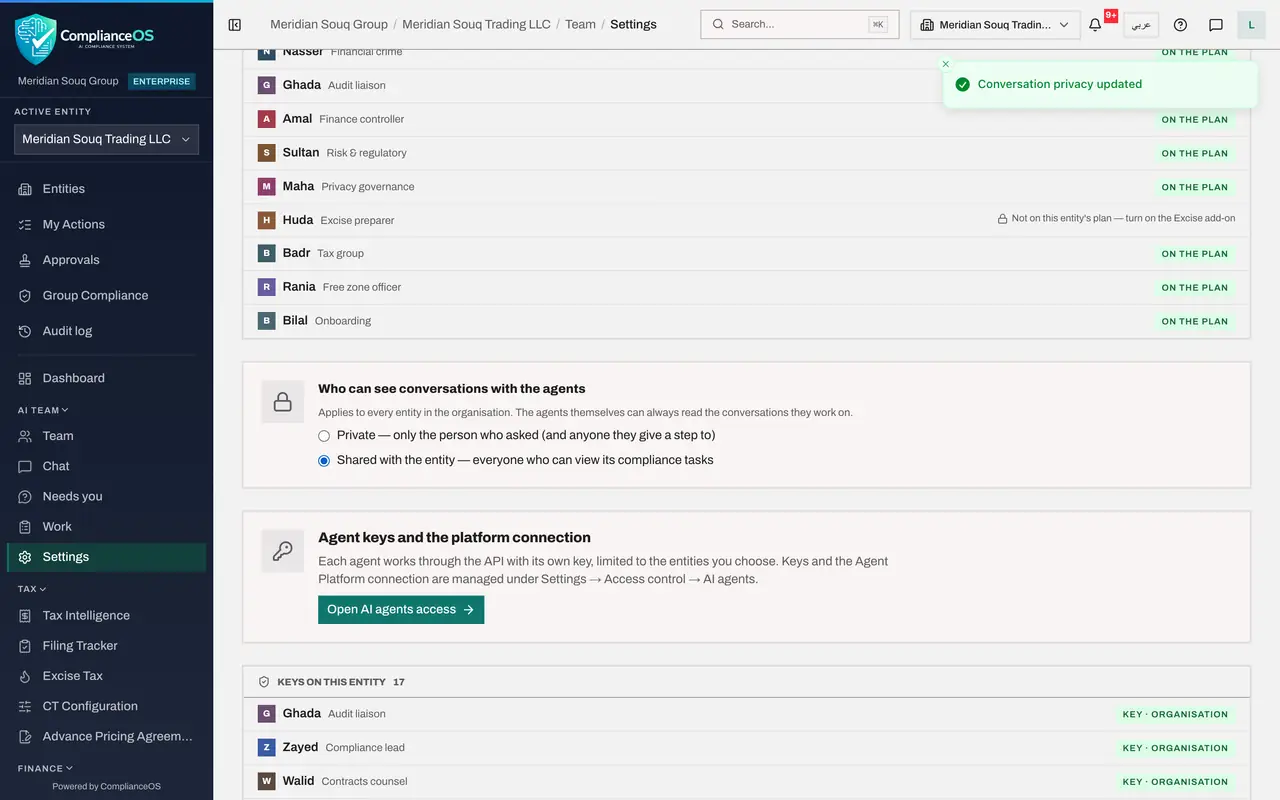
You are in AI team settings. Select the tab Access & keys. Further down is the setting Who can see conversations with the agents.
- Select Access & keys
- 2
Read the two choices
Private, the default, means only the person who asked sees a conversation, together with anyone they give a step of a plan to. Shared with the entity means everyone who can view the entity's compliance tasks sees every conversation. The line under the title says the setting applies to every entity in the organisation, and that the agents themselves can always read the conversations they work on.
- 3
Select Shared with the entity
Select Shared with the entity. The change is saved at once, and a message confirms Conversation privacy updated.
- 4
See the note on the Chat page
In the left menu choose Chat. The note under the title now says that everyone on this entity who can view compliance tasks can see conversations with the agents.
- Select Chat
- 5
Put it back to Private
Most organisations keep conversations private. Choose Settings in the left menu, select Access & keys again, and select Private. A message confirms Conversation privacy updated.
- Select Settings
- Select Access & keys
- 6
Check the Chat page again
Choose Chat. The note says again: Only you can see your conversations with the agents, and anyone you give a step of a plan to. Each conversation of yours also carries a small lock with the words Only you can see this conversation.
- Select Chat
How to check it worked
The setting Who can see conversations with the agents is back on Private, and the Chat page says that only you can see your conversations with the agents.
Common mistakes
- Sharing conversations to let one colleague help. Give that colleague a step of the plan instead: they see that conversation only.
- Thinking private hides the work from the agents. The agents can always read the conversations they work on.
- Forgetting that the setting applies to every entity in the organisation, not only the one you are on.
Check your understanding
1. Conversations are private. Who can see the tax manager's conversation about the VAT return?
- A.Everyone in the organisation
- B.The tax manager, anyone she gave a step of the plan to, and the agents working on it
- C.Only the administrator
- D.Nobody, not even the agents
Show answer
Answer: B. The tax manager, anyone she gave a step of the plan to, and the agents working on it
Private means the person who asked and anyone they gave a step to. The agents always read the conversations they work on.
2. Where does the setting apply?
- A.Only to the current entity
- B.To every entity in the organisation
- C.Only to the compliance lead
- D.Only to new agents
Show answer
Answer: B. To every entity in the organisation
The help text under the setting says it applies to every entity in the organisation.