Lesson 12 of 19
Let an agent onto an entity
What you will be able to do
This lesson is for the person who administers access, here the organisation administrator. The compliance officer has asked for Nasser, the financial crime agent, to be let onto Meridian Souq Trading LLC. You will open the request in the Approvals inbox, read exactly what Nasser's key would be allowed to do on the entity, approve it, and check that Nasser can now reach the entity, so that the question that was waiting goes to Nasser.
Before you start
- You are signed in as the organisation administrator, with the permission to manage access.
- Lesson 9 is done: the compliance officer's request to let Nasser onto Meridian Souq Trading LLC is waiting in Approvals.
Steps
- 1
Open Approvals
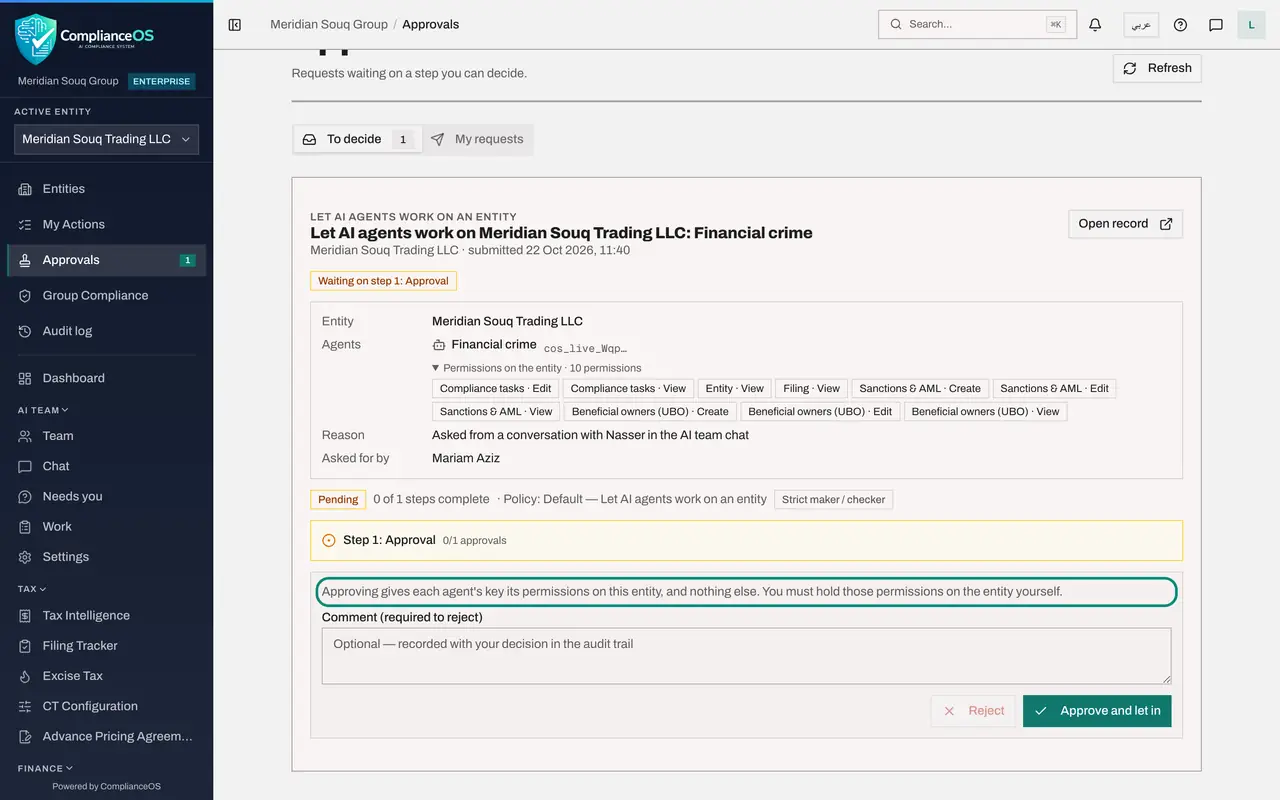
In the left menu choose Approvals. Under To decide is the request Let AI agents work on Meridian Souq Trading LLC: Financial crime, submitted by the compliance officer a few minutes ago.
- Select Approvals1
- 2
Read what is asked
The request shows the entity, the agent, Financial crime, with the start of its key, and the permissions the key would have on the entity: ten permissions, opened here with the small arrow: creating, editing and viewing in Sanctions and AML and in Beneficial owners, viewing the entity and its filings, and viewing and editing compliance tasks, so that Nasser can read and answer the conversation. The reason says it was asked for from a conversation with Nasser in the AI team chat, by Mariam Aziz.
- Select Permissions on the entity · 10 permissions
- 3
Read the policy
Below, the policy is Default, Let AI agents work on an entity, strict maker and checker, with one approval step. The note says that approving gives each agent's key its permissions on this entity, and nothing else, and that you must hold those permissions on the entity yourself.
- 4
Select Approve and let in
Select Approve and let in. A message confirms: The agents can now work on the entity. The request leaves To decide. Nasser's key can now work on Meridian Souq Trading LLC, with exactly those permissions.
- Select Approve and let in
- 5
Check the agent's access
To confirm, open Settings, Access control, and the tab AI agents. In the row Financial crime, Entities it can reach now includes Meridian Souq Trading LLC. The compliance officer's waiting question did not need to be sent again: it went to Nasser as soon as you approved, and the answer will appear in her own conversation, which stays private to her.
How to check it worked
The request has left To decide, and under Settings, Access control, AI agents, the row Financial crime lists Meridian Souq Trading LLC among the entities it can reach.
Common mistakes
- Approving without reading the permissions. Approving gives the agent's key exactly those permissions on this entity; you must hold them yourself.
- Approving your own request. The policy is strict maker and checker: the person who asked cannot approve.
- Thinking approval lets the agent decide things. It lets the agent read and prepare within those permissions; people still approve the results.
Check your understanding
1. What does Approve and let in give Nasser?
- A.Access to every entity
- B.Its key's listed permissions on this one entity, and nothing else
- C.The right to approve AML alerts on its own
- D.Organisation administrator rights
Show answer
Answer: B. Its key's listed permissions on this one entity, and nothing else
The request lists the permissions on the entity, and the note says approving gives each agent's key those permissions on this entity, and nothing else.
2. After you approve, what happens to the compliance officer's waiting question?
- A.She must send it again
- B.It goes to Nasser by itself
- C.It is deleted
- D.It goes to Zayed instead
Show answer
Answer: B. It goes to Nasser by itself
A waiting message is released to the agent as soon as the agent is enabled on the entity.