Lesson 19 of 19
Journey: the quarter-end VAT return with the AI team
What you will be able to do
This lesson is for the tax manager, and closes the third-quarter VAT journey of lessons 4 to 8. You will walk back through the whole record: the task and the plan you approved, the step the finance manager did, your own checkpoint, the agents' work, Hind's handover with what is left before filing, and where the plan stands. Everything the agents did is in this record, and the last step, signing off and filing, is still yours.
Before you start
- You are signed in as the tax manager of Meridian Souq Trading LLC.
- Lessons 4 to 8 are done: the agents have finished their part of the plan.
Steps
- 1
Go back to the start of the conversation
Open Chat. The conversation The whole team holds the whole journey. At the top is your task: prepare the third-quarter VAT return before 28 October. Below it, Changes requested by you, Plan approved by you, and the step you gave the finance manager.
- 2
Read the plan as it ran
The plan card shows each step with its result. Your review checkpoint is Done, with your note. Hind's step to compute the return and submit it for review shows Failed: Hind computed the draft, but submitting it for review is not something an agent can do, and its note says what is left for you. Your last checkpoint, review, sign off and file, is still open.
- 3
Read Hind's handover as your checklist
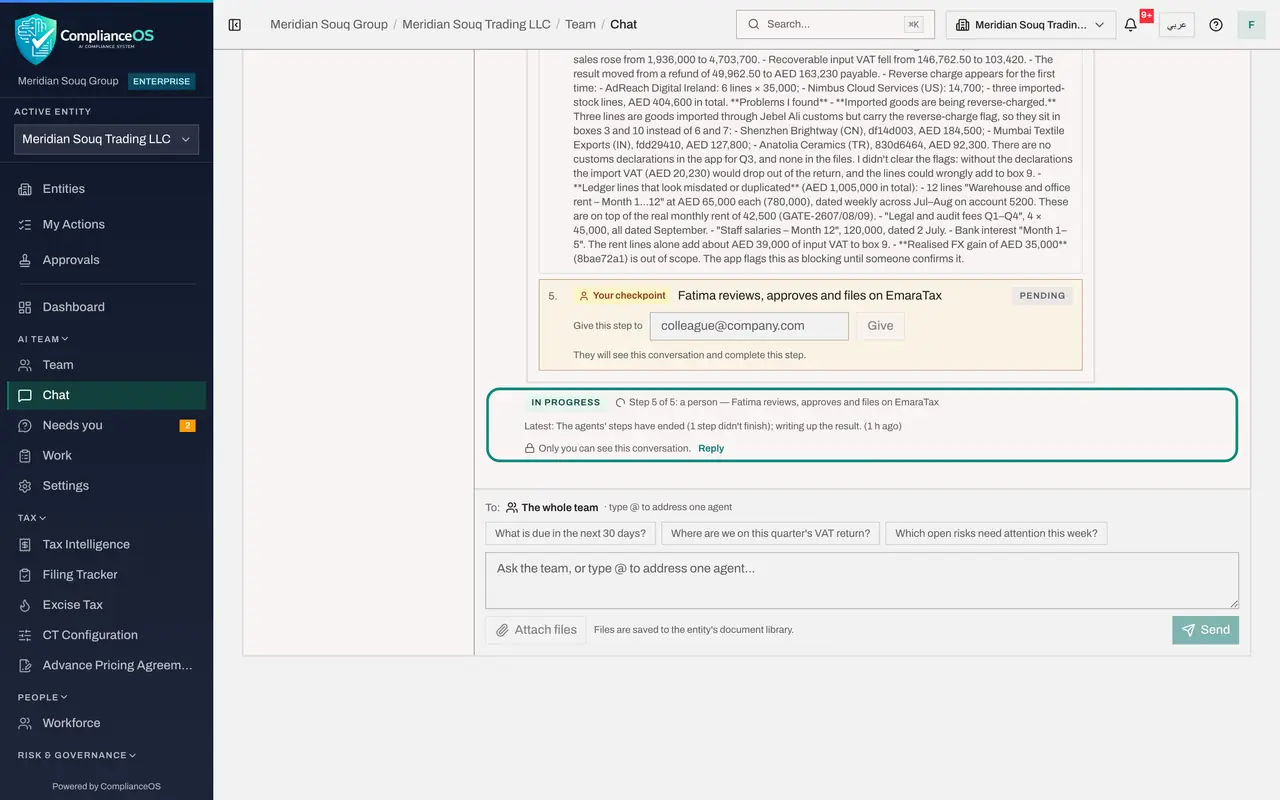
Under Hind's step is the handover: the draft return box by box, the checks Hind ran, the changes from the second quarter, and the problems found, such as the three imported goods sitting in the reverse-charge box, rent and fee lines that look misdated or duplicated, and the credit from the second quarter. It ends with what Hind needs from you. Read it as a colleague's checklist.
- 4
See where the plan stands
Under the plan, the status line says where the work stands: the agents' steps have ended, one of them did not finish, and the last step, review, sign off and file, waits for a person: you. It does not mean filed. The conversation stays open until you submit and lock the return on the VAT Return tab and mark your step done.
- 5
See the work on the Work page
Choose Work. The counts show the open work and what was escalated in the last 30 days: Hind's step, handed back to a person. Under Recent goals, each step of the plan is a goal with its agent, its state and the tokens it used. Each one opens to its handover and its steps, as in lesson 6.
- Select Work
- 6
See the deadline in the Filing Tracker
In the left menu, under Tax, choose Filing Tracker. The VAT return for 1 July to 30 September 2026 is listed, due on 28 October. Its deadline has been on the compliance calendar since the quarter ended, so the filing is tracked like any other. It stays open until you file.
- Select Filing Tracker
- 7
See Hind on the Team page
Finally, choose Team. Hind's card shows the last piece of work Hind handed over, for a person to check. The team is ready for the next request, and every step of this one is on record.
- Select Team
How to check it worked
The conversation shows that the agents' steps have ended, with Hind's handover on its step, while your own checkpoint, review, sign off and file, is still open, and the Filing Tracker shows the third-quarter return as due on 28 October.
Common mistakes
- Reading the end of the agents' steps as filed. The agents have finished their part; the return is filed only when a person submits and locks it.
- Skipping the points in Hind's handover. They name what must be settled before filing, such as the imported goods in the reverse-charge box.
- Rerunning the whole task when one step could not finish. Read the handover, settle what it asks, or ask for that step again.
Check your understanding
1. The agents' steps have ended, but your last checkpoint is still open. Is the return filed?
- A.Yes
- B.No: the agents finished their part; filing is your step
- C.Only if Zayed says so
- D.It is filed automatically on the due date
Show answer
Answer: B. No: the agents finished their part; filing is your step
Agents cannot file or sign off. The return is filed when a person submits and locks it on the VAT Return tab.
2. Where do you see what each agent did, step by step?
- A.Nowhere
- B.In each goal's details on the Work page, and in the plan in the conversation
- C.Only in the Audit log
- D.In e-mail
Show answer
Answer: B. In each goal's details on the Work page, and in the plan in the conversation
The plan shows each step's result, and each goal keeps its handover and every call the agent made.