Lesson 8 of 19
Answer the agent: give a go-ahead
What you will be able to do
This lesson is for the tax manager. An agent asks before it changes a record that matters: it sends a go-ahead, a request for your permission to make one change. Go-aheads and questions go to the person who asked for the work, in the conversation and under Needs you. You will ask Hind to mark a software subscription bought from the US for the reverse charge, read Hind's go-ahead, approve it, and check Hind's answer.
Before you start
- You are signed in as the tax manager of Meridian Souq Trading LLC.
- The third quarter includes a software subscription from Nimbus Cloud Services Inc, a supplier in the US.
Steps
- 1
Ask Hind to make a change
In the AI team's Chat, type @ and pick Hind, then type: please mark the Nimbus Cloud Services software subscription in Q3 2026 as reverse charge. It is a service bought from a supplier in the US.
- Type Message to the AI team:
@Hi - Choose HHindAIVAT preparer
- Type Message to the AI team:
@Hind please mark the Nimbus Cloud Services software subscription in Q…
- Type Message to the AI team:
- 2
Select Send and wait for Hind
Select Send. Hind reads the transaction first. Changing a tax record is something Hind asks a person about before doing it, so shortly afterwards a go-ahead appears in the conversation, labelled needs your go-ahead.
- Select Send
- 3
Read the go-ahead
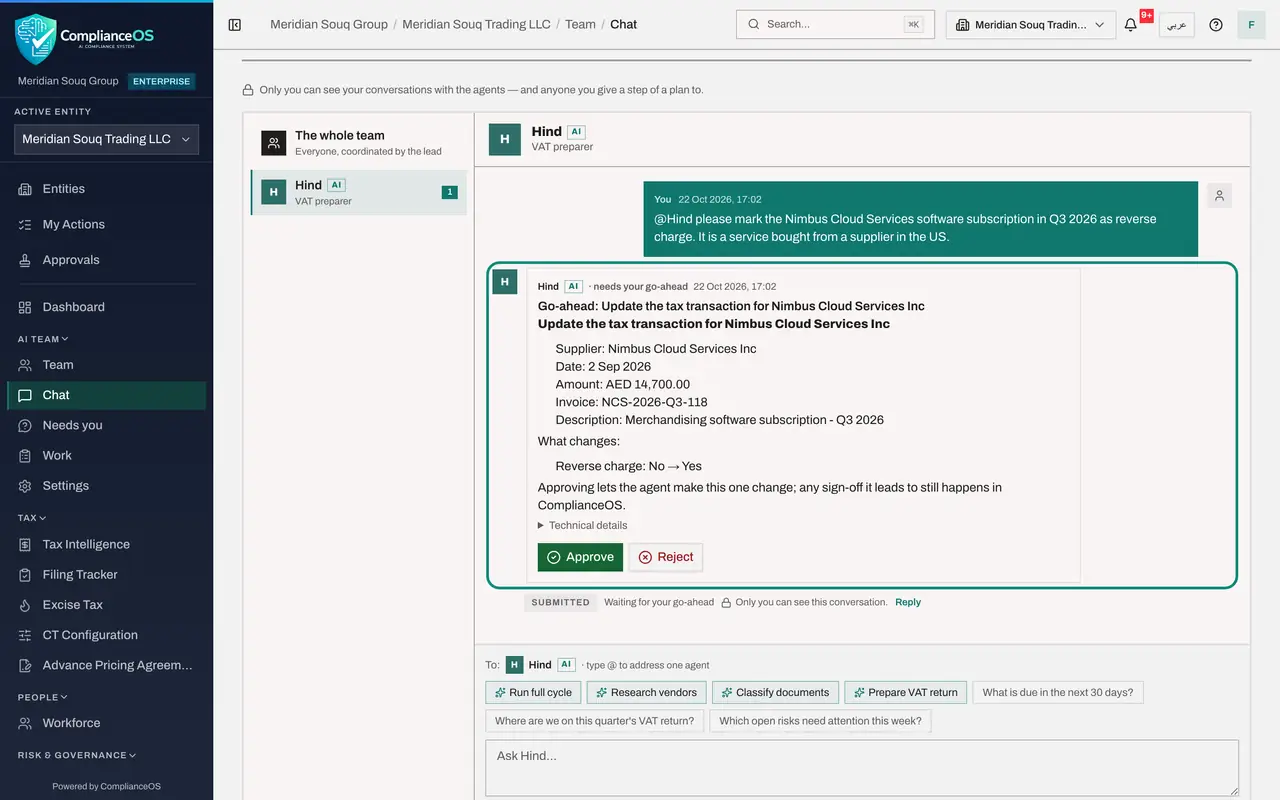
The go-ahead says in plain words what Hind wants to do: update the tax transaction for Nimbus Cloud Services Inc. It shows the record, with the supplier, the date, the amount of 14,700 dirhams, the invoice number and the description, and under What changes, the one change: Reverse charge, from No to Yes. The last line says approving lets the agent make this one change; any sign-off it leads to still happens in ComplianceOS. Technical details, folded away, holds the exact call for anyone who needs it. Approve and Reject are under it.
- 4
Find it under Needs you
The same go-ahead waits under Needs you, in the left menu: under Approvals, from Hind, marked For: tax manager. That is where you find everything the agents are waiting on you for, without opening each conversation.
- Select Needs you
- 5
Select Approve
You know this subscription: it is a service from the US, so the reverse charge applies. Select Approve. A message confirms Answer sent, the agent carries on, and the go-ahead leaves the list.
- Select Approve
- 6
Read Hind's answer
Choose Chat and open the conversation with Hind. Once the change is made, Hind's green Answer confirms that the subscription is now marked as reverse charge, says the change was approved in the app, and names the transaction: the Nimbus Cloud Services invoice of 14,700 dirhams. Hind also says what is still open, the line's VAT classification, and that it did nothing more because you only asked for the flag. The status reads Done.
How to check it worked
The conversation with Hind ends with Hind's green Answer and the status Done, and Needs you no longer lists the go-ahead.
Common mistakes
- Approving a go-ahead without reading what it changes. If you are not sure, Reject, or ask the agent in the conversation.
- Approving several go-aheads in quick succession. Approve one and let the agent take it before the next.
- Thinking a go-ahead signs anything off. It lets the agent make that one change; returns are still reviewed and filed by a person.
Check your understanding
1. What does Approve on a go-ahead allow?
- A.The agent may file the return
- B.The agent may make that one change, and nothing more
- C.The agent may change any record
- D.The agent may approve its own work
Show answer
Answer: B. The agent may make that one change, and nothing more
The request says it: approving lets it do this step only; any sign-off it leads to still happens in ComplianceOS.
2. Who receives an agent's go-ahead about your request?
- A.The administrator
- B.You, the person who asked
- C.Everyone on the entity
- D.Nobody: it waits in a log
Show answer
Answer: B. You, the person who asked
Questions and go-aheads go to the person who asked, in the conversation and under Needs you.