Lesson 11 of 19
When an agent isn't enabled
What you will be able to do
This lesson is for the compliance officer. An agent works on an entity only after it has been let onto that entity, with its own key and only the permissions a person approved. Here Nasser, the financial crime agent, has not been let onto Meridian Souq Trading LLC. You will address a question to Nasser, read the notice that says Nasser isn't enabled, send the question anyway so that it waits, and request access, which goes to the Approvals inbox.
Before you start
- You are signed in as the compliance officer of Meridian Souq Trading LLC.
- Nasser, the financial crime agent, has no access to Meridian Souq Trading LLC yet.
- Meridian Souq Trading LLC has customer due diligence records that are not yet verified.
Steps
- 1
Address the question to Nasser
You are on the Chat page of the AI team. Select the message box, type @ and the start of Nasser, and pick Nasser, Financial crime, from the list. The line To: changes to Nasser.
- Type Message to the AI team:
@Nas - Choose NNasserAIFinancial crime
- Type Message to the AI team:
- 2
Read the notice
A notice appears above the box: Nasser isn't enabled on Meridian Souq Trading LLC. It says why: Nasser hasn't been given access to this entity yet. It also says you can still send: your message will wait and go to Nasser once it's enabled. The button Request access asks for it.
- 3
Type your question
After the name, type: which customer due diligence records of Meridian Souq Trading LLC are still pending verification, and what is missing for each?
- Type Message to the AI team:
@Nasser which customer due diligence records of Meridian Souq Trading…
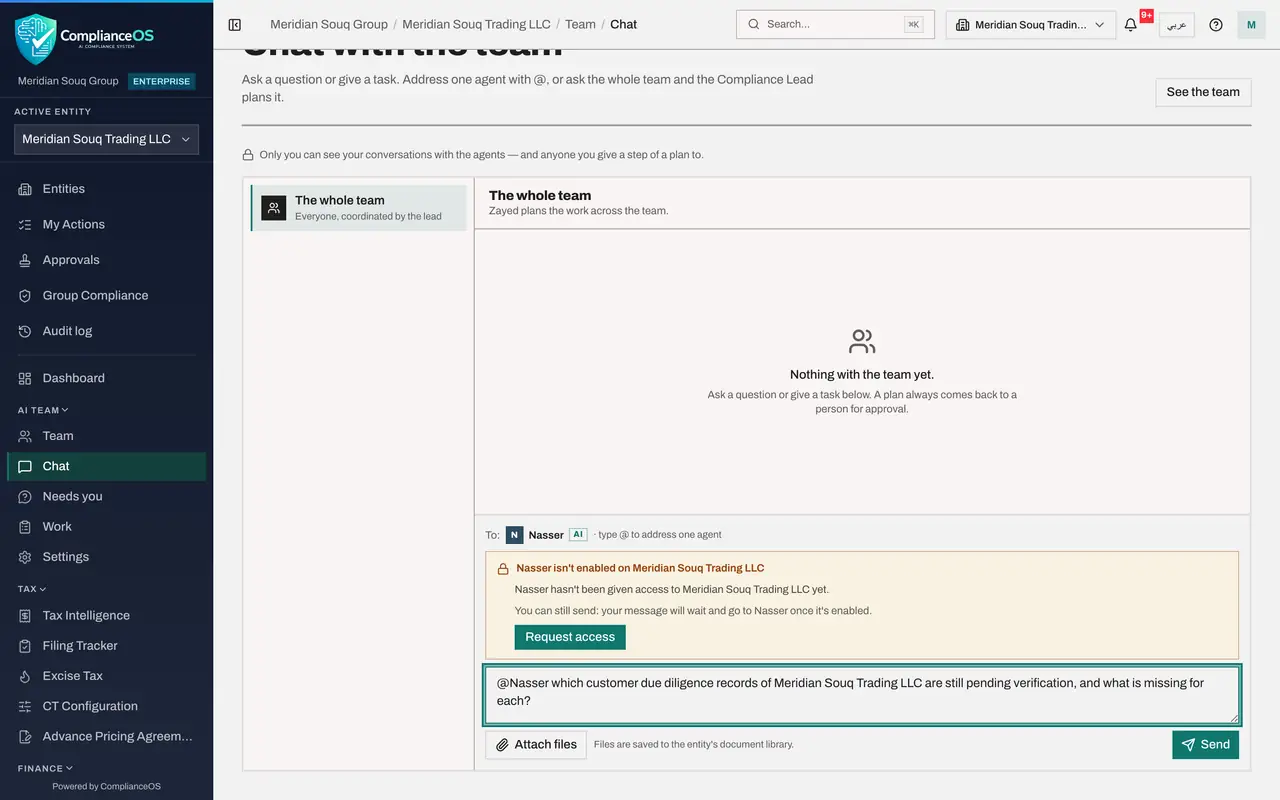
- Type Message to the AI team:
- 4
Select Send
Select Send. A message confirms that the question has been sent and will go to Nasser once Nasser is enabled on this entity. In the conversation with Nasser your question shows the status Agent not enabled, with the same notice under it.
- Select Send
- 5
Select Request access
In the notice under your question, select Request access. A message confirms Access requested, it's waiting in Approvals. The request names Nasser and this entity, and says it was asked for from this conversation.
- Select Request access
- 6
See that it is waiting for approval
The notice now says that a request to let Nasser work on Meridian Souq Trading LLC is waiting for approval, with Open in Approvals to follow it. Your question stays waiting. Nothing else is needed from you: once a person who administers access approves, the question goes to Nasser by itself.
How to check it worked
Your question to Nasser shows the status Agent not enabled, and the notice under it says Waiting for approval with a link Open in Approvals.
Common mistakes
- Retyping the question once the agent is enabled. There is no need: the waiting message goes to the agent by itself as soon as access is approved.
- Asking another agent to do the work instead. Each agent works only within the job and permissions it was given; ask for access for the right agent.
- Expecting to approve your own request. Access is approved by a different person, one who administers access on the entity.
Check your understanding
1. You send a question to an agent that isn't enabled on the entity. What happens to it?
- A.It is lost
- B.It waits, and goes to the agent as soon as the agent is enabled
- C.Another agent answers it
- D.It is sent by e-mail to the administrator
Show answer
Answer: B. It waits, and goes to the agent as soon as the agent is enabled
The notice says it: your message will wait and go to the agent once it's enabled.
2. Where does Request access send the request?
- A.To the agent
- B.To the Approvals inbox of a person who administers access on the entity
- C.To the billing team
- D.Nowhere until you e-mail it
Show answer
Answer: B. To the Approvals inbox of a person who administers access on the entity
A message confirms Access requested, it's waiting in Approvals, and the notice links to it.