Lesson 18 of 19
The AI budget and cost limits
What you will be able to do
This lesson is for the organisation administrator. Every answer and every piece of work by the agents uses AI, and AI has a cost. Two controls keep it in hand: a monthly AI budget for the whole team, and a cost limit for each piece of work an agent does. You will read this month's spend against the budget, see the spend by agent, change the budget and its warning level, and read the cost limits per agent. The amounts are estimates from the Agent Platform; your AI provider's invoice is the authority.
Before you start
- You are signed in as the organisation administrator. Only an organisation administrator changes the budget and the cost limits; others see them read-only.
- The agents have done some work this month, such as the third-quarter VAT return of the earlier lessons.
Steps
- 1
Open the Usage tab
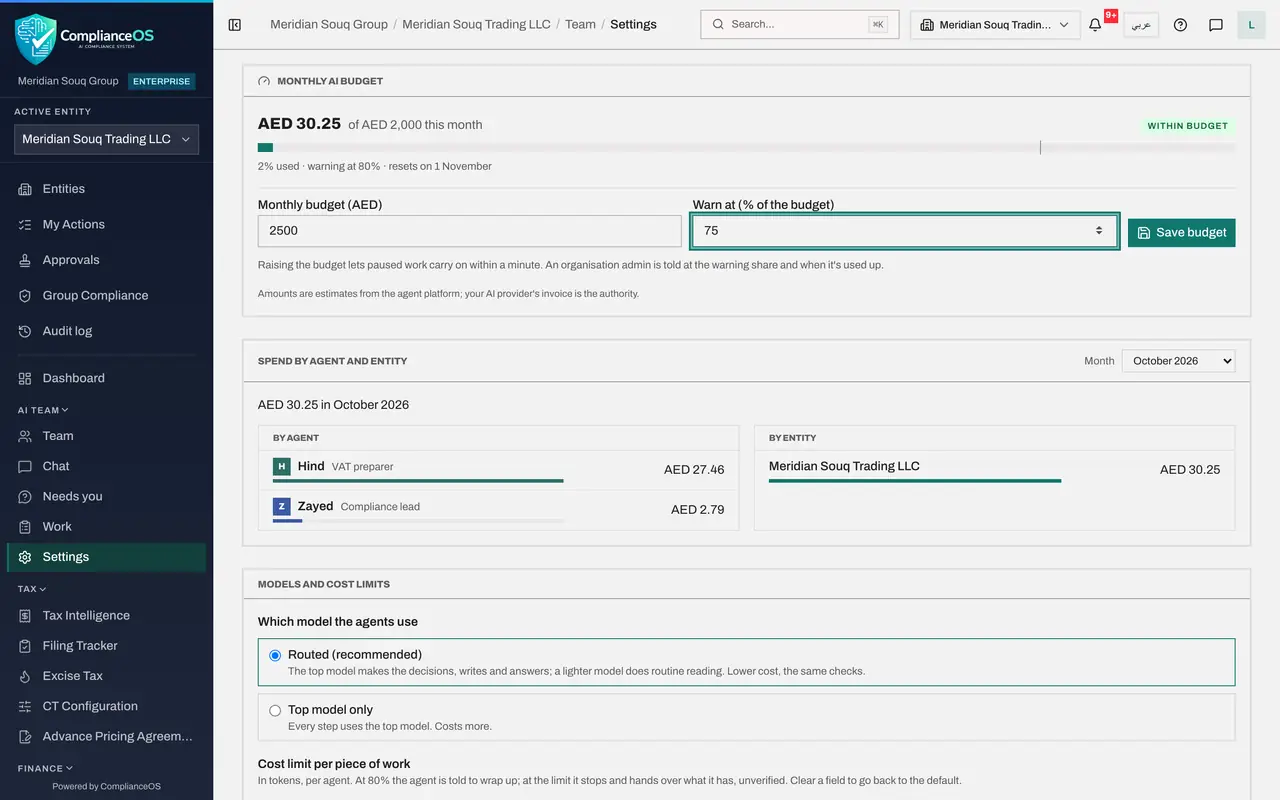
You are in AI team settings. Select the tab Usage and scroll to Monthly AI budget. It shows how much the AI team has spent this month in dirhams, against the monthly budget, with a bar and a state such as Within budget.
- Select Usage
- 2
Read the line under the bar
Under the bar, a line says what share of the budget is used, the share at which a warning is given, and the day the budget resets: the first of next month. An organisation admin is told when the warning share is reached, and again when the budget is used up.
- 3
See the spend by agent
Scroll to Spend by agent and entity. By agent shows which agents used the most this month, such as Hind for the VAT return and Zayed for planning. By entity shows the same per entity. The Month list lets you look at earlier months. The amounts are estimates; your AI provider's invoice is the authority.
- 4
Change the budget
Back at Monthly AI budget, select the field Monthly budget, in dirhams, and type 2500. In Warn at, the percentage of the budget at which you are warned, type 75.
- Type Monthly budget (AED):
2500 - Type Warn at (% of the budget):
75
- Type Monthly budget (AED):
- 5
Select Save budget
Select Save budget. A message confirms Budget saved, and the line under the bar now reads of 2,500 dirhams this month, with the warning at 75 percent. The help beside the button says that raising the budget lets paused work carry on within a minute.
- Select Save budget
- 6
Read the model choice
Scroll to Models and cost limits. Which model the agents use is Routed, the recommended choice: the top model makes the decisions, writes and answers, and a lighter model does routine reading, at lower cost with the same checks. Top model only uses the top model for every step and costs more.
- 7
Read the cost limits
Under Cost limit per piece of work is a limit in tokens for each agent. At 80 percent of its limit an agent is told to wrap up. At the limit it stops and hands over what it has, marked unverified, so a person checks it before relying on it. Each limit is between 10,000 and 20 million tokens; clearing a field goes back to the default.
How to check it worked
The monthly budget shows your new amount and warning level, a message confirmed Budget saved, and the cost limit table lists a limit in tokens for each agent.
Common mistakes
- Setting the budget so low that work pauses mid-month. When it is used up, agents pause before their next step until the budget is raised or the month turns; nothing is lost, but deadlines can slip.
- Raising an agent's cost limit to get past one stop without reading its handover. An agent that stops at its limit hands over what it has, unverified: check it first.
- Reading the amounts as an invoice. They are estimates; your AI provider's invoice is the authority.
Check your understanding
1. The month's AI budget is used up. What happens to the agents' work?
- A.It is deleted
- B.It pauses before the next step and carries on when the budget is raised or the month turns
- C.It carries on and the overspend is billed
- D.The agents approve their own work to save cost
Show answer
Answer: B. It pauses before the next step and carries on when the budget is raised or the month turns
The help under the budget says raising it lets paused work carry on within a minute; otherwise it resumes when the month turns.
2. An agent reaches 80 percent of its cost limit on a piece of work. What does it do?
- A.Nothing
- B.It is told to wrap up; at the limit it stops and hands over what it has, unverified
- C.It asks for a bigger budget
- D.It deletes its work
Show answer
Answer: B. It is told to wrap up; at the limit it stops and hands over what it has, unverified
The cost limit text says exactly this, which is why a handover at the limit must be checked before you rely on it.