Lesson 4 of 19
Give the team a task and approve the plan
What you will be able to do
This lesson is for the tax manager, and starts the third-quarter VAT return that the next lessons follow to the end. A piece of work is a task for the whole team: Zayed, the compliance lead, draws up a plan, gives each step to an agent or to a person, and nothing runs until you approve it. You will give the team the task, read the plan, ask for a change, and approve the revised plan.
Before you start
- You are signed in as the tax manager of Meridian Souq Trading LLC.
- The third-quarter transactions, July to September 2026, are imported but not classified. The return is due on 28 October 2026.
Steps
- 1
Select Give them a task
On the Team page, select Give them a task at the top right. The chat opens on The whole team, marked New task. The message box asks you to describe the task: what, for which period, and anything to watch out for.
- Select Give them a task
- 2
Describe the task
Type the task in plain words: Please prepare the Q3 2026 VAT return for Meridian Souq Trading LLC so I can review and file it before the 28 October deadline.
- Type Message to the AI team:
Please prepare the Q3 2026 VAT return for Meridian Souq Trading LLC so…
- Type Message to the AI team:
- 3
Select Send and wait for the plan
Select Send. Zayed, the compliance lead, reads the records and draws up a plan. This takes a minute or two. The status reads Awaiting your approval when the plan is ready.
- Select Send
- 4
Read the plan
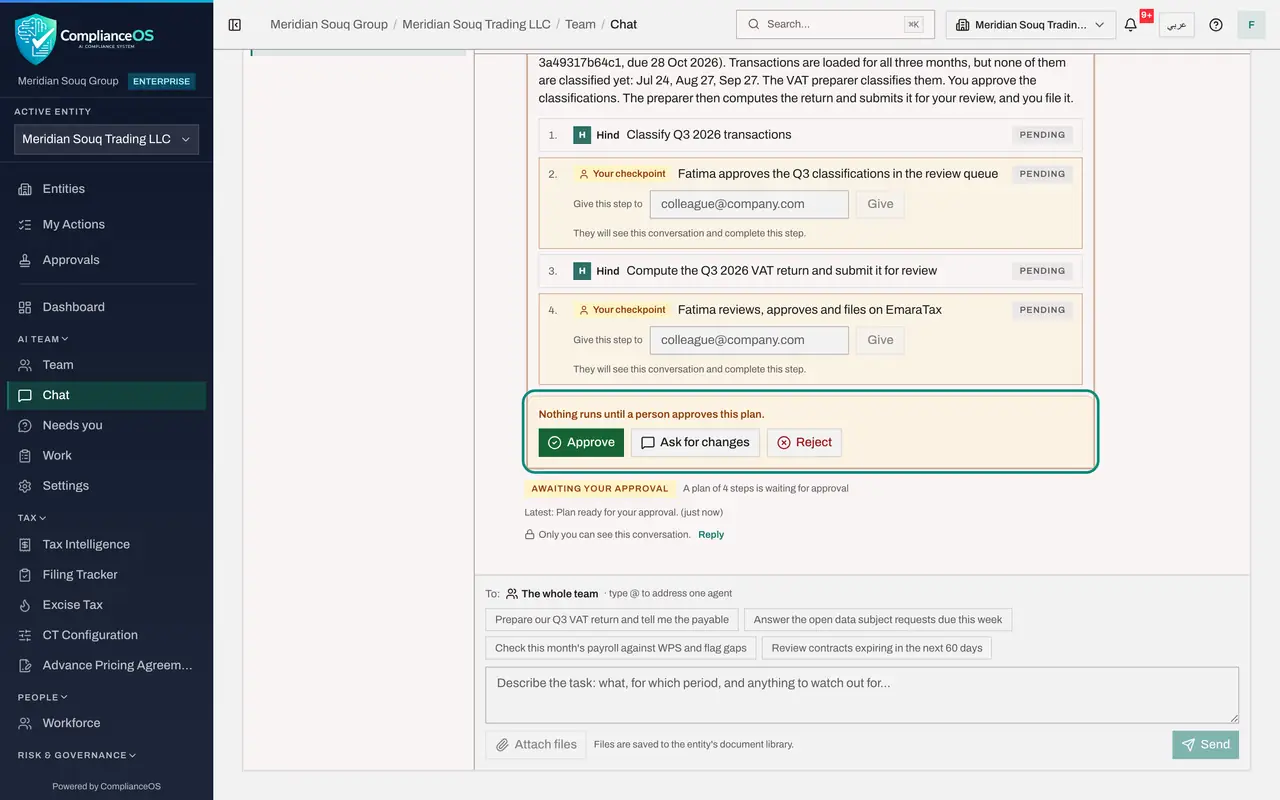
The plan by Zayed starts with a summary: the third quarter has 78 lines, none classified yet. Below are the steps in order. Steps with an agent's name are the agents' work: Hind, the VAT preparer, classifies the lines and later drafts the return. Steps marked Your checkpoint wait for a person, such as clearing the review queue and, at the end, signing off and filing the return. Agents cannot file or sign off.
- 5
Read the decision bar
At the foot of the plan, a line says: Nothing runs until a person approves this plan. Approve starts the agents. Ask for changes sends Zayed a comment and brings back a revised plan. Reject cancels the task.
- 6
Select Ask for changes
You want the finance manager to confirm the supplier bills first. Select Ask for changes, and in the box What should change type: Please add a step for Rashid Karim, our finance manager, to confirm that every Q3 supplier bill has been entered before the return is drafted. If anything needs my decision, ask me in this conversation.
- Select Ask for changes
- Type What should change:
Please add a step for Rashid Karim, our finance manager, to confirm th…
- 7
Select Send changes and wait for the revised plan
Select Send changes. A message confirms that the plan went back to the agents for changes, and a line in the conversation records Changes requested by you. Zayed sends a revised plan, again waiting for your approval.
- Select Send changes
- 8
Check the new step
The revised plan now starts with a checkpoint for the finance manager, Rashid Karim: confirm that every third-quarter supplier bill has been entered. Zayed put it first and says why in the summary: so that any late bills are classified too. Then Hind classifies, you clear the review queue, Hind drafts the return, and you review, sign off and file. The plan always comes back to you, however often it changes.
- 9
Select Approve
Select Approve. A message confirms Plan approved, the agents are starting. The conversation records Plan approved by you. The first step is a checkpoint for a person, so the status reads Waiting on a person until it is done: in the next lesson you give that step to the finance manager.
- Select Approve
How to check it worked
The plan in the conversation shows the step for the finance manager, and the line Plan approved by you.
Common mistakes
- Approving a plan without reading its steps. The plan says who does what, and which steps wait for a person; approving starts the agents on all of it.
- Rejecting a plan that only needs a change. Ask for changes, say what to change, and Zayed sends a revised plan for approval.
- Expecting the agents to file. The plan ends with a checkpoint for a person: agents cannot file or sign off.
Check your understanding
1. Zayed has proposed a plan. When do the agents start work?
- A.At once
- B.Only after a person approves the plan
- C.At midnight
- D.When the deadline is near
Show answer
Answer: B. Only after a person approves the plan
The plan says it: Nothing runs until a person approves this plan.
2. A plan is right except for one missing step. What do you do?
- A.Reject it and start again
- B.Ask for changes and say what to add
- C.Approve it and do the step yourself in secret
- D.Nothing
Show answer
Answer: B. Ask for changes and say what to add
Ask for changes sends your comment to Zayed, who comes back with a revised plan for you to approve.