Lesson 9 of 19
Do your checkpoint: approve the classifications
What you will be able to do
This lesson is for the tax manager, and continues the third-quarter VAT return. Hind has classified the quarter, but the agents never approve their own suggestions: the plan now waits at your checkpoint, approving the review queue. You will find the checkpoint, approve the AI classifications in the Sign-off cockpit as their reviewer, and mark your step done so that Hind can draft the return.
Before you start
- You are signed in as the tax manager, with the permission to approve tax classifications.
- Hind has classified the third quarter, and the plan waits at your checkpoint.
Steps
- 1
Find your checkpoint
In the conversation, Hind's classification step is Done, and its note says what Hind did and what is still open. Your checkpoint, step 3, reads Waiting for you: approve the third-quarter lines in the review queue, with what it should achieve, a note box and Mark my step done.
- 2
Open the Sign-off cockpit
In the left menu choose Tax Intelligence, select the Review Queue, and select Open sign-off cockpit. The cockpit lists every classification awaiting sign-off, with the AI suggestions marked as such.
- Select Open sign-off cockpit →
- 3
Read the reasoning where unsure
Select Why on a row to read the reasoning behind the suggestion. Do it for every row you are not sure of: you are about to become the reviewer of each one.
- Select Why
- 4
Select AI suggestions and approve them
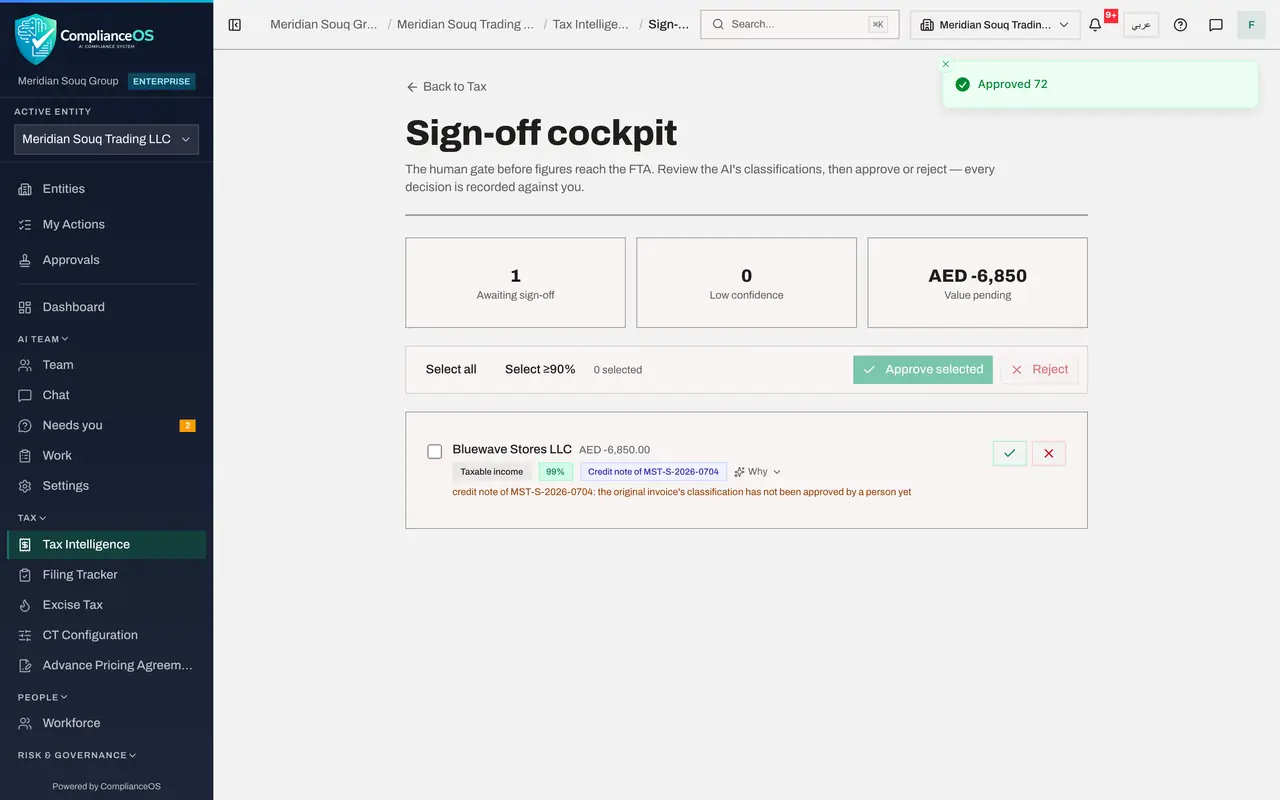
Select the button Select AI suggestions, then Approve selected. A message confirms how many were approved, each with you as the reviewer. One line stays: a credit note. The app holds a credit note until the invoice it corrects has been approved by a person, and that invoice was among the lines you just approved.
- Select Select AI suggestions (72)
- Select Approve selected
- 5
Approve the credit note
Reload the cockpit. The credit note can now be approved: its invoice is approved. Read its line, then select Select all and Approve selected. The cockpit says Nothing awaiting sign-off.
- Select Select all
- Select Approve selected
- 6
Go back to the conversation
In the left menu, under AI team, choose Chat. In your checkpoint, write a note for the agents in the box: what you did.
- Select Chat
- Type Add a note for the agents (optional) — what you did, anything they sho:
Reviewed and approved the quarter's AI classifications in the sign-off…
- 7
Select Mark my step done
Select Mark my step done. A message confirms Step marked done, the agents will carry on. Your checkpoint now says Done, with your name and the time, and Hind starts the next step: drafting the return.
- Select Mark my step done
How to check it worked
The Sign-off cockpit says Nothing awaiting sign-off, and in the conversation your checkpoint says Done by you, with the next step, Hind drafting the return, in progress.
Common mistakes
- Marking the checkpoint done before doing it. The agents carry on at once and draft the return from unreviewed figures.
- Approving every AI suggestion without reading the ones you are unsure of. Open Why on those first; you are recorded as the reviewer of each.
Check your understanding
1. Who approves the classifications the agent suggested?
- A.The agent itself
- B.A person with the Tax, Approve permission, recorded as the reviewer
- C.Nobody: they apply at once
- D.The compliance lead agent
Show answer
Answer: B. A person with the Tax, Approve permission, recorded as the reviewer
Agents never approve their own suggestions; the cockpit records you as the reviewer of each one.
2. What happens when you select Mark my step done?
- A.The return is filed
- B.The checkpoint is recorded as done by you and the next step starts
- C.The plan is cancelled
- D.Nothing
Show answer
Answer: B. The checkpoint is recorded as done by you and the next step starts
The plan was waiting for you; once your step is done, Hind starts the next step.