Lesson 3 of 19
Ask the whole team
What you will be able to do
This lesson is for the tax manager. When you don't know which agent to ask, ask the whole team. Your message goes to Zayed, the compliance lead, an AI agent who answers a question himself or, for a piece of work, draws up a plan and gives each step to the right agent. You will ask the team what is due in the next 30 days, read Zayed's answer, and see how to address one agent from the same box with @.
Before you start
- You are signed in as the tax manager of Meridian Souq Trading LLC.
- You hold the permission to talk to the AI team (AI agents, Instruct).
Steps
- 1
Select Talk to the team
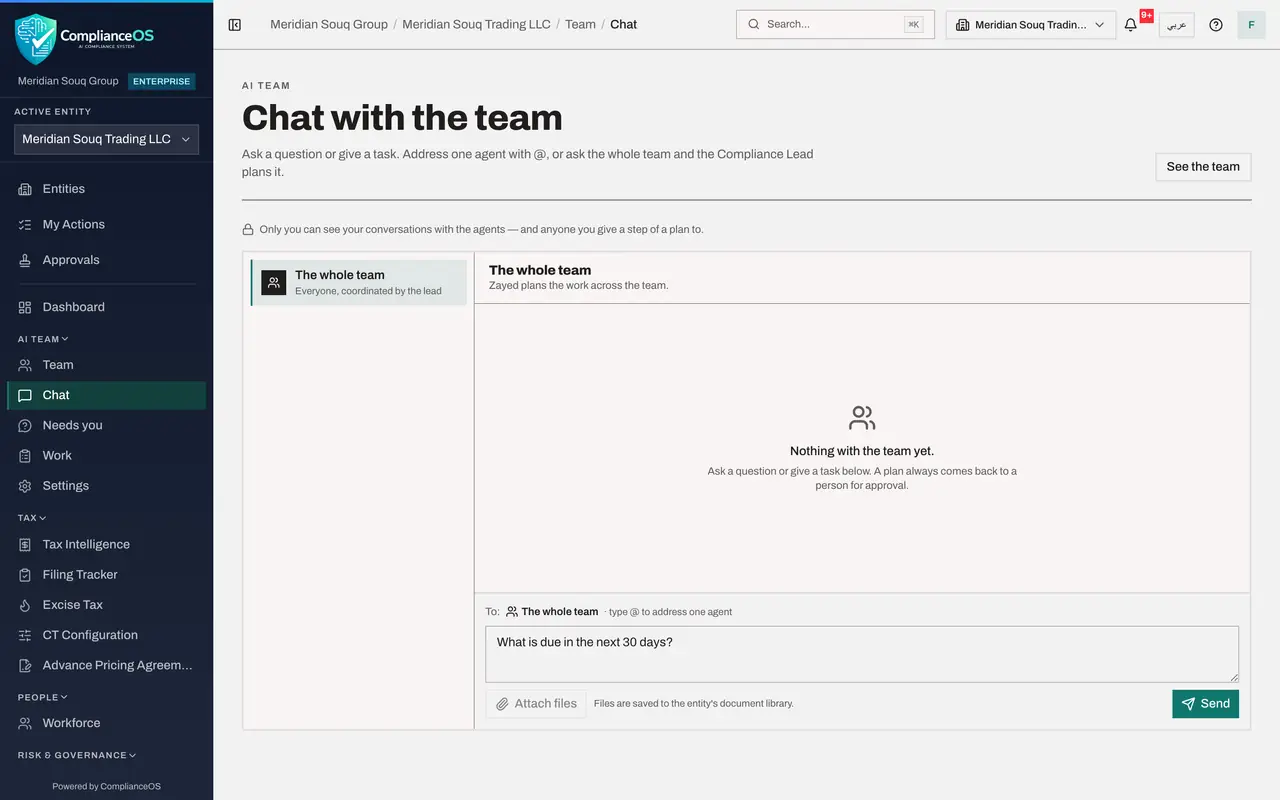
On the Team page, select Talk to the team at the top right. The chat opens on The whole team. The header says that Zayed plans the work across the team.
- Select Talk to the team
- 2
Read who will receive it
Above the message box, To: says The whole team, with the hint type @ to address one agent. Under it are three suggestions: What is due in the next 30 days?, Where are we on this quarter's VAT return?, and Which open risks need attention this week?
- 3
See how to address one agent
Type @ followed by Hi in the box. A list of agents appears with Hind, the VAT preparer, and her AI label. Picking her would address the message to Hind alone, and To: would change to Hind. This time you want the whole team: press Escape and clear the box.
- Type Message to the AI team:
@Hi
- Type Message to the AI team:
- 4
Select a suggestion
With the box empty, the suggestions show again. Select What is due in the next 30 days? It fills the box with the question. A suggestion only writes the question for you: nothing is sent until you select Send.
- Select What is due in the next 30 days?
- 5
Select Send and wait for Zayed
Select Send. A message confirms Sent to the team. The status under your question shows that Zayed has picked it up. A question to the team usually takes two or three minutes to answer.
- Select Send
- 6
Read Zayed's answer
Zayed's answer appears under his name with the AI label and the word Answer. He reports what is due in the next 30 days: the third-quarter VAT return, due on 28 October, which is on the compliance calendar for each entity, and what stands in the way, such as the quarter's lines that are not classified yet. He also says that no agent has started on it yet, because you asked a question: to get the work done, you give the team a task. Check anything an agent reports on the module's own screen.
- 7
See the conversation in the list
On the left, the list of conversations starts with The whole team. A conversation with a single agent gets its own line under it, with the agent's name and role. Select a line to go back to that conversation at any time.
How to check it worked
The conversation The whole team shows your question and Zayed's green Answer with the status Done, and you have checked anything it reports as due on the module's own screen.
Common mistakes
- Expecting every agent to answer. The whole team means the compliance lead: Zayed answers, or plans the work and hands steps to the others.
- Sending a task by mistake when you only wanted information. A question gets an answer; a request for work gets a plan, and nothing runs until a person approves it.
- Treating the answer as the calendar. Check deadlines in the Filing Tracker or the Compliance Calendar before you plan around them.
Check your understanding
1. Who answers a message sent to The whole team?
- A.Every agent, one after another
- B.Zayed, the compliance lead, who answers or plans the work
- C.The organisation administrator
- D.Nobody until an agent is chosen
Show answer
Answer: B. Zayed, the compliance lead, who answers or plans the work
The conversation header says it: Zayed plans the work across the team.
2. You type @Hi in the message box. What happens?
- A.The message is sent at once
- B.A list of agents appears, and picking Hind addresses the message to her
- C.Hind is removed from the team
- D.Nothing
Show answer
Answer: B. A list of agents appears, and picking Hind addresses the message to her
@ and the start of a name opens the list of agents; the line To: then shows the agent you picked.