Lesson 10 of 19
Check the agent's work before you sign off
What you will be able to do
This lesson is for the tax manager, and continues the third-quarter VAT return. Hind has computed the draft return, but could not finish its step: the plan asked it to submit the return for review, which an agent cannot do, and it found points that need your decision first. A handover is a report: what the agent did, what is still open, and what it needs from a person. You will read Hind's handover in the conversation and in the goal's details, open the draft return in Tax Intelligence, and decide what must be checked before anyone signs off. The final checkpoint, signing off and filing, is always yours.
Before you start
- You are signed in as the tax manager of Meridian Souq Trading LLC.
- Lessons 4 to 8 are done: you approved the quarter's classifications, and Hind has computed the draft third-quarter return.
Steps
- 1
Read Hind's handover in the plan
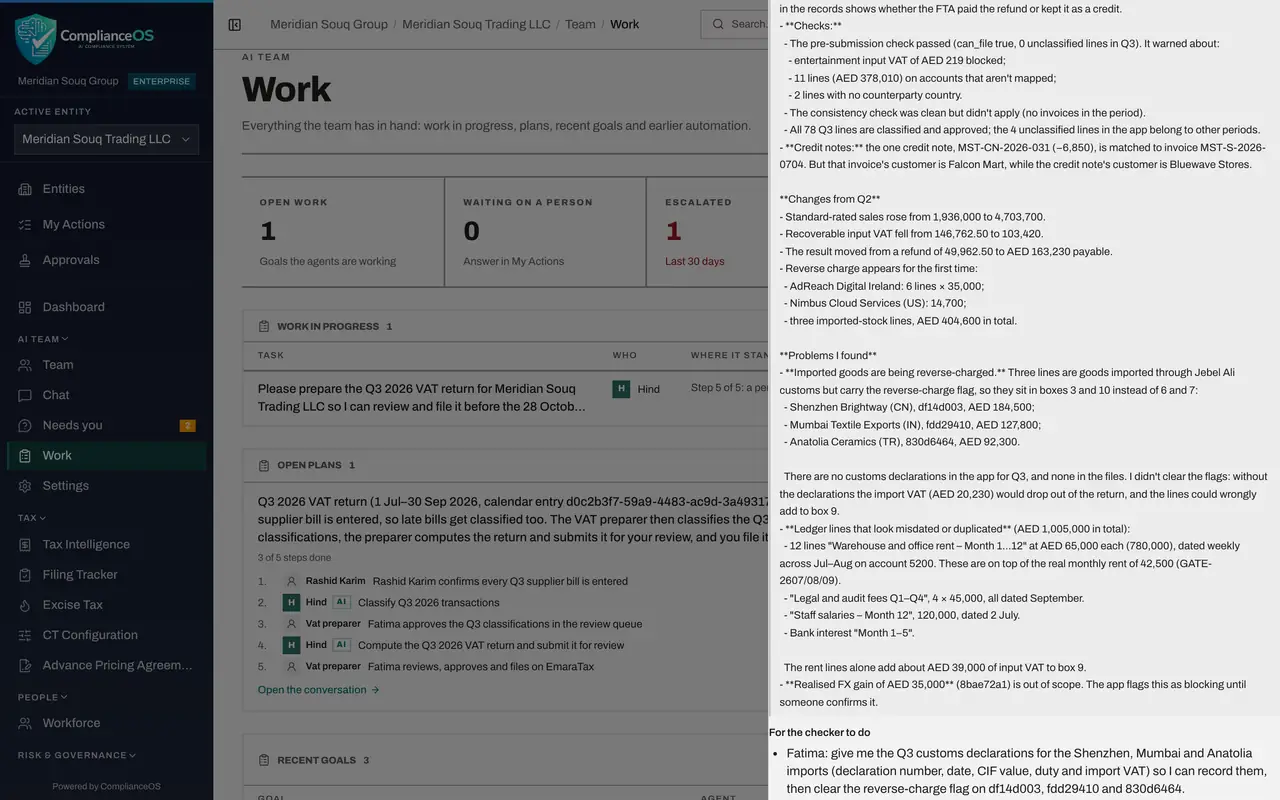
In the conversation, Hind's step, compute the return and submit it for review, shows Failed: Hind computed the draft return but could not submit it for review, because no agent can, and says several points need your decision first. The note under it is Hind's handover: the Form 201 figures, the checks it ran, the changes from the second quarter and the problems it found.
- 2
Open the goal's details
For the full record, choose Work, scroll to Recent goals and select Hind's goal, Compute the Q3 2026 VAT return, marked Escalated: Hind handed it back to a person. Under Handover, the state reads blocked, and For the checker to do lists your decisions one by one: the customs declarations for three imports, rent and fee lines that look misdated or duplicated, the credit from the second quarter, and a credit note matched to another customer's invoice. Below, Steps lists every call Hind made.
- Select Work
- 3
Open the draft return
Close the details and open Tax Intelligence on the VAT Return tab. The draft for 1 July to 30 September 2026 has the status Draft. Read the Form 201 boxes: box 3, supplies subject to the reverse charge, holds the services bought from abroad, but also the three imported goods that Hind flagged, while boxes 6 and 7, imports, are zero. That is exactly the kind of point to settle before anyone signs off.
- 4
Decide what is left before signing off
Back in the conversation, the last step is your checkpoint: review, sign off and file. It stays with you. Settle Hind's points first: get the customs declarations for the imports, confirm or correct the rent and fee lines, check the second-quarter credit on the FTA account, and correct or ask about anything else, for example by replying to Hind here. Then run the Pre-Submission Check on the VAT Return tab, and only when the return is right do you submit and lock it, and mark your step done.
- Select Chat
How to check it worked
You have read Hind's handover, found the draft return for 1 July to 30 September 2026 in Tax Intelligence, and listed what must be settled before you sign off, such as the imported goods in the reverse-charge box.
Common mistakes
- Signing off because the agent says the return is ready. Compare the figures on the return itself, and settle every warning first.
- Ignoring a handover that ends with points for you. Read For the checker to do, and settle each point or ask about it.
- Filing from the chat. Filing happens on the VAT Return tab, with Submit and Lock, by a person who may approve returns.
Check your understanding
1. Hind's handover lists a blocking warning. What do you do?
- A.Sign off anyway
- B.Settle the warning first, or ask Hind in the conversation, and sign off only when the return is right
- C.Delete the return
- D.Ask Hind to file
Show answer
Answer: B. Settle the warning first, or ask Hind in the conversation, and sign off only when the return is right
A handover is a report. The decision to sign off and file is the person's, on the return itself.
2. Where do you see what the agent checked and how confident it is?
- A.Only in e-mail
- B.In the goal's details: Handover, Verification and Evidence
- C.Nowhere
- D.In the Audit log only
Show answer
Answer: B. In the goal's details: Handover, Verification and Evidence
The goal's details keep the handover, the checker's verification and the evidence with a confidence and its reasons.