Lesson 1 of 16
Sign in and sign out
What you will be able to do
Sign in to ComplianceOS with your work email and password, confirm that you are in your own account, sign out when you finish, and know what to do if you forget your password.
Before you start
- Your administrator has invited you and you have set a password.
- You know the web address your organisation uses for ComplianceOS.
Steps
- 1
Open the ComplianceOS sign-in page
Open the ComplianceOS address your organisation gave you. The sign-in page asks for two things: your email and your password.
- 2
Enter your work email
Select the Email box and type the work email address that your administrator invited. In this course we sign in as Mariam Aziz, the compliance officer of a fictional retailer.
- Type Email:
mariam.aziz@c01.example.com
- Type Email:
- 3
Enter your password
Select the Password box and type your password. It shows as dots so that nobody near you can read it.
- Type Password:
(your password)
- Type Password:
- 4
Select Sign in
Select Sign in. After a moment the Dashboard for your organisation opens. If the email or password is wrong, a red message appears on the form and you can try again.
- Select Sign in
- 5
Check that you are in your own account
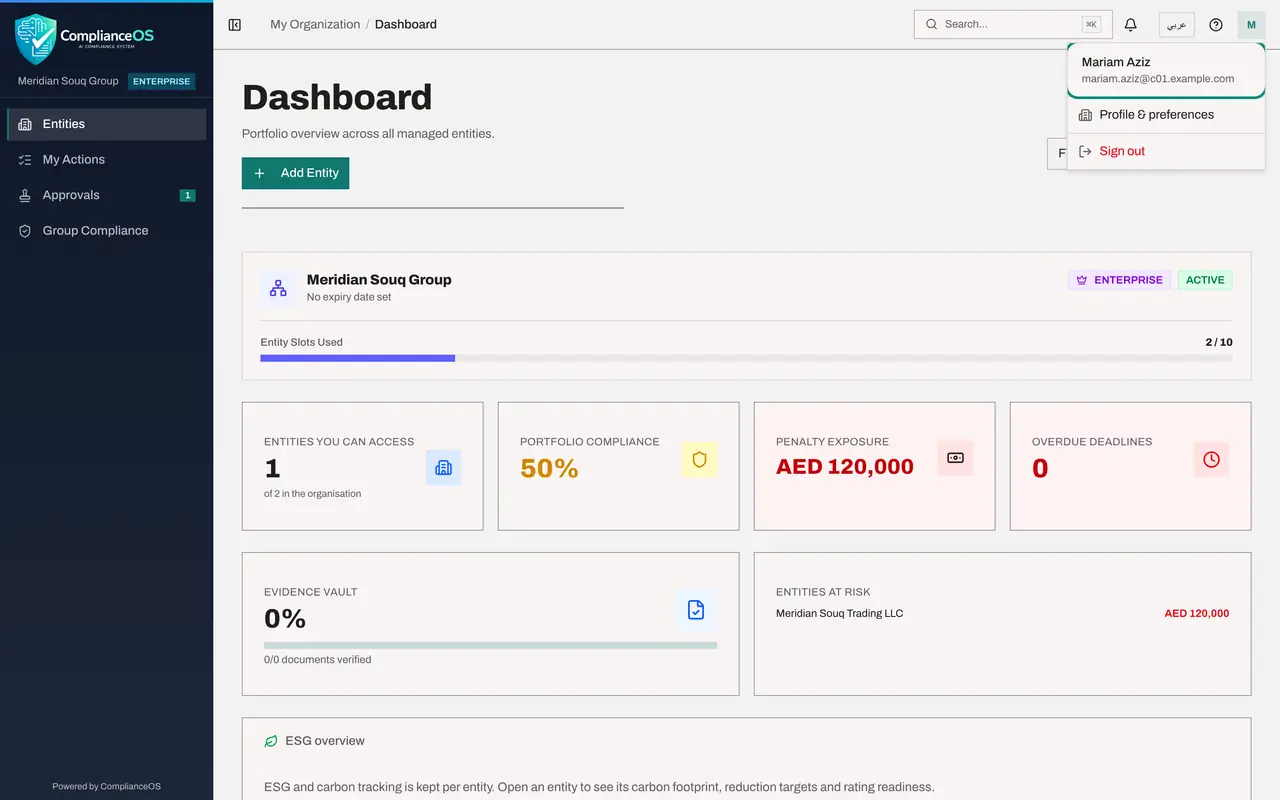
Select the round button with your initial in the top right corner. The account menu opens with your name and email at the top. Confirm that they are yours.
- Select Account menu
- 6
Select Sign out when you finish
At the bottom of the same menu, select Sign out. You return to the sign-in page, and nobody can use your account from this browser until you sign in again.
- Select Sign out
- 7
Select Forgot password if you cannot sign in
If you cannot remember your password, select Forgot password, above the Password box. The Reset your password page opens.
- Select Forgot password?:
(your password)
- Select Forgot password?:
- 8
Ask for a reset link
Here you type your work email and select Send reset link. A link to choose a new password is sent to that address. We do not send one in this lesson.
- 9
Go back to the sign-in page
Select Back to sign in to return to the sign-in page. The Create one link below the form is only for an organisation that has no ComplianceOS account yet. If your organisation already uses ComplianceOS, ask your administrator for an invitation instead.
- Select Back to sign in
How to check it worked
After you select Sign in you see the Dashboard, and the account menu in the top right corner shows your own name and email. After you select Sign out you are back on the sign-in page.
Common mistakes
- Closing the browser tab instead of signing out. On a shared or borrowed computer the next person could open your account. Always use Sign out.
- Typing a personal email address. Use the work email your administrator invited; any other address is not recognised.
- Borrowing a colleague's password when yours is forgotten. Use Forgot password on the sign-in page instead, so that every action stays recorded under the right name.
Check your understanding
1. Where is Sign out?
- A.At the bottom of the left menu
- B.In the account menu that opens from the round button with your initial, in the top right corner
- C.On the Help page
- D.Inside the bell
Show answer
Answer: B. In the account menu that opens from the round button with your initial, in the top right corner
The round button with your initial opens the account menu. Sign out is the last item in it.
2. You have forgotten your password. What should you do?
- A.Use a colleague's account for today
- B.Select Create one and make a second account
- C.Select Forgot password on the sign-in page and ask for a reset link
- D.Keep guessing until it works
Show answer
Answer: C. Select Forgot password on the sign-in page and ask for a reset link
Forgot password sends a reset link to your work email so that you can set a new password for your own account. Sharing accounts breaks the record of who did what.