Lesson 19 of 26
Walid reviews a new supplier contract
What you will be able to do
This lesson is for legal counsel. Walid, the AI agent for contracts, reads a contract the app has analysed, sets up what the company must do under it, the obligations, with their deadlines, and sets out the risks for you. When the app scores a newly uploaded contract as high risk, Walid starts on it by himself. You will upload the new freight forwarding agreement with Gulfline Freight Services, see Walid start, approve the corrections he proposes under Needs you, and read the risks in his handover.
Before you start
- You are signed in as legal counsel of Meridian Souq Trading LLC.
- You have the signed-off draft of the Gulfline Freight Services agreement as a PDF, ready to upload.
Steps
- 1
Upload the agreement
In the left menu, open Contracts. Select the upload area, where it says drop or click, and choose the file freight-forwarding-agreement-gulfline.pdf. A message confirms the upload, and the app starts analysing the contract: its parties, terms, obligations and risk.
- Upload Choose a file:
freight-forwarding-agreement-gulfline.pdf
- Upload Choose a file:
- 2
See the analysed contract
After a minute or two the contract appears in the list, marked Extraction complete, with a spinning mark while the app finishes its risk score. The Gulfline agreement scores high: 60 out of 100, because of its minimum spend and exclusivity. A high-risk contract is an event: Walid, the AI agent for contracts, starts on it by himself.
- 3
See Walid start on the Work page
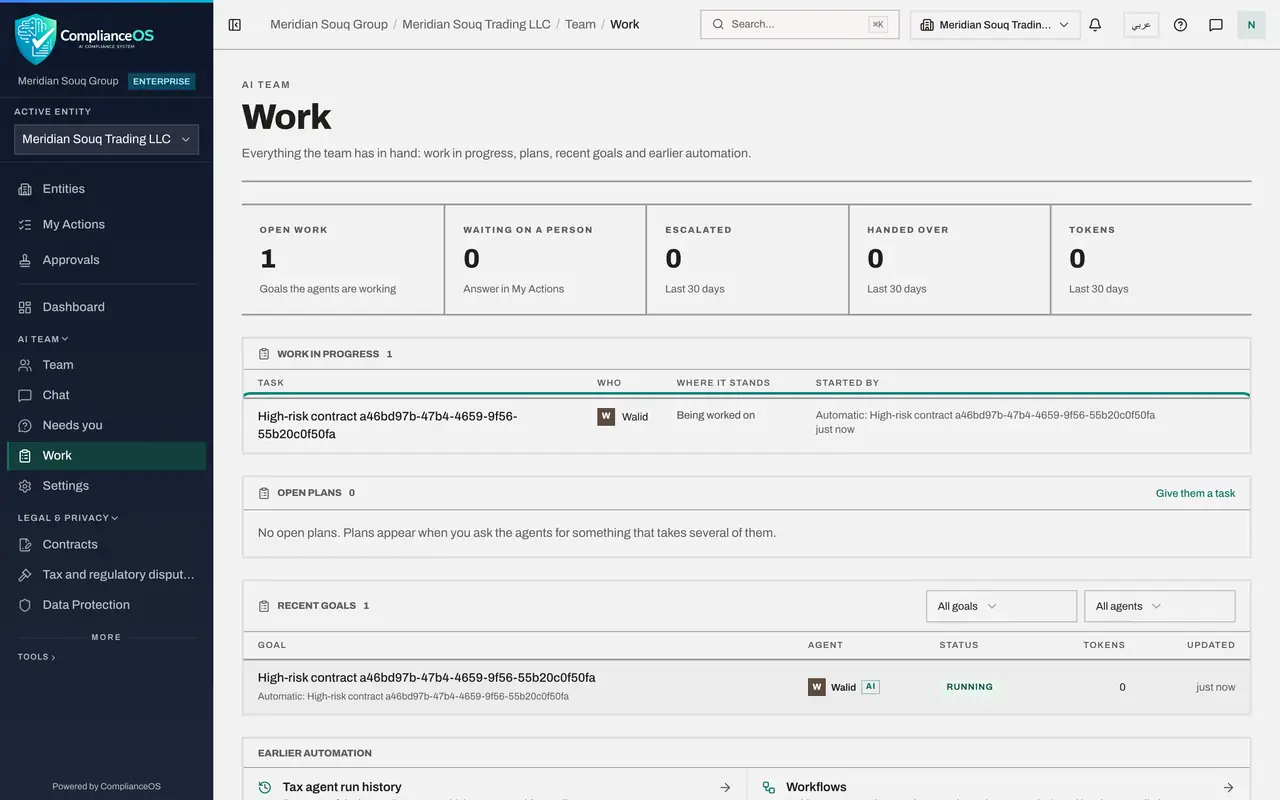
In the left menu, under AI team, open Work. A goal for the high-risk contract appears with Walid as the agent, started automatically.
- 4
Answer Walid under Needs you
Walid reads the contract's analysis against the clauses, and asks before every change. His go-aheads wait under Needs you, marked For: legal counsel: add two obligations the analysis missed, the minimum annual spend of 600,000 dirhams and the exclusivity on sea freight from China, each citing its clause; correct the insurance certificate deadline; and set the last date for the renewal notice. Check each against the clause and select Approve. Walid then asks who should review the contract; type that you will decide, and send.
- Select Approve
- Select Approve
- Select Approve
- Select Approve
- Type Your answer:
Please list it in your handover and leave the decision to me. - Select Send
- 5
Read Walid's risks
Select Walid's goal. Under Handover he explains the high score, then sets out the risks for counsel clause by clause: a take-or-pay minimum spend, exclusivity with no exit, automatic renewal unless notice is given by 2 August 2028, liability capped per kilogram so light, valuable cargo is under-covered, one-sided cost terms and missing clauses such as force majeure. He lists the fields the app's analysis overstated, which he left for your decision, and what he changed. Under For the checker to do: choose the reviewer, not the person who signed, and decide what to renegotiate.
How to check it worked
The Gulfline contract is on the Contracts page with its obligations and deadlines. On the Work page Walid's goal shows Handed over, and his handover lists the risks and what to negotiate or check before signing.
Common mistakes
- Writing to Walid as well after the upload. A high-risk contract already starts his work; a second request does it twice.
- Approving a corrected date without checking the clause it comes from. Walid quotes the clause; check it.
Check your understanding
1. Walid finds an obligation date that doesn't match the clause. What does it do?
- A.Changes it silently
- B.Asks for a go-ahead to correct it, quoting the clause
- C.Deletes the contract
- D.Ignores it
Show answer
Answer: B. Asks for a go-ahead to correct it, quoting the clause
Changes to records that matter go through a go-ahead.
2. Who signs off the contract?
- A.Walid
- B.Legal counsel
- C.The supplier
- D.The app
Show answer
Answer: B. Legal counsel
The agent reviews and reports; counsel decides.