Lesson 18 of 26
Jamal chases expiring visas and IDs
What you will be able to do
This lesson is for the HR director. Visas, Emirates IDs and labour cards expire, and a lapsed one brings fines. Jamal, the AI agent for the workforce, lists what is expiring or expired and asks you, in one question, where each renewal stands. You will ask Jamal to chase the renewals, answer its question and read the table it hands over.
Before you start
- You are signed in as the HR director of Meridian Souq Trading LLC.
- Some employees' documents expire within 30 days, and one has expired.
Steps
- 1
Ask Jamal about renewals
In the AI team's Chat for Meridian Souq Trading LLC, type @ and pick Jamal, and type: which of our staff visas, Emirates IDs and labour cards need renewing? Please chase them.
- Type Message to the AI team:
@Jam - Choose JJamalAIWorkforce & WPS
- Type Message to the AI team:
@Jamal which of our staff visas, Emirates IDs and labour cards need re…
- Type Message to the AI team:
- 2
Select Send
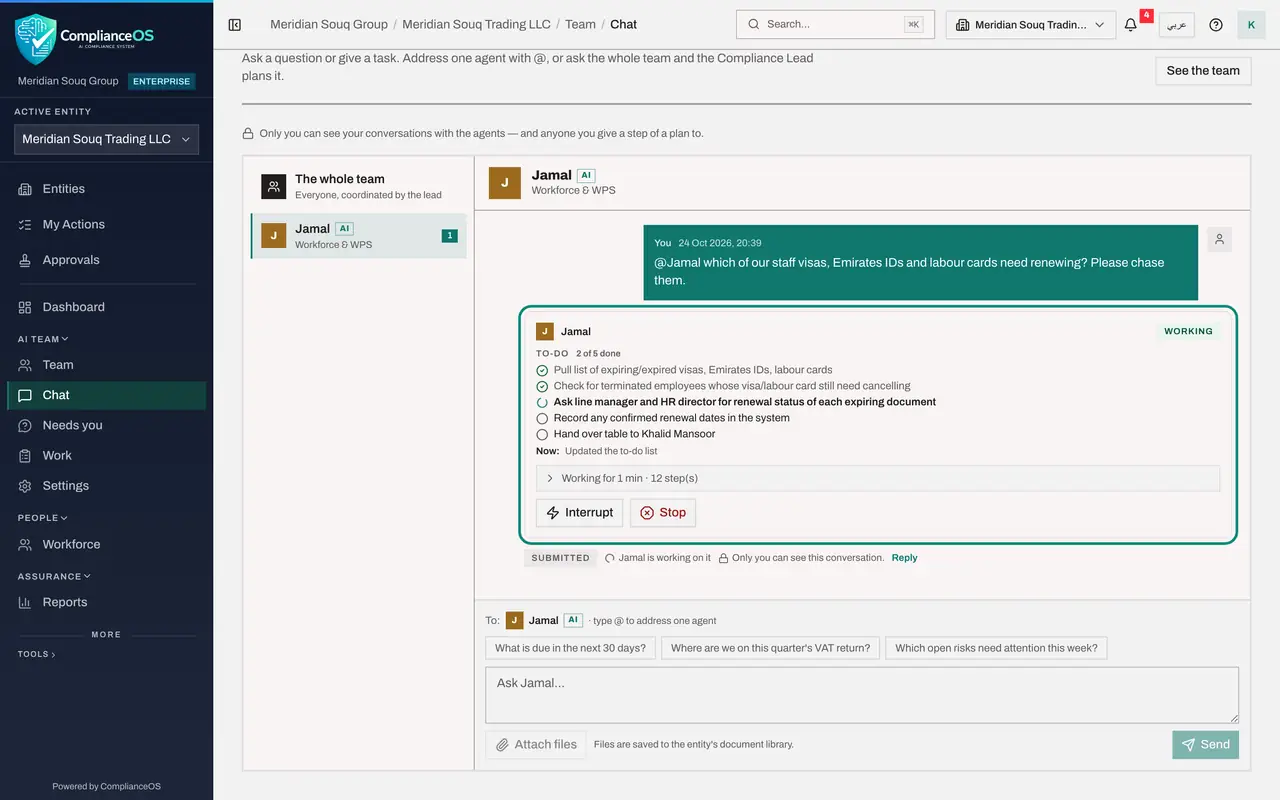
Select Send. Jamal's card under your message is marked Working.
- Select Send
- 3
Watch Jamal work
Jamal reads the documents that are expiring or expired. Its card shows what it is doing.
- 4
Answer Jamal's questions
Jamal asks where each renewal stands, numbered by employee: Arjun's residence visa, already expired; Nadia's visa and labour card, due in 16 days; and Sameer's Emirates ID. He sends the chase twice, once for the HR director and once for the line manager, and both reach you, because you asked for the work. Type your answers together in the box under each and select Send.
- Type Your answer:
1. Arjun's visa renewal was applied for on 8 October; GDRFA approval e… - Select Send
- Type Your answer:
1. Arjun's visa renewal was applied for on 8 October; GDRFA approval e… - Select Send
- Type Your answer:
- 5
Read Jamal's table
Jamal's green Answer has a table: three staff, four documents, each with its expiry date, the days left, who was asked and your answer. He explains that the line manager was not asked directly, because the app sent both requests to you; forward it if you want his confirmation. No records were changed: when a new document arrives, send Jamal the scan or new expiry date, and a checker approves the update.
- 6
Check the employees in Workforce
In the left menu, open Workforce and the tab Expiring documents. The same documents are listed with their expiry dates; this is where HR updates a renewal once it comes through.
- Select Expiring documents
How to check it worked
Jamal's green Answer has a table of the documents that need renewing, with the employee, the document, the expiry date and where the renewal stands from your answer. Nothing was changed in the employee records without your say-so.
Common mistakes
- Answering only some of the documents. Jamal numbers each one; answer them all by number in one reply.
- Giving an answer that doesn't match the record. Jamal checks your answer against the employee and asks again rather than guess.
Check your understanding
1. Jamal finds four documents to renew. How does it ask about them?
- A.Four separate e-mails
- B.One grouped question to the person who asked
- C.It doesn't ask
- D.It asks the employees directly
Show answer
Answer: B. One grouped question to the person who asked
Agents group their questions so you answer once.
2. A renewal comes through. When does Jamal update the employee's record?
- A.Straight away, on a guess
- B.When you send the new expiry date or scan, with a checker's approval
- C.Never
- D.Only at year end
Show answer
Answer: B. When you send the new expiry date or scan, with a checker's approval
Agents change records from evidence, and changes that matter go through an approval.