Lesson 21 of 26
Sultan works out what a regulatory change means
What you will be able to do
This lesson is for the compliance officer. ComplianceOS follows regulators' publications and matches each new one to the companies it may affect. A high-impact match raises an alert, and the alert is an event that starts Sultan, the AI agent for risk and regulation: he reads the change, says what it means for the company and hands the work it needs to the right colleague. You will find a new alert about VAT on loyalty points, follow Sultan's work and read his handover.
Before you start
- You are signed in as the compliance officer of Meridian Souq Trading LLC.
- Overnight, the regulatory feed matched a new (fictional, training) clarification on VAT for loyalty programme points to the company; Trading runs the Meridian Rewards programme.
Steps
- 1
Open Regulatory
In the left menu, open Regulatory. A new alert is at the top: a clarification on VAT for loyalty programme points and redemptions, marked high impact, effective from 1 January 2027. It is a training example. You don't need to send it to anyone: the alert has already started Sultan.
- 2
See Sultan's work on the Work page
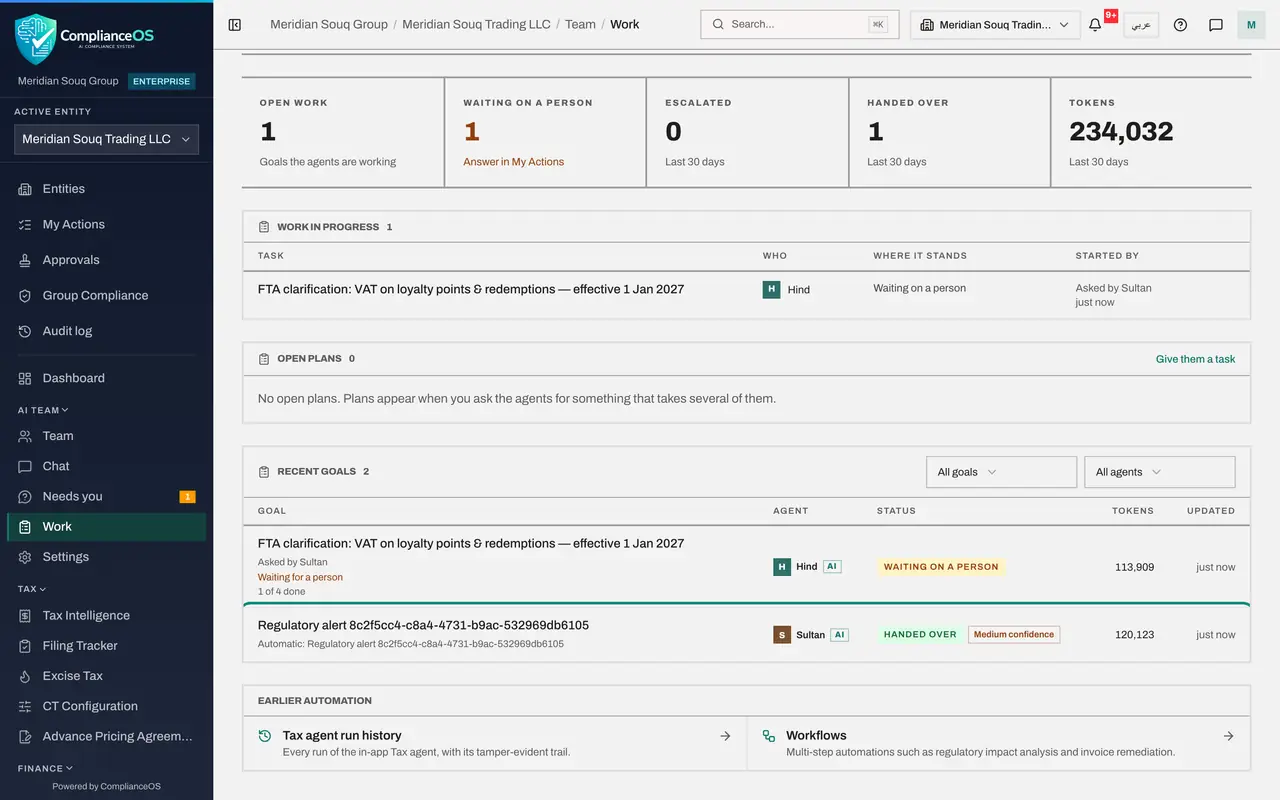
In the left menu, under AI team, open Work. A goal about the new alert appears with Sultan as the agent. Nobody wrote to him: the alert started it.
- 3
Approve Sultan's go-ahead and wait for his handover
Sultan reads the update, checks the company's profile and calendar, and syncs the risk register. Updating the risk entry for the change is a change, so he asks first: his go-ahead waits under Needs you, with the notes and a treatment plan for the risk. Read it and select Approve. When he is done his goal shows Handed over, and a goal for Hind, the VAT agent, appears beside it.
- Select Approve
- 4
Read Sultan's handover
Select Sultan's goal. Under Handover he says the alert is relevant: from 1 January 2027, redeeming loyalty points for goods carries VAT, and a points ledger must be reconciled to each return. He found no loyalty programme in the records, so whether it applies still needs confirming, and he handed that to Hind. He updated the risk register with a treatment plan due 31 December, and left the alert unread: marking it read is yours once the work is under way.
- 5
See the work Sultan handed to Hind
Close the panel. In the list, Hind's goal about the loyalty points clarification sits beside Sultan's: the hand-off between two agents. It shows Waiting on a person: Hind is asking the tax team, under Needs you, whether the company runs a loyalty programme.
How to check it worked
The alert is listed under Regulatory, still unread. On the Work page Sultan's goal shows Handed over, and a goal for Hind, the VAT agent, shows the work he handed to her. Sultan's handover says what changes, from when, and what is for you.
Common mistakes
- Expecting Sultan to mark the alert read or done. That stays with you once you have acted on it.
- Asking Sultan and Hind separately about the same change. Sultan hands VAT work to Hind himself; follow both on the Work page.
Check your understanding
1. What starts Sultan's work on the loyalty-points clarification?
- A.A high-impact regulatory alert for the company
- B.Your e-mail
- C.A yearly schedule
- D.Hind
Show answer
Answer: A. A high-impact regulatory alert for the company
A new high or critical regulatory alert is an event that starts the risk and regulatory agent.
2. The change is about VAT. What does Sultan do with that part?
- A.Ignores it
- B.Hands it to Hind, the VAT agent, and says so in his handover
- C.Files a VAT return
- D.Asks the tax authority
Show answer
Answer: B. Hands it to Hind, the VAT agent, and says so in his handover
Agents hand work to the colleague whose job it is, and you see both goals on the Work page.