Lesson 26 of 26
Dalia gathers evidence from the library
What you will be able to do
This lesson is for the compliance officer. Compliance tasks often need proof: a copy of the trade licence, the VAT certificate, a signed policy. Dalia, the AI agent for evidence, finds the documents in the library, reads them, puts them in the Evidence Vault against the right task and has each reviewed. You will attach a document the library doesn't have yet, ask Dalia to get the open evidence tasks ready, approve her go-aheads, and find the evidence waiting for your sign-off. Attach files gives the file to the agent you are writing to; Dalia, like Lina and Hind, can open what you attach.
Before you start
- You are signed in as the compliance officer of Meridian Souq Trading LLC.
- Several compliance tasks wait for evidence; most of the documents they need are in the document library, and you have the board-approved 2026 AML risk assessment as a PDF.
Steps
- 1
Ask Dalia to get the evidence ready
In the AI team's Chat for Meridian Souq Trading LLC, type @ and pick Dalia, the evidence agent, and type: please get the open evidence tasks ready for my sign-off. Most documents should be in our document library; I've attached the 2026 AML risk assessment the board approved, which isn't there yet.
- Type Message to the AI team:
@Dal - Choose DDaliaAIEvidence clerk
- Type Message to the AI team:
@Dalia please get the open evidence tasks ready for my sign-off. Most…
- Type Message to the AI team:
- 2
Attach the risk assessment
Under the message box, select Attach files and choose aml-risk-assessment-2026.pdf. It uploads to the document library and appears under the message box with its name; the small x would remove it.
- Select Attach files
- Upload file:
aml-risk-assessment-2026.pdf
- 3
Select Send
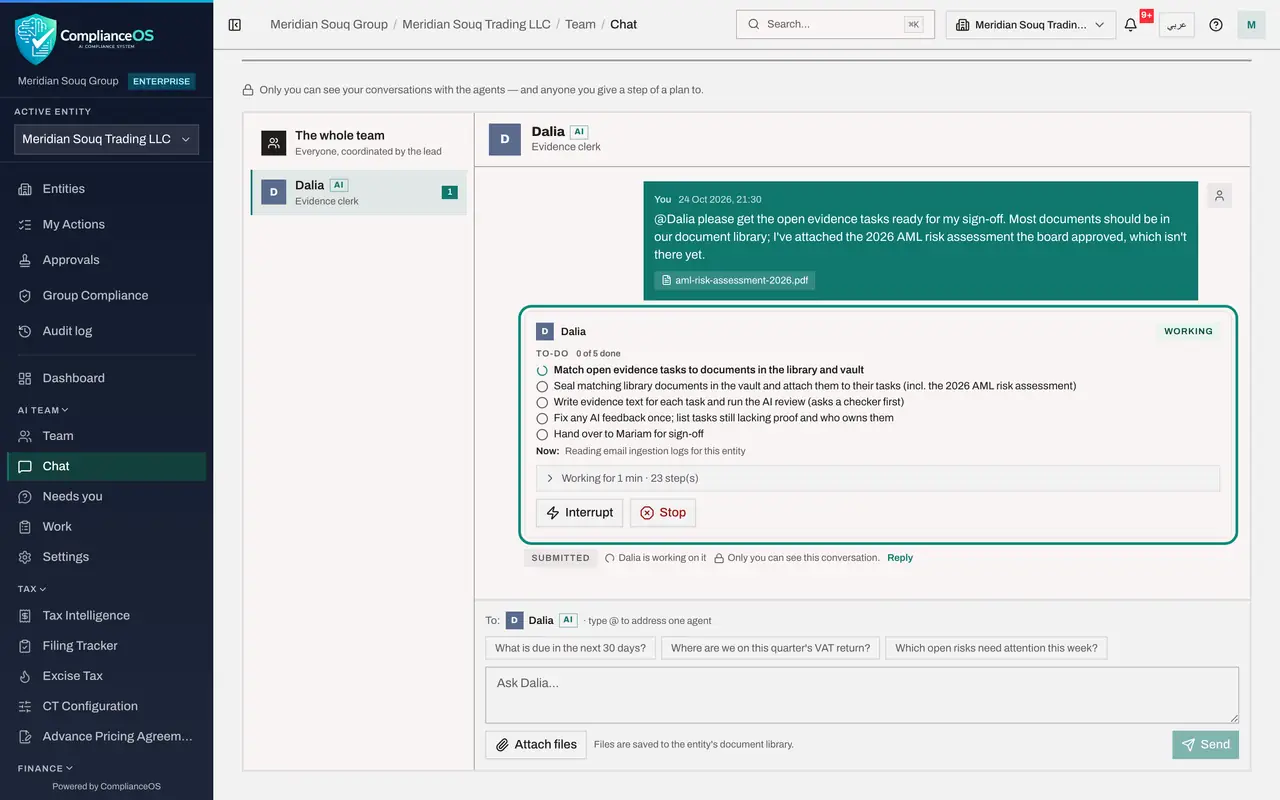
Select Send. Your message appears with the file, and Dalia's card under it is marked Working.
- Select Send
- 4
Read Dalia's to-do list
Dalia writes her to-do list: list the open evidence tasks, find and read the documents in the library and your attachment, put each in the Evidence Vault against its task, submit the evidence and have it reviewed by AI, and report back.
- 5
Approve Dalia's go-aheads and answer her question
Dalia asks before each change, so a series of go-aheads arrives: first, vault a library document as evidence for a task, one per document and task; then, trigger the AI review of the evidence she submitted. Check that each document belongs to its task and select Approve. For one task the library has no proof, the authority's acknowledgement of the owners' declaration; Dalia asks whether you have it. Type that you'll handle it, and send.
- Select Approve
- Select Approve
- Select Approve
- Select Approve
- Select Approve
- Select Approve
- Select Approve
- Select Approve
- Select Approve
- Select Approve
- Select Approve
- Select Approve
- Select Approve
- Select Approve
- Select Approve
- Select Approve
- Type Your answer:
Leave that one for me and list it as missing. - Select Send
- 6
Read Dalia's answer
Dalia's green Answer: four tasks passed the AI review and are ready for your sign-off, such as the AML training register and the MLRO appointment. Four failed, and Dalia says why, from what she read in the documents: three are marked as training copies, and one needs the authority's own acknowledgement. Your attachment was the same file already saved to the library when you attached it, so she sealed that copy rather than upload it twice. She did not reword evidence to force a pass. Everything she used is sealed in the Evidence Vault against its task.
- 7
See what Dalia read
On Dalia's card, select the line that says how long she worked. The steps show each document she vaulted with its task, the evidence she submitted, and a line where she summarised her work so far to keep going on a long job.
- Select Worked for 11 min · 79 step(s) · 24 change(s)
- 8
See the sealed documents in the Evidence Vault
In the left menu, open Evidence Vault. The summary counts the sealed records, and the newest at the top of the list are the documents Dalia vaulted, such as the VAT registration certificate, each sealed with its fingerprint and retention period. You sign off the evidence on each task; the ones that failed review are for you to decide.
How to check it worked
Evidence shows the tasks Dalia prepared, each with its document and AI review, waiting for your sign-off. Dalia's answer lists which passed, which failed and why, and what is still missing.
Common mistakes
- Signing off evidence because Dalia attached it. Open the document and check it is the right, current one.
- Expecting Dalia to find documents that were never uploaded. She lists what is missing; get it from its owner.
Check your understanding
1. How do you hand Dalia a document that isn't in the library yet?
- A.E-mail it to her
- B.Attach it to your message with Attach files
- C.Read it out in the chat
- D.Ask an administrator
Show answer
Answer: B. Attach it to your message with Attach files
Attached files are saved to the library and handed to the agent you are writing to.
2. How does Dalia know a library document is the right proof?
- A.By its file name only
- B.She reads it: dates, names and signatures
- C.She guesses
- D.The owner tells her
Show answer
Answer: B. She reads it: dates, names and signatures
Agents can read PDFs and other documents and check them before using them.
3. Who signs off the evidence?
- A.Dalia
- B.The compliance officer
- C.The auditor
- D.Nobody
Show answer
Answer: B. The compliance officer
The agent prepares; a person signs off.