Lesson 7 of 26
Rania starts by herself when a licence is registered
What you will be able to do
This lesson is for the compliance officer. Some work starts without a message: when something happens in ComplianceOS, the agent whose job it is starts on it by itself. Registering a free-zone licence is one of those events: Rania, the AI agent for free zones, sets up what the company now owes the free-zone authority. You will register the Jebel Ali Free Zone licence of Meridian Souq Manufacturing FZE, see Rania's work appear on the Work page, and read her handover.
Before you start
- You are signed in as the compliance officer, with access to Meridian Souq Manufacturing FZE.
- No free-zone licence is registered for the company yet.
Steps
- 1
Open Free Zone and select Register License
Make sure the entity at the top is Meridian Souq Manufacturing FZE. In the left menu, open Free Zone, and select Register License at the top right. The Register License form opens.
- Select Register License
- 2
Fill in the licence
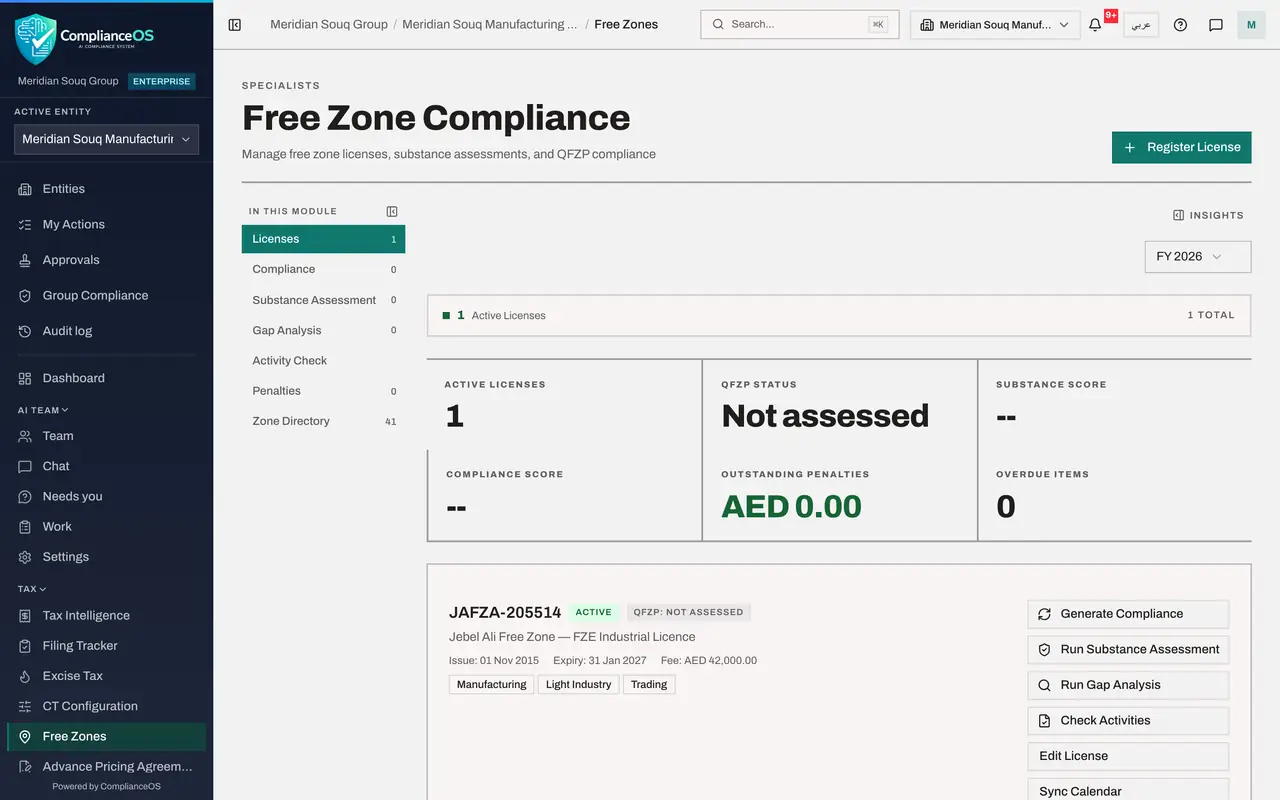
Under Free Zone, choose JAFZA, the Jebel Ali Free Zone. Type the licence number JAFZA-205514 and the type FZE Industrial Licence. Enter the issue date, 1 November 2015, and the expiry date, 31 January 2027, and the annual fee of 42,000 dirhams. Under Permitted activities, add the licence's three activities: Manufacturing, Light Industry and Trading.
- Select Select zone
- Choose JAFZA - Jebel Ali Free Zone
- Type e.g. DIFC-2024-001:
JAFZA-205514 - Type e.g. Commercial:
FZE Industrial Licence - Type issue_date:
2015-11-01 - Type expiry_date:
2027-01-31 - Type e.g. 50000:
42000 - Type Or add another licence activity…:
Manufacturing - Select Add
- Type Or add another licence activity…:
Light Industry - Select Add
- Type Or add another licence activity…:
Trading - Select Add
- 3
Select Register License
Select Register License at the foot of the form. A message confirms it, and the licence appears in the list. That is all you do: registering a licence is an event that starts Rania's work by itself.
- Select Register License
- 4
See Rania's work on the Work page
In the left menu, under AI team, open Work. Within a minute a task appears under Work in progress: New free-zone licence JAFZA-205514, with Rania, started automatically. Below, under Recent goals, the same goal shows Running, what Rania is doing now and her to-do count. Nobody wrote to her: the event started it.
- 5
Wait for Rania's handover
Rania sets up the obligations that come with the licence, puts them on the compliance calendar, and checks the company's activities against the licence. A minute or two later her goal shows Handed over. If she needs you, her question waits under Needs you.
- 6
Read the handover
Select Rania's goal. Under Handover, Rania says she created six obligations from the zone's rules, the annual return, activity report and audit submission for 2025 and 2026, and put them and the licence expiry on the calendar. The activity check is low risk, with one point to confirm about warehousing. Three 2025 items already show as overdue, and nothing shows whether they were filed outside ComplianceOS. The penalty calculator gave zero for each, which doesn't match the zone's published fees, so Rania works out the exposure from those instead. Under For the checker to do are your steps: confirm whether the 2025 items were filed and upload the proof.
How to check it worked
Free Zone lists the licence JAFZA-205514. On the Work page, Rania's goal about the new licence shows Handed over, and its handover lists the obligations she set up, what is overdue and what is for you to check.
Common mistakes
- Writing to Rania as well after registering the licence. The event already started her work; a second request does it twice.
- Leaving out the licence's activities. Rania checks the company's activities against them; without them she can't.
- Assuming the obligations are final. Check the dates in the handover against the authority's letter.
Check your understanding
1. You register a free-zone licence. What starts Rania's work?
- A.A message you send her
- B.The event itself: a licence registered
- C.A weekly schedule only
- D.Nothing; she waits to be asked
Show answer
Answer: B. The event itself: a licence registered
Some events start the right agent by itself; you see the work on the Work page.
2. Where do you follow work that started by itself?
- A.On the Work page of the AI team
- B.In the browser history
- C.Only in e-mail
- D.Nowhere
Show answer
Answer: A. On the Work page of the AI team
Every goal, whoever started it, is on the Work page with its steps and handover.