Lesson 1 of 26
Majid projects a free-zone company's corporate tax
What you will be able to do
This lesson is for the tax manager. Majid, the AI agent for corporate tax, can project a year's corporate tax from the records as they stand and test a free-zone company against the conditions for the 0% rate. You will ask Majid for the 2026 projection of Meridian Souq E-Commerce FZ-LLC, follow its to-do list while it works, read its answer and open the step-by-step record of what it did. Majid prepares a draft; nothing is filed, and a person decides.
Before you start
- You are signed in as the tax manager, with access to Meridian Souq E-Commerce FZ-LLC.
- The company's 2026 transactions are in Tax Intelligence, and its Dubai Internet City licence is registered.
Steps
- 1
Ask Majid for the projection
Make sure the entity at the top of the page is Meridian Souq E-Commerce FZ-LLC. In the left menu, under AI team, choose Chat, type @ and pick Majid, the corporate tax agent. Then type your request in plain words: please project our 2026 corporate tax for Meridian Souq E-Commerce FZ-LLC and tell me whether we still qualify for the 0% free-zone rate. Tell me what is still missing before the figures can be relied on.
- Type Message to the AI team:
@Maj - Choose MMajidAICorporate tax & transfer pricing
- Type Message to the AI team:
@Majid please project our 2026 corporate tax for Meridian Souq E-Comme…
- Type Message to the AI team:
- 2
Select Send
Select Send. Your message appears on the right, and under it a card for Majid, marked Working. Majid is an AI agent: it reads the company's records through ComplianceOS with only the permissions it was given.
- Select Send
- 3
Watch Majid's card
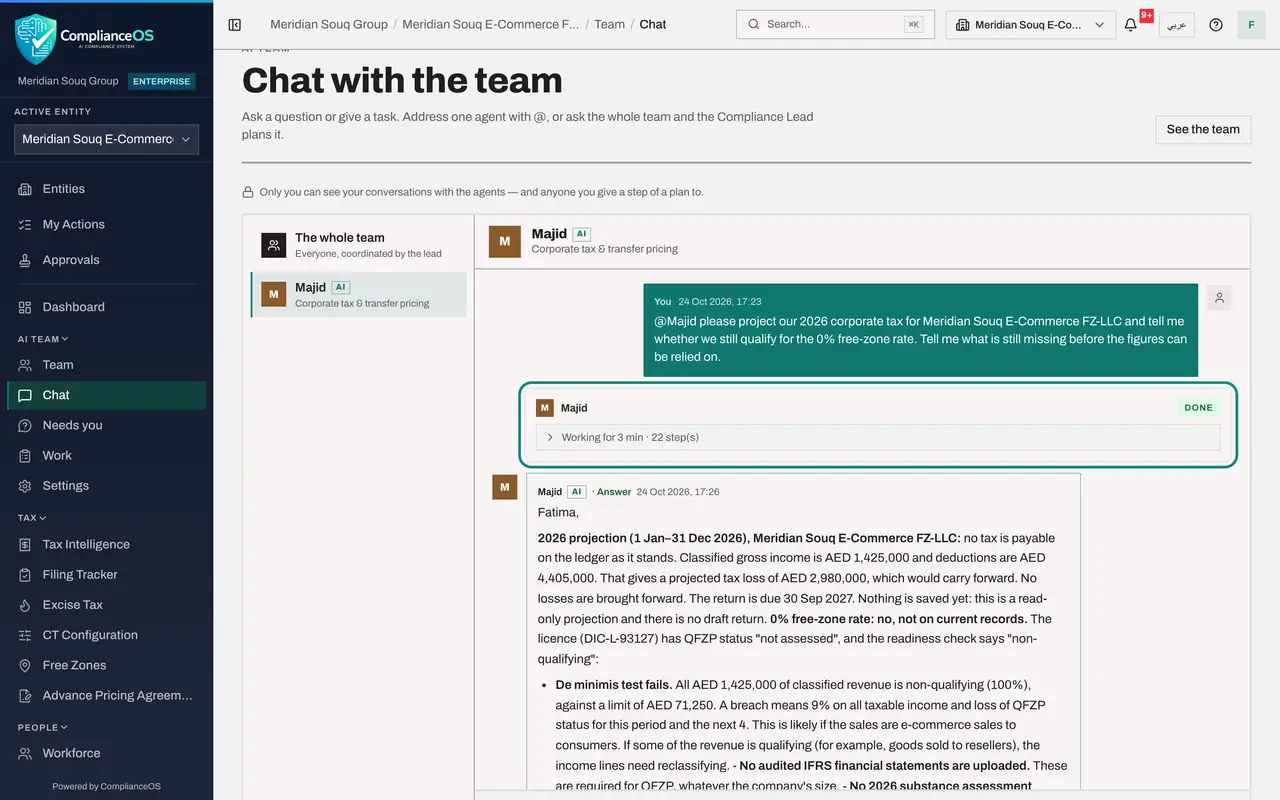
Majid's card under your message shows what it is doing. For a projection it goes straight to the records: the corporate tax position for 2026, the free-zone readiness check and the ledger lines. The line under the card counts how long it has worked and how many steps it took. You can leave the page; the work carries on. After about three minutes the card shows Done.
- 4
Read Majid's answer
Majid's answer appears in green, marked Answer. On the ledger as it stands, 2026 shows a tax loss, so no tax is payable, and Majid says this is a read-only projection: nothing was saved. On the 0% free-zone rate the answer is no, not on the current records: all the classified income counts as non-qualifying, far above the small limit allowed, and audited accounts and a substance assessment are missing. Majid then lists what is missing before the figures can be relied on, such as 44 unclassified lines and the related-party fees, and what you need to do.
- 5
Open the step-by-step record
On Majid's card, select the line that says how long Majid worked and how many steps it took. The list opens with each step in words: reading the corporate tax position for 2026, the free-zone status and readiness, the related parties and the ledger lines, and the calculations it ran. Near the end, Majid checked its own handover and revised it before handing over. Each step opens to its result and the records it read.
- Select Worked for 3 min · 23 step(s)
- 6
Check the figures in Corporate Tax Return
An answer is a report; the record is in the module. In the left menu, under Tax, open Corporate Tax Return. No 2026 draft is here yet, as Majid said: its projection only read the records. Once the open lines are settled, you can ask Majid to compute the draft, or select Compute Return yourself. Filing stays with a person.
How to check it worked
The conversation with Majid ends with a green Answer and the status Done. Majid's card shows its to-do list with every item done, and Tax, Corporate Tax Return shows the 2026 draft Majid computed. Nothing has been filed.
Common mistakes
- Relying on a projection while lines are still unclassified or unreviewed. Majid says which lines it left out; settle them first.
- Treating the free-zone answer as final. The 0% rate depends on facts only you hold, such as staff and premises in the zone; give Majid those facts or check them yourself.
- Expecting Majid to file. Agents prepare drafts; filing is done by a person.
Check your understanding
1. Where do you see what Majid plans to do and how far it has got?
- A.In an e-mail
- B.In its to-do list on its card under your message
- C.Only in the audit log
- D.Nowhere until it finishes
Show answer
Answer: B. In its to-do list on its card under your message
The to-do list on the agent's card shows each item: to do, doing now, done or blocked.
2. Majid says some lines were left out of the projection. What does that mean?
- A.The figures are final
- B.The figures are a projection from the records as they stand; the open lines must be settled first
- C.Majid has deleted them
- D.The return has been filed without them
Show answer
Answer: B. The figures are a projection from the records as they stand; the open lines must be settled first
A projection is only as good as the records it reads. Settle the open lines, then ask again.