Lesson 9 of 26
Nasser screens new customers, and you change the brief
What you will be able to do
This lesson is for the AML officer. Before a new business customer can trade, it and its owners are screened against the sanctions lists and for politically exposed persons. Nasser, the AI agent for financial crime, screens each customer and owner by name and lists what is still missing for onboarding. Halfway through, one customer pulls out: you will use Interrupt to tell Nasser to leave it out, without stopping the rest of the work.
Before you start
- You are signed in as the AML officer of Meridian Souq Trading LLC.
- Five new customers are under Sanctions and AML, customer due diligence, with their owners in the notes; none has been screened yet.
Steps
- 1
Ask Nasser to screen the new customers
In the AI team's Chat for Meridian Souq Trading LLC, type @ and pick Nasser, the financial crime agent, and type: please screen our five new customers and their owners, and tell me what is still needed before we can finish onboarding them.
- Type Message to the AI team:
@Nas - Choose NNasserAIFinancial crime
- Type Message to the AI team:
@Nasser please screen our five new customers and their owners, and tel…
- Type Message to the AI team:
- 2
Select Send
Select Send. Nasser's card under your message is marked Working.
- Select Send
- 3
Read Nasser's to-do list
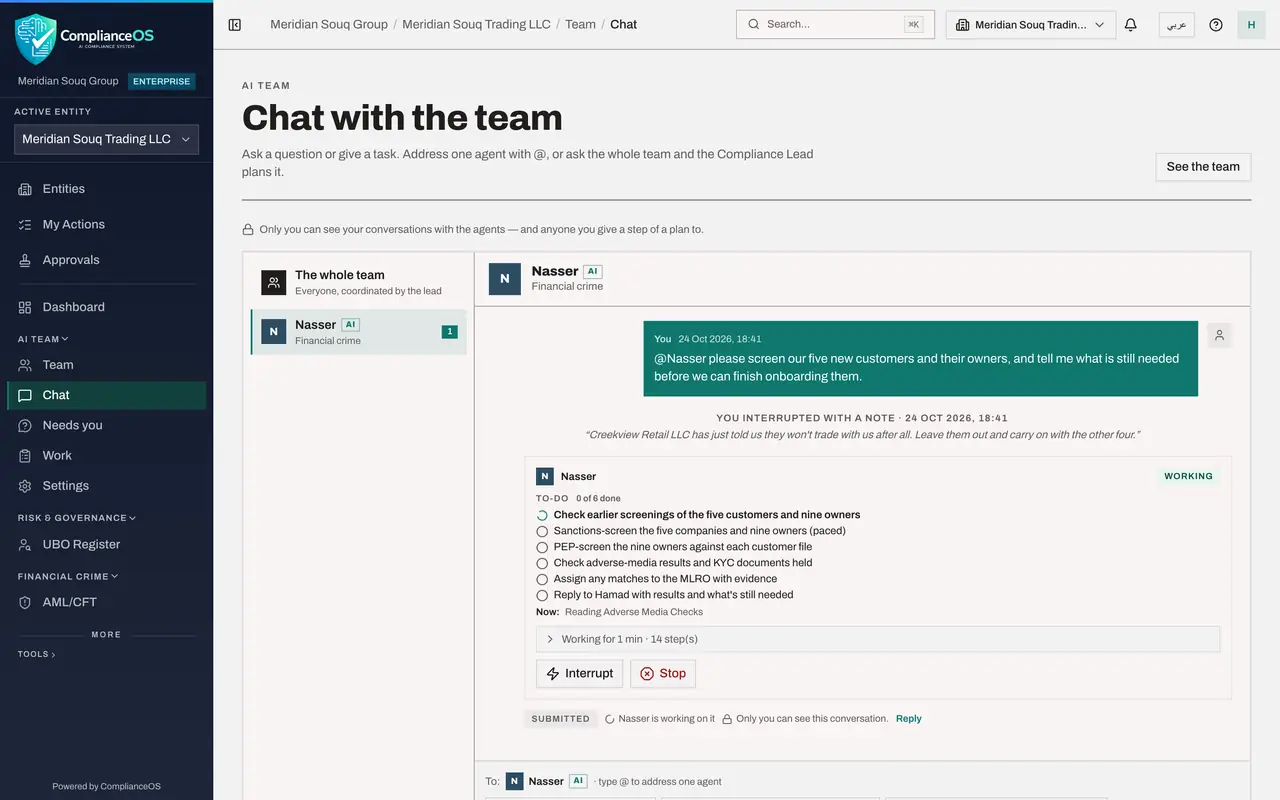
Nasser writes a to-do list of six items: check earlier screenings of the five customers and nine owners, screen the companies and owners against the sanctions lists, screen the owners for politically exposed persons, check adverse media and the KYC documents held, pass any match to the MLRO, and reply to you. The line Now: says what it is reading.
- 4
Interrupt Nasser with a note
Creekview Retail has just told you it won't trade with you. On Nasser's card, select Interrupt. A box opens: type Creekview Retail LLC has just told us they won't trade with us after all. Leave them out and carry on with the other four. Then select Send now. Above Nasser's card a line says You interrupted with a note, with your words. Nasser reads it before its next step, and the rest of the work carries on.
- Select Interrupt
- Type Urgent note for Nasser:
Creekview Retail LLC has just told us they won't trade with us after a… - Select Send now
- 5
Read Nasser's answer
While it works, Nasser asks four go-aheads, one per customer, to add the screening results and the open points to the customer's record; read each and select Approve. Then its green Answer: the four remaining customers and their seven owners were screened, with no sanctions or PEP match, and Creekview Retail was left out as you asked. Nasser notes that two owners are from countries on the FATF grey list and suggests the MLRO looks again at one customer's low risk rating. None of the four can be finished yet: the KYC documents are missing, the owners should be screened again with dates of birth, and verification is the MLRO's decision.
- 6
See the screenings in the record
On Nasser's card, select the line that says how long it worked. Each screening is a step, with the name screened and the result, and your note is there where Nasser read it. Names are partly hidden here; the person who asked can show them.
- Select Worked for 5 min · 75 step(s) · 18 change(s)
- 7
Check the screenings in AML/CFT
In the left menu, under Financial crime, open AML/CFT; it opens on Screening. The counts include the screenings Nasser ran, all cleared, and PEP screenings shows the seven owners. Under CDD Records the five customers are still pending verification: deciding their onboarding stays with you.
How to check it worked
Nasser's green Answer gives the screening results for the four customers and their owners, leaves out Creekview Retail LLC, and lists what is still needed before onboarding; each customer record has Nasser's note, added with your go-ahead. No customer is marked verified: that is your decision.
Common mistakes
- Stopping the agent to change one detail. Interrupt sends a note it reads first, and the rest of the work carries on.
- Treating a clear screening as a finished onboarding. Documents and checks still have to be complete; Nasser lists what is missing.
- Expecting Nasser to mark a customer verified. Verification is the AML officer's decision.
Check your understanding
1. A customer pulls out while Nasser is screening. What do you do?
- A.Stop Nasser and start again
- B.Select Interrupt and send a note to leave that customer out
- C.Wait and delete the result
- D.Ask the administrator
Show answer
Answer: B. Select Interrupt and send a note to leave that customer out
Interrupt reaches the agent before its next step; it changes course and carries on.
2. Who marks a new customer as verified?
- A.Nasser
- B.The AML officer, after checking
- C.The system, automatically
- D.The customer
Show answer
Answer: B. The AML officer, after checking
Agents screen and report; the person decides.