Lesson 23 of 26
Amal gets September ready to close
What you will be able to do
This lesson is for the finance manager. Closing a month means checking that everything is in: journals posted, bank lines matched, accruals made. Amal, the AI agent for finance, runs the close checklist, prepares what is missing for your approval and tells you what is left. You will ask Amal to get September ready, see her hand part of the work to Hind, and read what is left for you. You close the period yourself.
Before you start
- You are signed in as the finance manager of Meridian Souq Trading LLC.
- September 2026 is open, with a draft journal, some unmatched bank lines and a missing month-end accrual.
Steps
- 1
Ask Amal to prepare September
In the AI team's Chat for Meridian Souq Trading LLC, type @ and pick Amal, the finance agent, and type: please get September 2026 ready to close for Meridian Souq Trading LLC and tell me what's left for me.
- Type Message to the AI team:
@Ama - Choose AAmalAIFinance controller
- Type Message to the AI team:
@Amal please get September 2026 ready to close for Meridian Souq Tradi…
- Type Message to the AI team:
- 2
Select Send
Select Send. Amal's card under your message is marked Working.
- Select Send
- 3
Read Amal's to-do list
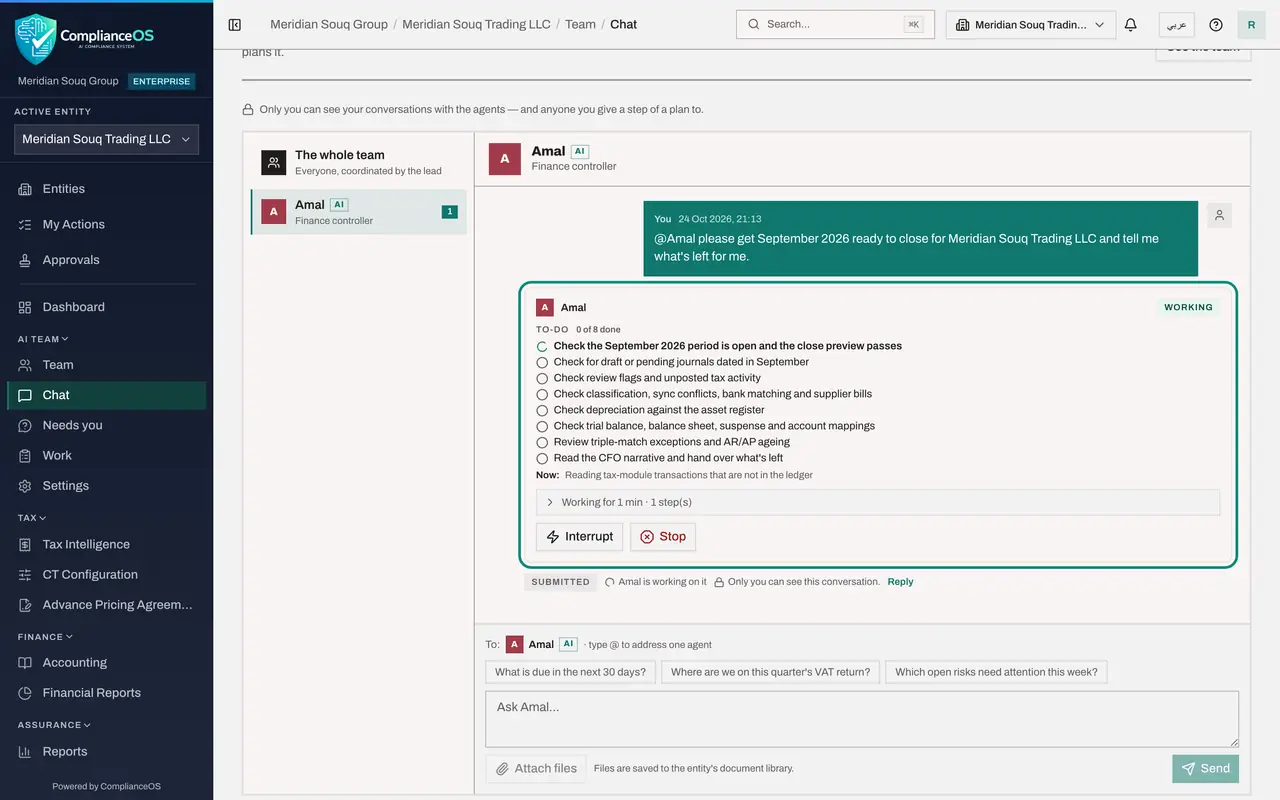
Amal writes the close checklist as her to-do list, eight items: the period and the close preview, draft journals, review flags, classification and bank matching, depreciation, the trial balance and balance sheet, matching exceptions and ageing, and the hand-over. Notes under some items show what she found.
- 4
See Amal hand work to Hind
None of September's transactions are classified, so nothing can be posted. Classifying is Hind's job, so Amal asks her: a second card appears under your message, for Hind, with her own to-do list for the 27 September lines. The two agents work side by side, and each card shows its own progress.
- 5
Read what is left for you
Amal's green Answer: September can't be closed yet, and she posted or submitted nothing. The blockers, with the records behind each: a draft accrual journal prepared by someone else, which its preparer must submit and you approve; all 27 September transactions unclassified, now with Hind; no bank lines matched; two supplier bills not verified; and depreciation never posted, about 5,900 dirhams for September alone. She also lists what is in order, and warns that the app's month commentary is misleading while nothing is posted.
- 6
Check in Accounting
In the left menu, under Finance, open Accounting. Its sections match Amal's checklist: Supplier Bills with the two unverified bills, Banking with 79 unmatched lines, Journals with the draft accrual, Fixed Assets, and Periods, where September is still open. You close it there once the blockers are cleared.
How to check it worked
Amal's green Answer lists the blockers with the records behind each and what is in order, and a card for Hind shows the classification she was asked to do. The period is still open: closing it is yours.
Common mistakes
- Closing the period because the agent said it is ready. Read what is left first.
- Approving a journal without checking the account and the amount.
Check your understanding
1. Who closes September?
- A.Amal
- B.The finance manager
- C.The bank
- D.It closes by itself
Show answer
Answer: B. The finance manager
Agents prepare the close; a person approves the journals and closes the period.
2. September's transactions are unclassified. What does Amal do?
- A.Classifies them herself
- B.Asks Hind, whose job it is, and says so
- C.Ignores them
- D.Closes the month anyway
Show answer
Answer: B. Asks Hind, whose job it is, and says so
Agents hand work to the colleague whose job it is; you see both cards in the conversation.