Lesson 3 of 26
Badr projects the tax group's corporate tax
What you will be able to do
This lesson is for the tax manager of the group. Meridian Souq Holdings, Trading and Hospitality form one corporate tax group, which files one return. Badr, the AI agent for group tax, builds the group projection from each member's corporate tax figures and takes out the transactions between members. You will ask Badr for the 2026 group projection from the parent company, follow its work, read its answer and look at the step-by-step record.
Before you start
- You are signed in as the tax manager, with access to Meridian Souq Holdings LLC, the parent of the tax group.
- The tax group of Holdings, Trading and Hospitality is set up under Tax, Tax Groups.
Steps
- 1
Ask Badr on the parent company
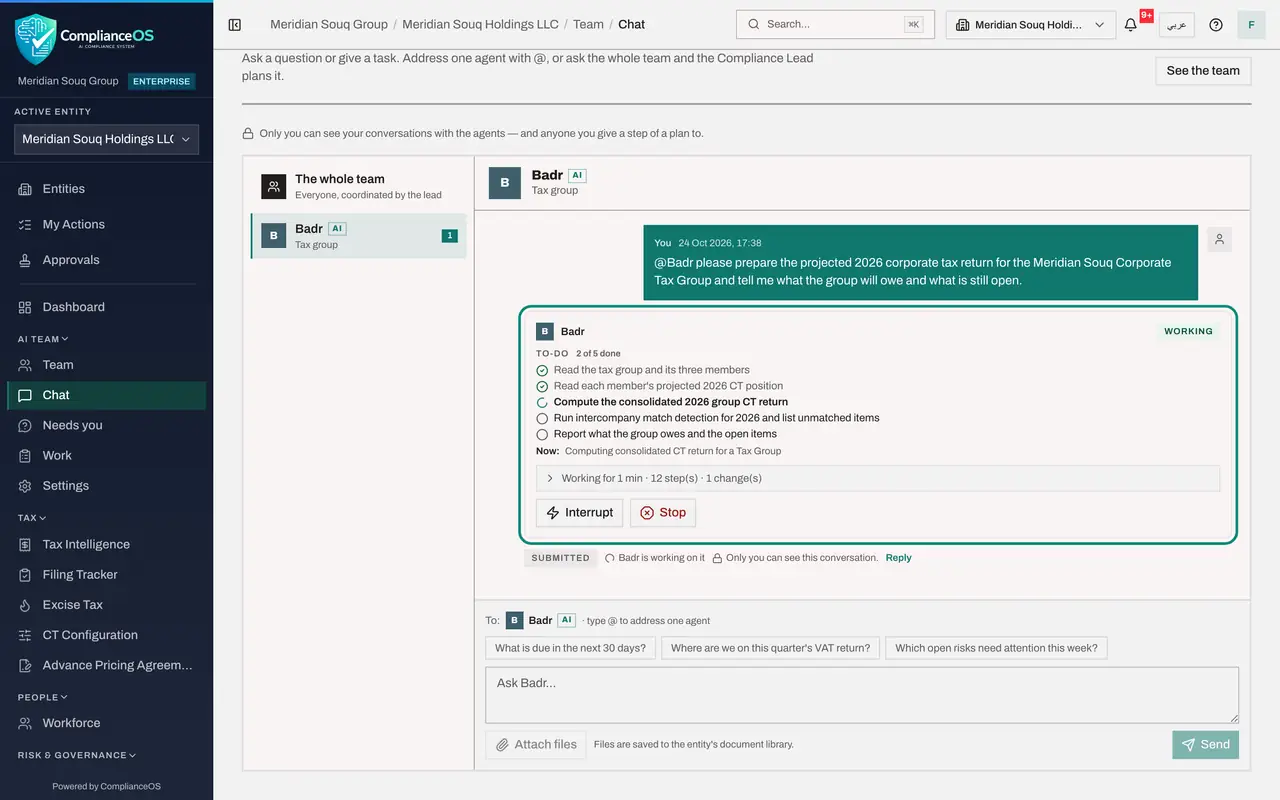
Make sure the entity at the top is Meridian Souq Holdings LLC, the parent of the tax group. In the AI team's Chat, type @ and pick Badr, the group tax agent, then type: please prepare the projected 2026 corporate tax return for the Meridian Souq Corporate Tax Group and tell me what the group will owe and what is still open.
- Type Message to the AI team:
@Bad - Choose BBadrAITax group
- Type Message to the AI team:
@Badr please prepare the projected 2026 corporate tax return for the M…
- Type Message to the AI team:
- 2
Select Send
Select Send. Your message appears on the right, and Badr's card under it is marked Working.
- Select Send
- 3
Follow Badr's to-do list
Badr writes a to-do list of five items: read the tax group and its three members, read each member's projected 2026 corporate tax position, compute the group return, look for transactions between members that should cancel out, and report back. The ticks fill in as it works; a group projection takes several minutes.
- 4
Read Badr's answer
Badr's green Answer gives the draft group return for 2026, saved as a draft and not filed: about 569,000 dirhams of tax on the group's figures as they stand. It shows each member's own projection, and explains why the group draft is higher: it ties part of the members' expenses to the dividends Trading pays Holdings. Badr asks you to decide that treatment, and lists what is still open: unclassified lines in all three companies, intercompany matches waiting to be confirmed, and the audited group accounts.
- 5
See how Badr got there
On Badr's card, select the line that says how long it worked. The steps open in words: running the intercompany matching, pausing while it ran in the background, reading the matches, computing the consolidated return for the tax group, and the calculations it checked. Each step opens to its result and the records it read or changed.
- Select Working for 9 min · 57 step(s) · 3 change(s)
- 6
Open CT Tax Groups
To review the group draft yourself, open CT Tax Groups, from Tax Intelligence. The page explains that a tax group spans several companies, so it needs a role held for the whole organisation, not for one entity. Your role here is for single entities, so ask an administrator to give you the Tax manager role at organisation level, under Settings, Access. Badr's draft waits there for you.
How to check it worked
The conversation with Badr ends with a green Answer that gives the group's draft 2026 corporate tax, each member's own figures, the points for you to decide and what is still open. The draft is saved, not filed.
Common mistakes
- Asking from a member company. Ask Badr on the parent company, where the tax group is set up.
- Adding up the members' figures yourself. Transactions between members, such as management fees, cancel out in a group return; Badr takes them out.
- Reading the projection as a filed figure. It is projected from the records as they stand.
- Expecting to review a group return with a role for one entity. Tax groups need your role at organisation level.
Check your understanding
1. Why does a group return take out transactions between members?
- A.They are not taxable anywhere
- B.Within one tax group they are income for one member and a cost for another, so they cancel out
- C.The agent cannot read them
- D.They are filed separately by each member
Show answer
Answer: B. Within one tax group they are income for one member and a cost for another, so they cancel out
A tax group is taxed as one; what members charge each other nets to nothing.
2. From which company do you ask Badr for the group projection?
- A.Any member
- B.The parent company, where the tax group is set up
- C.Each member in turn
- D.None: Badr works on its own schedule
Show answer
Answer: B. The parent company, where the tax group is set up
Badr works on the parent's tax group and reads each member's figures from there.