Lesson 6 of 26
Change your mind: stop an agent
What you will be able to do
This lesson is for the tax manager. You can stop an agent at any time. Stop tells it to finish the step it is on and hand over what it has done so far; nothing it already did is lost, and it starts nothing new. You will ask Hind, the VAT agent, to classify Meridian Souq Hospitality LLC's third quarter, then remember that the accountant is already doing it, stop Hind and look at what it had done.
Before you start
- You are signed in as the tax manager, with access to Meridian Souq Hospitality LLC.
- Hospitality's July to September transactions are imported but not yet classified.
Steps
- 1
Ask Hind to classify the quarter
Make sure the entity at the top is Meridian Souq Hospitality LLC. In the AI team's Chat, type @ and pick Hind, the VAT agent, and type: please classify Hospitality's Q3 2026 transactions and compute the Q3 return.
- Type Message to the AI team:
@Hi - Choose HHindAIVAT preparer
- Type Message to the AI team:
@Hind please classify Hospitality's Q3 2026 transactions and compute t…
- Type Message to the AI team:
- 2
Select Send
Select Send. Your message appears on the right, and Hind's card under it is marked Working.
- Select Send
- 3
See Hind start
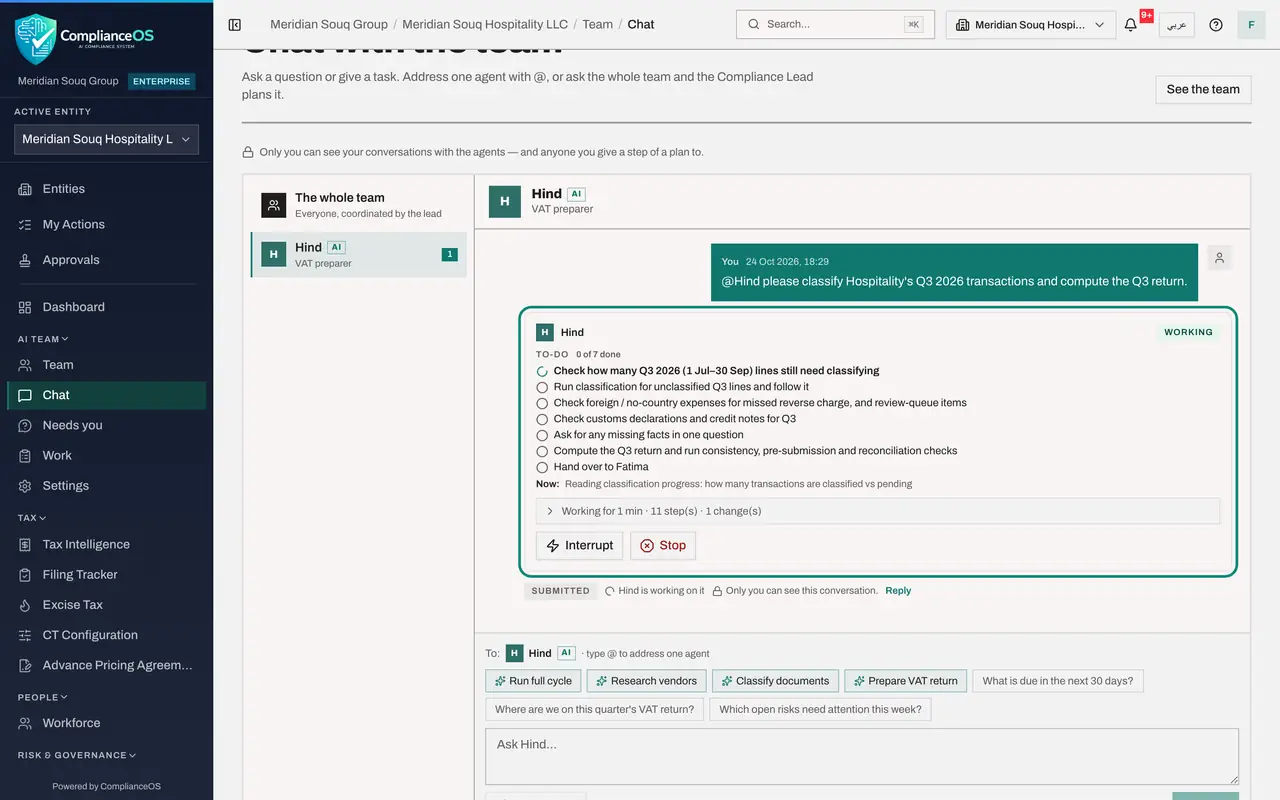
Hind writes its to-do list: check the quarter, classify the lines, compute the return. Under the card are two buttons for the person who asked: Interrupt, to send Hind an urgent note, and Stop.
- 4
Select Stop
You remember that Ahmed, the accountant, is already classifying Hospitality's quarter himself. On Hind's card, select Stop. A box asks you to confirm: Hind stops before its next step and hands over what it has done so far. Select Stop.
- Select Stop
- Select Stop
- 5
See that Hind has stopped
Above the card a line says You stopped an agent, with the time. Hind's card now shows Stopped, and the line under the to-do list says who stopped it and that the work done so far is kept. Hind stopped on its first item, so all seven items are still open on its list.
- 6
See what Hind did before it stopped
On Hind's card, select the line that says how long it worked, the steps it took and the one change it made. The list opens with every step up to the moment you stopped it: Hind read the VAT periods and the classification progress, then started the app's batch classification of the quarter's lines, and was waiting for it when you stopped it. That batch is a job in the app, not the agent: it carries on, so tell Ahmed, who can see the result in Tax Intelligence.
- Select Worked for 1 min · 14 step(s) · 1 change(s)
How to check it worked
Hind's card shows Stopped, with a line saying who stopped it and that the work done so far is kept; the items Hind had not started are still open on its list, and its step-by-step record shows what it did before it stopped.
Common mistakes
- Closing the browser to stop an agent. Its work runs on the server; use Stop.
- Expecting Stop to undo the work already done. It stops the agent's next step; changes already made, and app jobs it already started, stay. Its step-by-step record shows them.
- Using Stop when you only want to change the instructions. Interrupt sends the agent a note it reads first, and it carries on.
Check your understanding
1. What happens when you select Stop on an agent's card?
- A.Everything it did is undone
- B.It stops before its next step and hands over what it has done
- C.It carries on but quietly
- D.The administrator is asked to approve the stop
Show answer
Answer: B. It stops before its next step and hands over what it has done
Stop ends the work and keeps what was done, with a handover that says so.
2. You want the agent to carry on, but differently. Which do you use?
- A.Stop
- B.Interrupt, with a note
- C.Delete the conversation
- D.Log out
Show answer
Answer: B. Interrupt, with a note
Interrupt sends an urgent note the agent reads before anything else; Stop ends the work.