Lesson 8 of 10
What you see without access to tax records
What you will be able to do
This lesson is for everyone outside the finance and tax team, and for the people who support them. A member of staff with no tax role cannot see customs declarations at all. You will see what the left menu looks like without tax access, what the page says if a colleague sends you a link to it, and who it tells you to ask.
Before you start
- You are signed in as Aisha Farouk, an employee whose only role is self-service access to her own staff record.
- A colleague in the finance team has sent her the web address of the Customs Declarations page.
Steps
- 1
Look at the left menu
Aisha's left menu is short: Entities, My Actions, Approvals, Dashboard, Workforce and a few tools. There is no Tax group and no Tax Intelligence, so there is no way to reach customs declarations from the menu.
- 2
Open the address a colleague sent
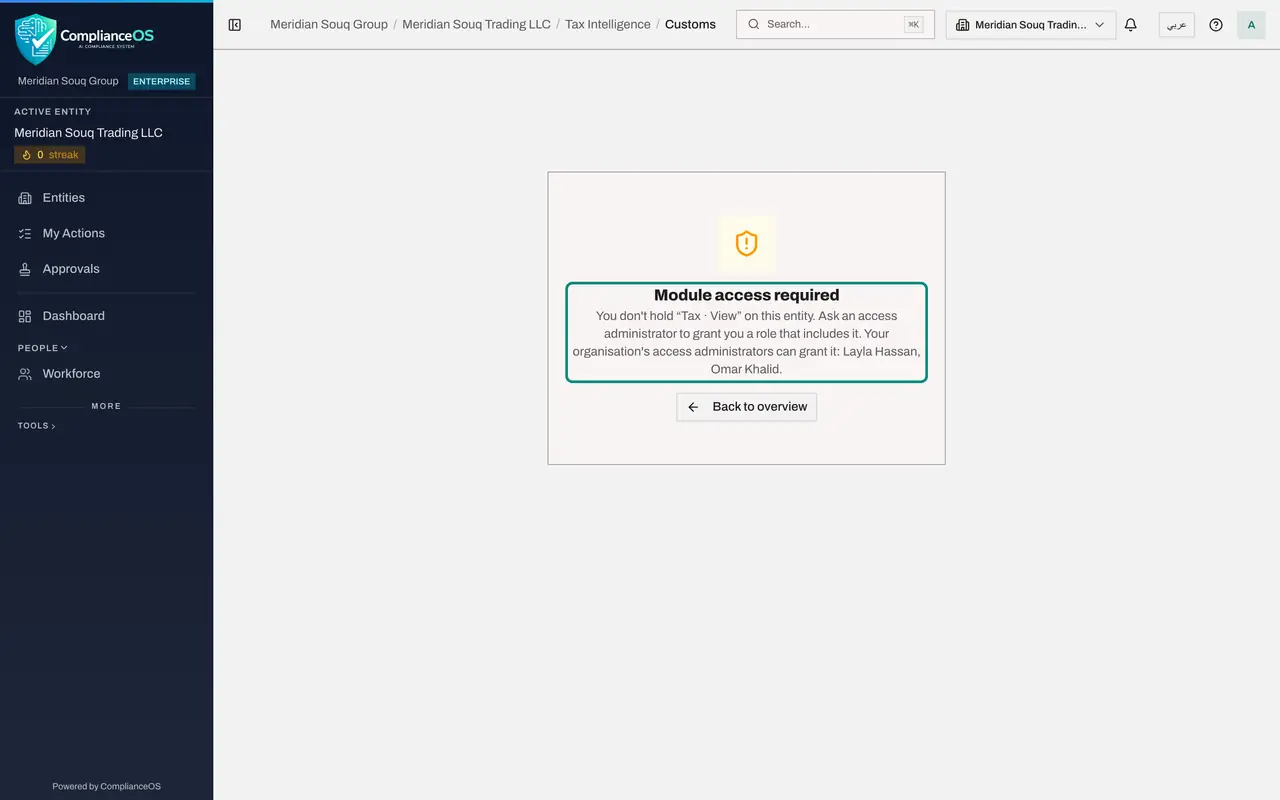
Paste the address of the Customs Declarations page into the browser and press Enter. Instead of the list, the page says Module access required. It explains that you do not hold tax, view on this entity, and tells you to ask an access administrator for a role that includes it.
- 3
Read who can grant it
Under the explanation the page says: Your organisation's access administrators can grant it, followed by their names. Those are the people to ask. Tell them which permission the page named, tax, view, and why you need it.
- 4
Select Back to overview
Select Back to overview. You are taken to the dashboard of the entity, where everything you are allowed to see is listed.
- Select Back to overview
How to check it worked
The left menu has no Tax group. Opening the address of Customs Declarations shows Module access required, names the permission that is missing, tax, view, and names the organisation's access administrators who can grant it. Back to overview returns you to the entity dashboard.
Common mistakes
- Asking the colleague to share their sign-in so you can look. Never share accounts. Ask for the figures you need, or for a role that includes them.
- Asking whoever happens to be nearby for access. Only the people the page names, the organisation's access administrators, can grant a role. Ask one of them, and say which permission the page named.
Check your understanding
1. An employee without a tax role opens the address of Customs Declarations. What appears?
- A.An empty list
- B.The list, with the buttons greyed out
- C.Module access required, naming the permission tax, view
- D.The sign-in page
Show answer
Answer: C. Module access required, naming the permission tax, view
Without the permission to view tax records the page shows no data at all, only the name of the permission that is needed.
2. Who can give you access to tax records?
- A.Any colleague in finance
- B.An access administrator of your organisation
- C.The auditor
- D.Nobody: it cannot be changed
Show answer
Answer: B. An access administrator of your organisation
Roles are granted by the people who administer access. The page names your organisation's access administrators, so you know whom to ask.