Lesson 7 of 10
What a read-only role sees: the auditor
What you will be able to do
This lesson is for auditors and anyone else with a read-only role, and for the tax team who support them. The auditor can open Customs Declarations and read every figure, but cannot change anything. You will see the note that says so, and that the buttons to add, upload, edit and delete are simply not shown to a read-only person.
Before you start
- You are signed in as the auditor, Daniel Brooks, whose role lets him read and export tax records but not change them.
- The five customs declarations of the quarter are recorded.
Steps
- 1
Open Customs Declarations
The auditor's left menu includes Tax Intelligence. Open it, then select Returns, the Customs tab and Open Customs Declarations, exactly as the tax team does.
- Select Returns
- Select Customs
- Select Open Customs Declarations
- 2
Read the note at the top
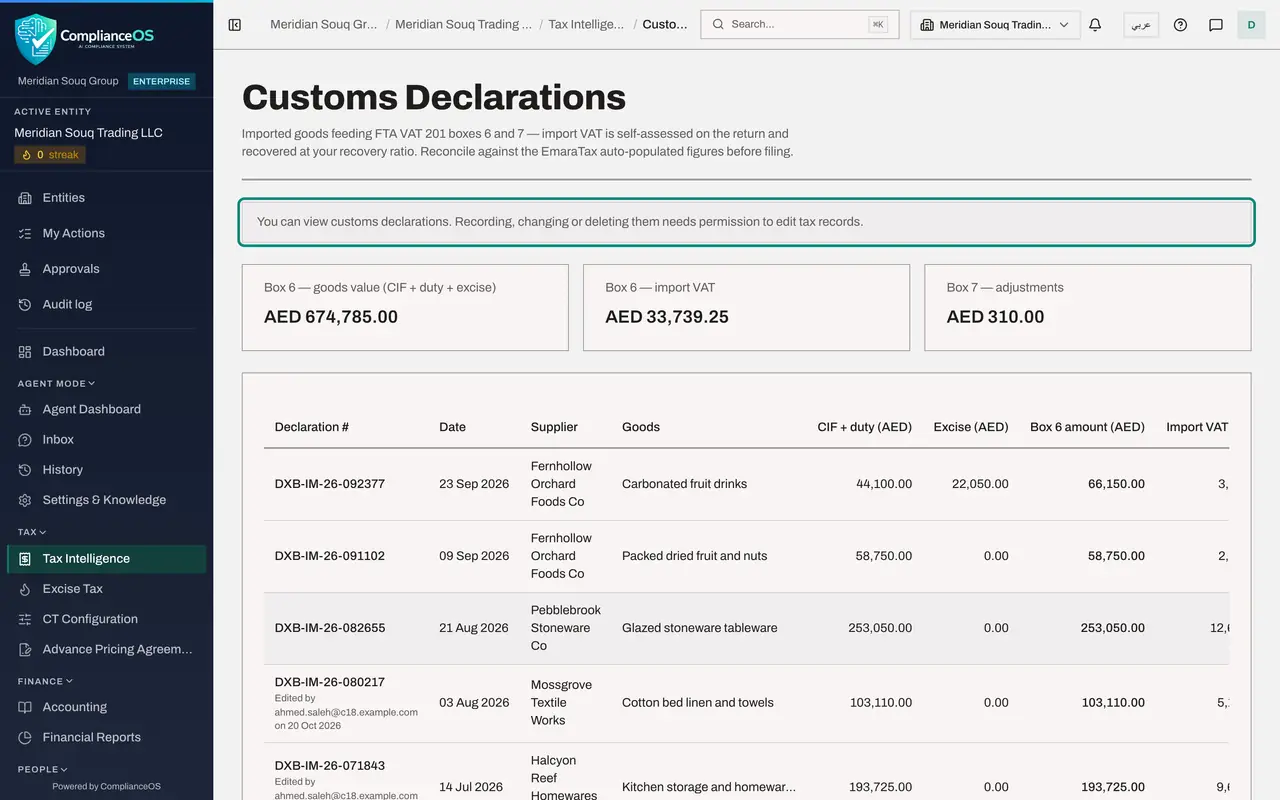
Under the title a note reads: You can view customs declarations. Recording, changing or deleting them needs permission to edit tax records. It is shown to everyone whose role can read tax records but not change them.
- 3
Read the list and the totals
Select Hide navigation at the top left so every column fits. Everything is visible: the three totals, each declaration with its date, supplier, goods and amounts, and the source of each row. Reading needs only the permission to view tax records, which the auditor has.
- Select Hide navigation
- 4
See which controls are missing
Compare this with the accountant's screen. There is no Add declaration and no Upload statement at the top right, and the rows end without a pencil or a bin. Under the declaration ending 0217 the auditor can still read who last edited it and when.
How to check it worked
You opened Customs Declarations and read the list and the totals. A note says you can view customs declarations and that recording, changing or deleting them needs permission to edit tax records. There is no Add declaration, no Upload statement, and no pencil or bin on the rows. The list still has the same five declarations and the same totals.
Common mistakes
- Reporting the missing buttons as a fault. It is the control working: the screen shows a read-only person only what they may do. If you do need to record declarations, ask an access administrator for a role that includes editing tax records.
- Asking a colleague to make a change for you without a record of why. If a figure looks wrong, raise it as an audit finding or ask the tax team to correct it: every edit they make is kept in the audit log with their name.
Check your understanding
1. The auditor opens Customs Declarations. What does he see?
- A.Nothing: the page is refused
- B.The list and the totals, with a note that he can only view, and no buttons to add, upload, edit or delete
- C.The list with every button, each refused when selected
- D.Only the totals
Show answer
Answer: B. The list and the totals, with a note that he can only view, and no buttons to add, upload, edit or delete
Reading needs only the permission to view tax records. Controls that need more are not shown, and the note explains why.
2. Which permission would let a person record or change customs declarations?
- A.tax, view
- B.tax, edit
- C.evidence, create
- D.audit hub, view
Show answer
Answer: B. tax, edit
The note on the screen says recording, changing or deleting declarations needs permission to edit tax records. Deleting additionally needs tax, delete.