Lesson 4 of 10
Correct a declaration and record a box 7 adjustment
What you will be able to do
This lesson is for the accountant. A recorded declaration sometimes has to change: customs issues an amended declaration, or you find that import value added tax, or VAT, was reported wrongly in an earlier return. You will open the edit form with the pencil, amend the figures of one declaration, and record an adjustment with its reason on another. Adjustments are what fill box 7 of the VAT return.
Before you start
- You are signed in as the accountant, and the five declarations from the previous lessons are in the list.
- Customs has issued an amended declaration for DXB-IM-26-080217: the CIF value is now 98,200.00 dirhams, the duty 4,910.00 and the import VAT 5,155.50.
- Separately, a review found that 310.00 dirhams of import VAT was left out of the return for April to June 2026. It has to be added to this quarter's return as an adjustment.
- The edit form does not let you change the declaration number or the declaration date. If either is wrong, delete the declaration and add it again; the next lesson shows how.
Steps
- 1
Find the declaration and select its pencil
On Customs Declarations, select Hide navigation at the top left so every column fits. Find the declaration ending 0217, from Mossgrove Textile Works. At the end of its row are two icons. Select the pencil. Resting the pointer on it shows its name: Edit, box 7 adjustment.
- Select Hide navigation
- Select Edit declaration DXB-IM-26-080217
- 2
Read the Edit customs declaration form
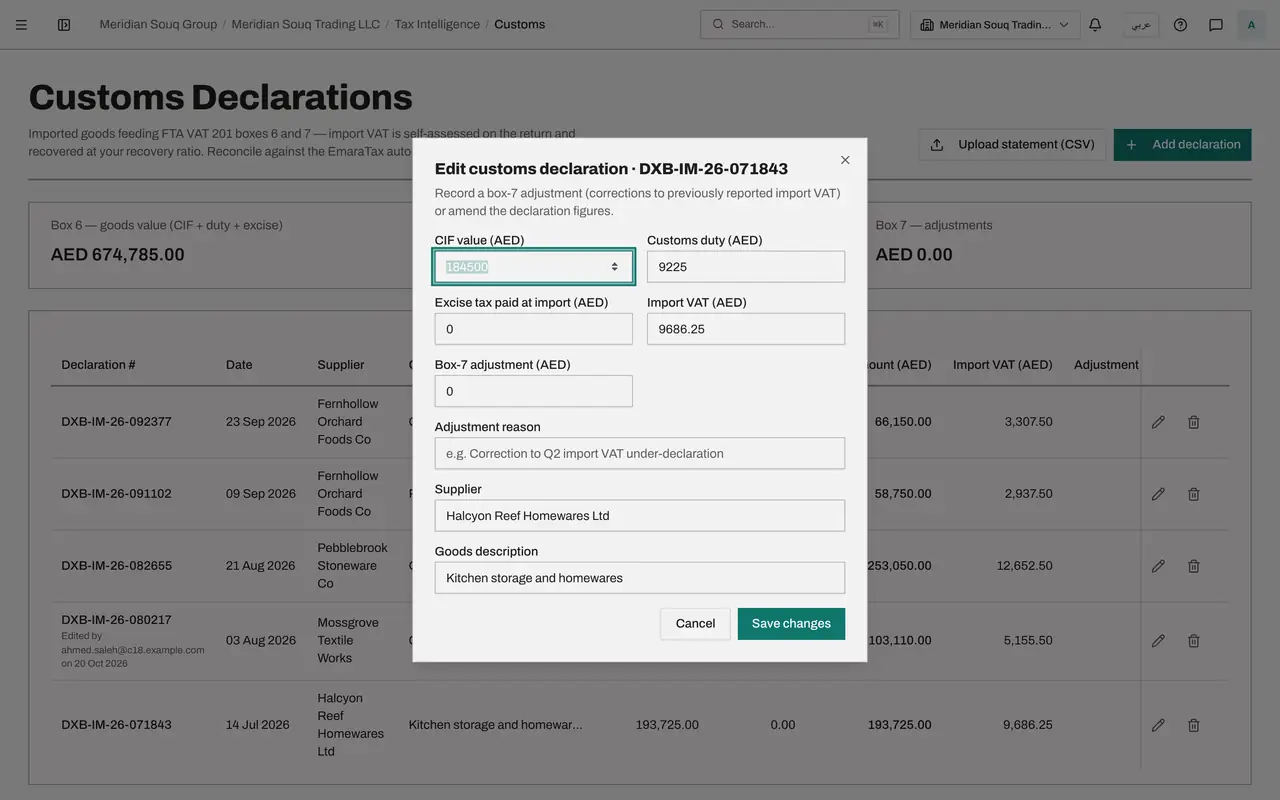
The form shows the figures as recorded: CIF value, Customs duty, Excise tax paid at import, Import VAT, then Box 7 adjustment, Adjustment reason, Supplier and Goods description. The declaration number and date are not here, because they cannot be changed.
- 3
Type the amended CIF value
The amended declaration from customs gives a CIF value, the cost, insurance and freight value, of 98,200 dirhams. Select what is in CIF value and type 98200 over it.
- Type CIF value (AED):
98200
- Type CIF value (AED):
- 4
Type the amended duty and import VAT
Do the same for the duty and the VAT. In Customs duty type 4910, and in Import VAT type 5155.50. Excise stays at zero.
- Type Customs duty (AED):
4910 - Type Import VAT (AED):
5155.50
- Type Customs duty (AED):
- 5
Select Save changes
Select Save changes. The message Declaration saved appears, and the row now shows 103,110.00 under CIF plus duty and 5,155.50 under Import VAT. Under the declaration number a small line reads Edited by, with your name and today's date. The totals above the list change with it.
- Select Save changes
- 6
Open the declaration that will carry the adjustment
Now the adjustment. It must sit on a declaration dated inside the quarter whose return should carry it. Select the pencil on the declaration ending 1843, dated 14 July 2026.
- Select Edit declaration DXB-IM-26-071843
- 7
Type the box 7 adjustment
Leave the first four figures alone. In Box 7 adjustment type the amount of import VAT to add: 310. This is the tax itself, not the value of the goods.
- Type Box-7 adjustment (AED):
310
- Type Box-7 adjustment (AED):
- 8
Type the adjustment reason
In Adjustment reason say what is being corrected and for which period. The greyed example in the box shows the kind of wording expected. Here: Correction to import VAT under-declared on a June 2026 declaration.
- Type Adjustment reason:
Correction to import VAT under-declared on a June 2026 declaration
- Type Adjustment reason:
- 9
Check the supplier and select Save changes
Supplier and Goods description can be corrected here too; leave them as they are. Select Save changes.
- Select Save changes
- 10
Read the adjustment in the list and in the totals
The row ending 1843 now shows 310.00 under Adjustment, with the start of the reason underneath, and the third total, Box 7 adjustments, reads 310.00 dirhams.
- 11
See where the changes are kept
Select the pencil on the row ending 0217 again. Under the fields the form says who last edited the declaration and when, and that every change is kept in the audit log: the figures before and after each edit, with the person and the time. An auditor or administrator who can open the audit log can read that history.
- Select Edit declaration DXB-IM-26-080217
- 12
Select Cancel
Select Cancel to close the form without changing anything. The list is as you left it.
- Select Cancel
How to check it worked
The declaration ending 0217 shows 103,110.00 under CIF plus duty and 5,155.50 under Import VAT, with Edited by and the date under its number. The declaration ending 1843 shows 310.00 under Adjustment with the reason below it. The third total, Box 7 adjustments, reads 310.00 dirhams.
Common mistakes
- Typing a correction for an earlier period into Import VAT. That changes box 6. A correction to import VAT that was already reported belongs in Box 7 adjustment, with a reason.
- Leaving Adjustment reason blank. The app accepts it, but an adjustment without a reason cannot be explained to an auditor later.
- Putting the adjustment on a declaration dated in the wrong quarter. An adjustment is counted in the VAT return whose period contains the date of the declaration it is recorded on.
- Correcting figures without keeping the amended declaration. The row shows who edited it and when, and every change is kept in the audit log, but the paper from customs is what explains why. Keep it, or place it in the Evidence Vault.
Check your understanding
1. Where do you record a correction to import VAT that was reported wrongly in an earlier return?
- A.In Import VAT, by changing the figure
- B.In Box 7 adjustment, with a reason
- C.In CIF value
- D.In a new declaration with a made-up number
Show answer
Answer: B. In Box 7 adjustment, with a reason
Box 7 of the VAT return is for adjustments to imports already reported. The edit form has a Box 7 adjustment field and a reason field for exactly this.
2. A declaration was recorded with the wrong date. How do you fix it?
- A.Change the date in the edit form
- B.Record a box 7 adjustment
- C.Delete the declaration and add it again with the right date
- D.Upload the statement again
Show answer
Answer: C. Delete the declaration and add it again with the right date
The edit form has no date or number field, and uploading again skips declarations that already exist. Deleting and adding again is the only way.