Lesson 6 of 10
See the imports in the VAT return: boxes 6, 7 and 10
What you will be able to do
This lesson is for the tax manager. You will compute the value added tax return, or VAT return, for July to September 2026 and follow the customs declarations into it. Box 6 carries the imported goods and their VAT, box 7 the adjustment, and box 10 gives the same tax back as recoverable. You will also see where the return explains its own arithmetic, and what to compare with the tax authority's portal before filing.
Before you start
- You are signed in as the tax manager, Fatima Noor.
- The five customs declarations of the quarter are recorded, one of them amended and one carrying a box 7 adjustment of 310.00 dirhams.
- No sales or purchase transactions have been recorded for this entity in this course, so every figure in the return comes from customs. In real work the same boxes sit beside your sales and purchases; the VAT course covers those.
- Computing a return does not file it. Filing is done with Submit and Lock, which the VAT course covers, and then by you on the tax authority's own portal.
Steps
- 1
Select Returns in Tax Intelligence
In Tax Intelligence select Returns. The VAT Return tab opens first. The Customs tab, where the declarations live, is the last tab of the same group.
- Select Returns
- 2
Choose the year and the quarter
Choose 2026 in Year and select Q3 under Quick select. Period Start becomes 1 July 2026 and Period End 30 September 2026. A customs declaration is counted in the period that contains its declaration date.
- Choose Year:
2026 - Select Q3
- Choose Year:
- 3
Select Filing-Ready
Projected counts every classified transaction, and Filing-Ready counts approved transactions only. Select Filing-Ready, the view used for filing. Customs declarations are not transactions and have no approval step: they are counted as soon as they are recorded.
- Select Filing-Ready
- 4
Select Compute VAT Return and read the three totals
Select the Compute button. After a few seconds three totals appear. The first, the tax due, is 34,049.25 dirhams: the import tax plus the adjustment. The second, the recoverable tax, is the same amount. The third, the net payable, is therefore zero.
- Select Compute VAT Return
- 5
Read the status line
Under the totals is the period, the date the return is due, 28 October 2026, and the status Draft. Submit and Lock, on the right, files the return and locks the period. Do not select it in this lesson. It needs the permission to approve tax returns, so for the accountant it is greyed out.
- 6
Read box 6
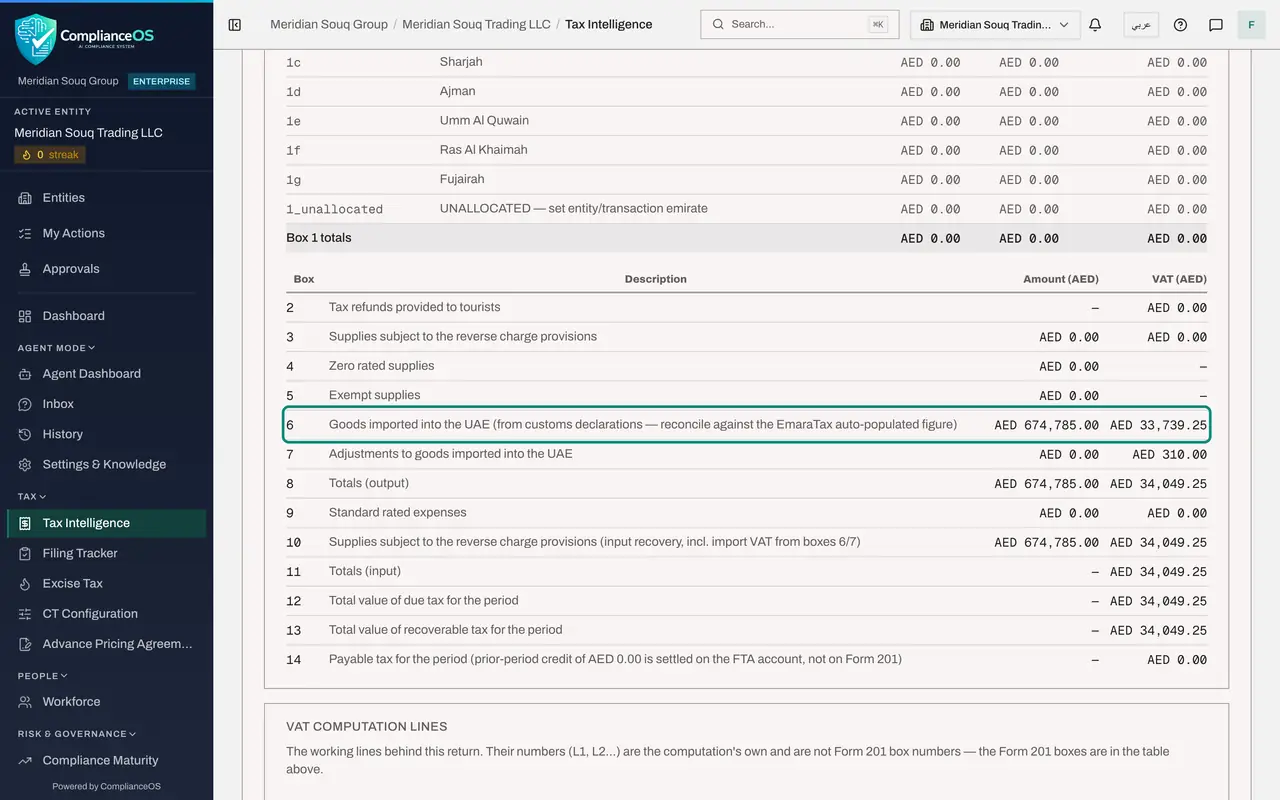
Scroll to the table headed FTA Form 201, which is laid out like the tax authority's form. Box 6 is goods imported into the country. Its amount is 674,785.00 dirhams and its VAT is 33,739.25. That is the same figure as the first total on the Customs Declarations screen: the CIF value plus duty plus excise of every declaration in the quarter, including the 22,050 of excise on the drinks declaration.
- 7
Read box 7
Box 7 is adjustments to imported goods. Its VAT column shows 310.00, the adjustment recorded with the pencil in lesson 4. Its amount column stays at zero, because an adjustment is recorded as tax only.
- 8
Read box 8
Box 8 totals the tax due side of the return. With no sales in this example it repeats the imports: 674,785.00 of value and 34,049.25 of VAT, which is box 6 plus box 7.
- 9
Read boxes 10 and 11
Box 10 is the recovery side of reverse charge. Its description says it includes import VAT from boxes 6 and 7, and it shows the same 34,049.25. Box 11 totals the recoverable tax. If the business made exempt supplies, only part of the import VAT would come back here.
- 10
Read boxes 12 to 14
Box 12 is the total tax due, 34,049.25. Box 13 is the total recoverable tax, 34,049.25. Box 14 is the payable tax for the period: zero. These are the figures to copy when you file on the portal.
- 11
Read the note about imported goods
Further down, under Computation notes and alerts, the note headed Imported goods box 6 shows the working: 5 customs declarations, the goods value made of CIF, duty and excise, the import VAT and the box 7 adjustment. It ends with the instruction to reconcile against the figure the portal fills in before filing. If that figure differs, a declaration is missing, duplicated or dated in the wrong quarter.
- 12
Find the return in VAT Return History
At the bottom, VAT Return History lists each computed return with its period, output VAT, input VAT, net VAT and the date it was created.
How to check it worked
In the computed return, box 6 shows imported goods of 674,785 dirhams with tax of 33,739.25. Box 7 shows an adjustment of 310 dirhams. Box 10 shows recoverable tax of 34,049.25, and box 14, the payable tax, is zero. The note about imported goods names 5 customs declarations.
Common mistakes
- Leaving excise out of the value of imported goods. Box 6 is the CIF value plus customs duty plus excise tax paid at import. Type the excise in its own box on the declaration, and the Customs Declarations screen and the return agree.
- Recording the same import again as a purchase with reverse charge. Imported goods are taxed through the customs declaration in box 6. Reverse charge in box 3 is for services bought from abroad.
- Filing box 6 without comparing it with the portal. The tax authority's portal fills box 6 from customs data by itself, and the return reminds you to reconcile the two figures first.
Check your understanding
1. One declaration carried 22,050 dirhams of excise tax. How does the VAT return treat it?
- A.It ignores it
- B.It adds it to the value of imported goods in box 6
- C.It puts it in box 7
- D.It deducts it from the import VAT
Show answer
Answer: B. It adds it to the value of imported goods in box 6
The value of imported goods for VAT is the CIF value plus customs duty plus excise tax paid at import. Box 6 reads 674,785.00, the same as the first total on the Customs Declarations screen.
2. Import VAT of 33,739.25 and an adjustment of 310.00 are due in boxes 6 and 7. Why is the payable tax zero?
- A.Because customs already collected it
- B.Because the same 34,049.25 is recovered in box 10
- C.Because imports are exempt
- D.Because the return is only a draft
Show answer
Answer: B. Because the same 34,049.25 is recovered in box 10
Import VAT is self-assessed: declared as tax due and recovered in the same return. With full recovery and nothing else in the period, the two cancel out.