Lesson 1 of 10
Find the Customs Declarations screen and read it
What you will be able to do
This lesson is for the tax manager and the accountant. When goods are imported into the United Arab Emirates, the customs declaration shows the value of the goods, the customs duty and the import value added tax, or VAT. ComplianceOS keeps these declarations inside Tax Intelligence, because they fill boxes 6 and 7 of the VAT return. You will find the screen, read its three totals and see what it looks like before anything has been recorded.
Before you start
- You are signed in as the tax manager, Fatima Noor. The accountant sees the same screen.
- The active entity, shown at the top of the left menu, is Meridian Souq Trading LLC. Customs declarations are kept for the active entity only.
- Nothing has been recorded yet, so the list is empty.
Steps
- 1
Open Tax Intelligence
In the left menu, under Tax, select Tax Intelligence. This is where transactions are classified and where the VAT return is prepared.
- Select Tax Intelligence
- 2
Select Returns
Above the tabs is a row of groups: Work, Returns, Analysis, Setup and More. Select Returns. Its tabs are VAT Return, CT Return, Withholding Tax and Customs.
- Select Returns
- 3
Select the Customs tab
Select Customs. A short panel explains that imported goods feed boxes 6 and 7 of the VAT return, which is the form the Federal Tax Authority calls VAT 201. Import VAT is self-assessed: you declare it as tax due and recover it in the same return.
- Select Customs
- 4
Select Open Customs Declarations
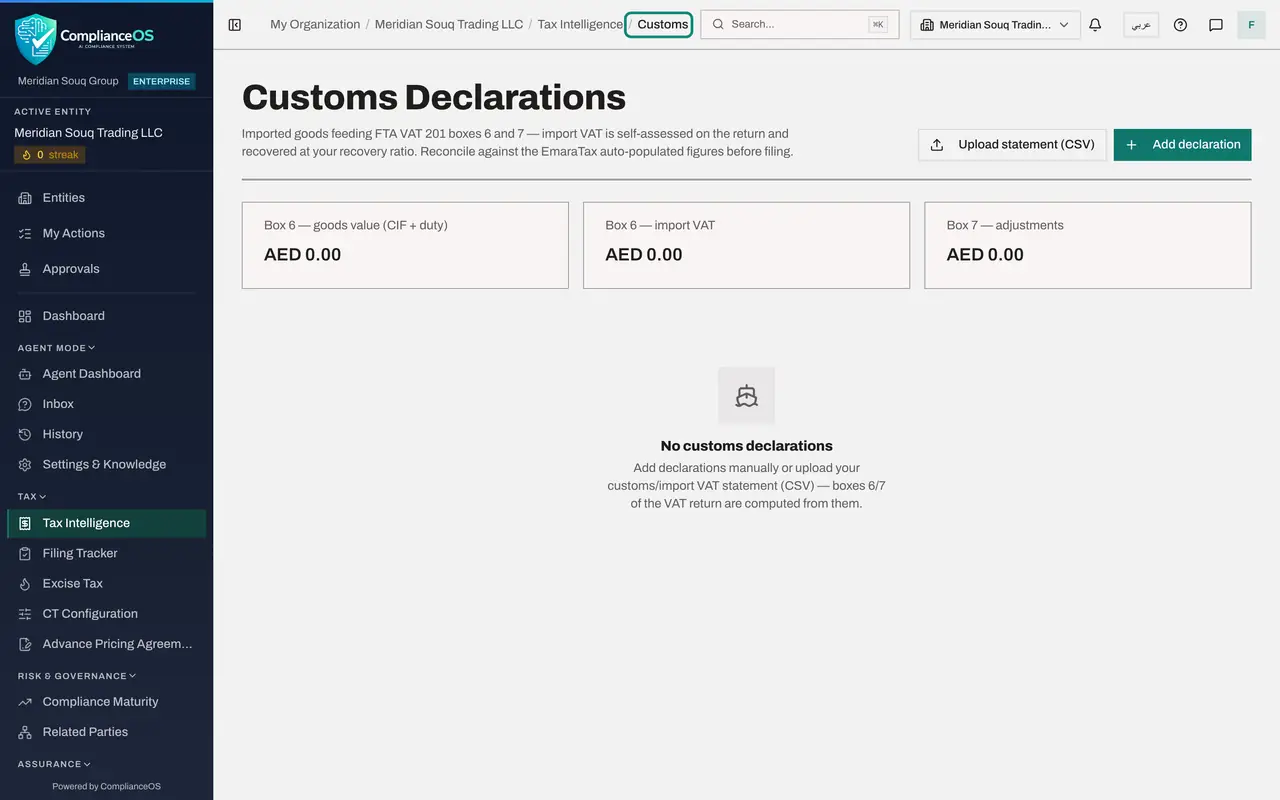
Select Open Customs Declarations. The Customs Declarations screen opens. The trail at the top of the page now reads Tax Intelligence, then Customs; select Tax Intelligence there whenever you want to go back.
- Select Open Customs Declarations
- 5
Read the three totals
Three totals sit above the list. The first is the goods value for box 6: the cost, insurance and freight value, or CIF, plus the customs duty, plus any excise tax paid at import. The second is the import VAT for box 6. The third is box 7, adjustments. Each adds up every declaration in the list, and all three are zero until something is recorded.
- 6
Read the empty list
Below the totals the page says No customs declarations. It tells you the two ways to fill the list: add declarations by hand, or upload the statement of imports as a file.
- 7
Find the two buttons
At the top right are the two buttons you will use in the next lessons. Add declaration opens a form for one declaration. Upload statement brings in many declarations at once from a comma separated values file, or CSV.
How to check it worked
You reached Customs Declarations from Tax Intelligence by choosing Returns, then Customs, then Open Customs Declarations. The top of the page reads Tax Intelligence, then Customs. The three totals show zero, and the page says No customs declarations.
Common mistakes
- Looking for customs in the left menu. There is no menu entry: the screen is reached from the Customs tab of Tax Intelligence, under Returns.
- Expecting this screen to send anything to the customs authority. It is a record of declarations that customs has already issued. Nothing is submitted from here.
- Recording declarations under the wrong company. Check the active entity at the top of the left menu first.
Check your understanding
1. Where do you open the Customs Declarations screen?
- A.From its own entry in the left menu
- B.In Tax Intelligence: Returns, then the Customs tab, then Open Customs Declarations
- C.In the Evidence Vault
- D.In the Compliance Calendar
Show answer
Answer: B. In Tax Intelligence: Returns, then the Customs tab, then Open Customs Declarations
Customs declarations are part of the VAT work, so they sit behind the Customs tab of the Returns group in Tax Intelligence.
2. Which boxes of the VAT return do customs declarations fill?
- A.Boxes 1a to 1g
- B.Boxes 3 and 10 only
- C.Boxes 6 and 7
- D.Box 9
Show answer
Answer: C. Boxes 6 and 7
Box 6 is goods imported into the country and box 7 is adjustments to those imports. Both are computed from the declarations recorded here.