Lesson 5 of 10
Duplicate numbers, and deleting a declaration
What you will be able to do
This lesson is for the accountant. You will see what happens when a declaration number is entered a second time, record a declaration that turns out to belong to another company of the group, and remove it with the bin. The app asks you to confirm a deletion and records it in the audit log, but it cannot be undone, so the lesson also shows how to check before you confirm.
Before you start
- You are signed in as the accountant, and the five declarations from the previous lessons are in the list.
- The declaration used for the mistake is DXB-IM-26-093015, dated 30 September 2026: CIF value 12,400.00 dirhams, customs duty 620.00 and import VAT 651.00, supplier Halcyon Reef Homewares Ltd. It belongs to Meridian Souq E-Commerce FZ-LLC, not to the active entity.
- The accountant can delete a declaration. A person with a read-only role does not see the bin at all, as lesson 7 shows.
Steps
- 1
Select Add declaration and enter a number that already exists
On Customs Declarations select Hide navigation at the top left, so every column of the list fits. Then select Add declaration. To see how a duplicate is handled, type the number of a declaration that is already in the list, the one ending 2655, enter its date, 21 August 2026, and its CIF value, 241000.
- Select Hide navigation
- Select Add declaration
- Type Declaration number:
DXB-IM-26-082655 - Type Declaration date:
2026-08-21 - Type CIF value (AED):
241000
- 2
Select Save declaration and read the refusal
Select Save declaration. The form stays open and a message in red at the bottom reads Declaration DXB-IM-26-082655 already recorded. The app keeps one declaration per number for each entity, so the import cannot be counted twice.
- Select Save declaration
- 3
Change the number and the date
Now record the declaration you meant to add. Replace the number with the one on the document, ending 3015, and change the date to 30 September 2026.
- Type Declaration number:
DXB-IM-26-093015 - Type Declaration date:
2026-09-30
- Type Declaration number:
- 4
Type the amounts
Now the amounts from the document. In CIF value type 12400 over the figure that is there. In Customs duty type 620. There is no excise. In Import VAT type 651.
- Type CIF value (AED):
12400 - Type Customs duty (AED):
620 - Type Import VAT (AED):
651
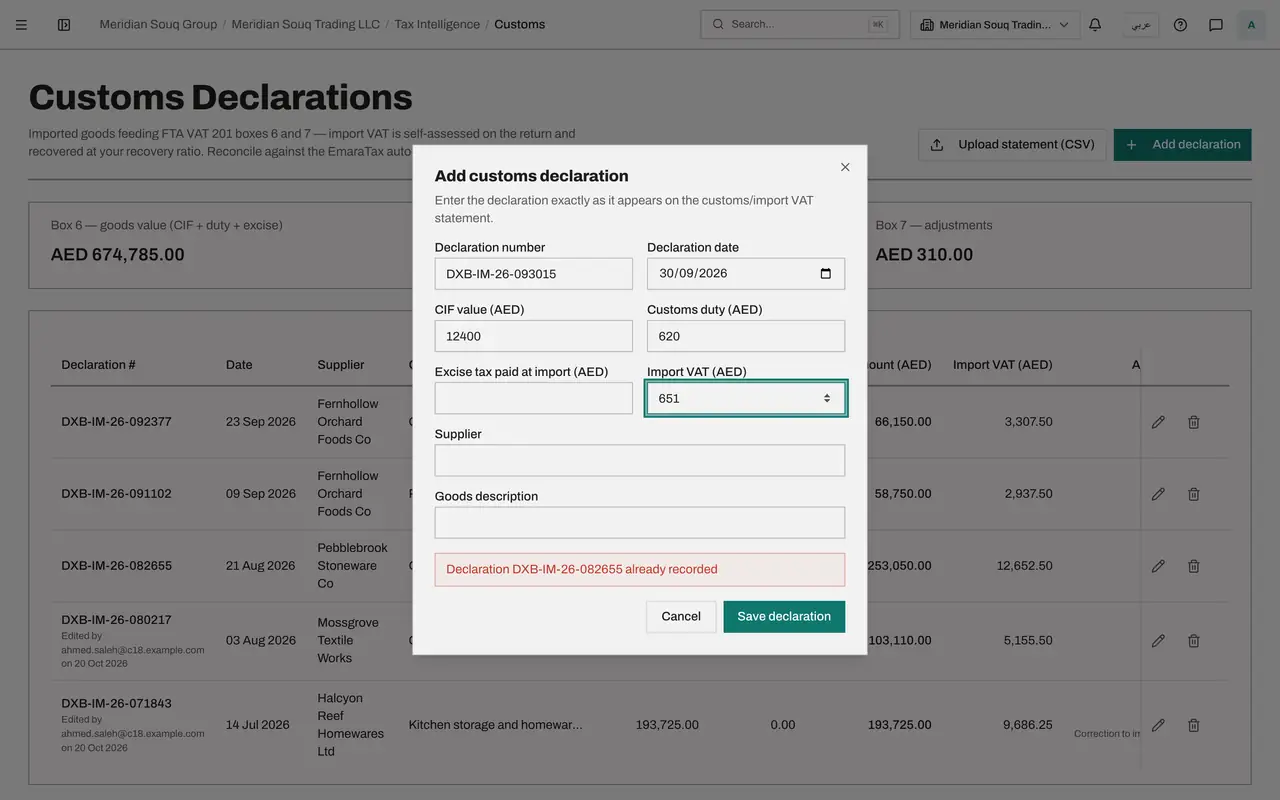
- Type CIF value (AED):
- 5
Type the supplier and save
Type the supplier, Halcyon Reef Homewares Ltd, and select Save declaration. This time the form closes, Declaration saved appears, and the declaration is at the top of the list, because it has the latest date.
- Type Supplier:
Halcyon Reef Homewares Ltd - Select Save declaration
- Type Supplier:
- 6
Spot the mistake
Checking the paper declaration again, you see the importer named on it is Meridian Souq E-Commerce FZ-LLC, the other company of the group. It has been recorded under Meridian Souq Trading LLC, the active entity named in the page trail at the top, and it has pushed the totals up. It must come out of this list.
- 7
Select the bin on the row
Select the bin at the end of the row ending 3015. A question opens: Delete this customs declaration? It names the declaration, says it will no longer count in boxes 6 and 7 of the VAT return, and says the deletion is recorded in the audit log. Read the number it names: it ends in 3015.
- Select Delete declaration DXB-IM-26-093015
- 8
Select Delete
Select Delete. The message Declaration deleted appears, the row disappears and the totals return to 674,785.00, 33,739.25 and 310.00. There is no undo: to bring a declaration back you would add it again.
- Select Delete
How to check it worked
The list is back to five declarations and the declaration ending 3015 is gone. The totals read 674,785.00 dirhams of goods value, 33,739.25 dirhams of import VAT and 310.00 dirhams of adjustments, as they did before this lesson.
Common mistakes
- Changing the number of a declaration the app says is already recorded just to get it saved. The message means that declaration is in the list. Select Cancel and look for it; only correct the number if you typed it wrongly.
- Selecting Delete in the confirmation without reading the number it names. Once confirmed, the declaration is gone and there is no undo; only the audit log keeps a record of it.
- Deleting a declaration to correct an amount. Amounts, the supplier and adjustments are changed with the pencil. Delete only when the number, the date or the company is wrong.
Check your understanding
1. You select Save declaration and the form shows Declaration DXB-IM-26-082655 already recorded. What does it mean?
- A.The amounts are too large
- B.A declaration with that number is already in the list for this entity
- C.You do not have permission
- D.The supplier is missing
Show answer
Answer: B. A declaration with that number is already in the list for this entity
A declaration number is recorded once for each entity. The form stays open with the message so you can correct the number or cancel.
2. What happens when you select the bin at the end of a row?
- A.The declaration is deleted at once
- B.A question names the declaration and asks you to confirm; once confirmed it is removed and the deletion is recorded in the audit log
- C.The declaration is moved to an archive you can restore from
- D.A second person must approve
Show answer
Answer: B. A question names the declaration and asks you to confirm; once confirmed it is removed and the deletion is recorded in the audit log
The confirmation names the declaration and says it will no longer count in boxes 6 and 7. There is no undo, so read the number before you select Delete.